How We Planned the Architecture & Tech Stack for Our ETL Platform (MVP → Next-Level)
Discover the architectural decisions behind our ETL platform, including MVP tech stack choices, real-time updates, and a clear path to scale.


Sivamanikandan K
Solution Architect


At Railsfactory, we are building a modern ETL (Extract–Transform–Load) platform that connects with external services such as Microsoft ERP, Zoho ERP, and many third-party APIs.
Our system fetches relevant data (e.g., Sales Report tables), maps schemas, processes jobs through an ETL engine, and finally makes the output available to reporting tools like Power BI or Tableau.
This blog explains how we architected the MVP to be simple, fast, and powerful. It also elaborates how the architecture can evolve after the MVP, with a clear upgrade path.
I’ve written this so that even beginners can clearly understand how to choose the right architecture and tech stack.
MVP Architecture – Simple, Practical, and Real-Time
The goal of our MVP was to build a working ETL system quickly without over-engineering. At the same time, I wanted it to feel modern, so we included real-time job progress using Server-Sent Events (SSE) inside the MVP itself.
Here’s how the full MVP architecture looks.
1. Frontend: Next.js
Why I choose Next.js:
-
React ecosystem + excellent developer experience
-
Server-side rendering useful for dashboards
-
Easy to integrate with REST API + SSE
-
Supports API routes for proxying calls
-
Fast to build an MVP UI
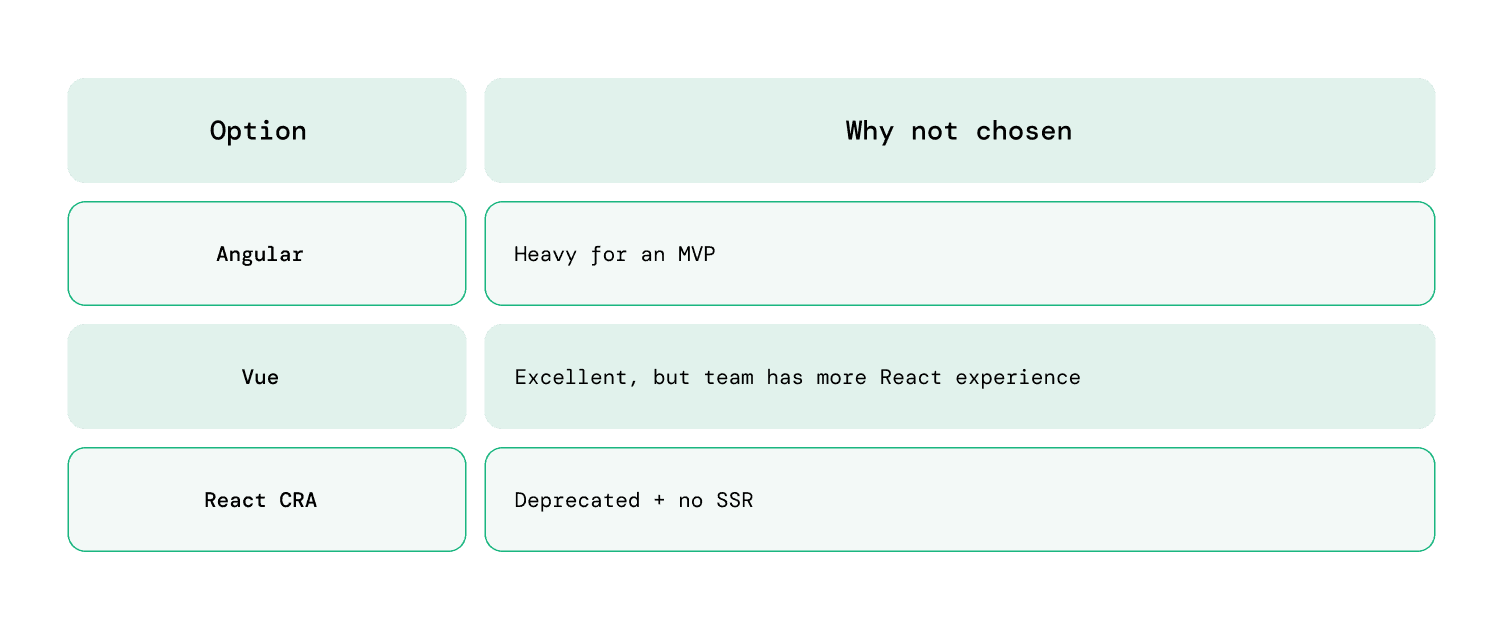
Compared to Alternatives:
2. Engine Backend: FastAPI + PostgreSQL
The ETL engine is developed using FastAPI, with Postgres as the database.
FastAPI Responsibilities:
-
Handle external integrations (Zoho, Microsoft ERP, etc.)
-
Map data structures dynamically
-
Store connection details
-
Push jobs to queue table
-
Stream job progress to UI (SSE)
-
Push final updates via webhooks
Why I choose FastAPI:
-
Async & extremely fast
-
Easy schema validation with Pydantic
-
Perfect for hitting 3rd-party APIs
-
Clean design & easy to maintain
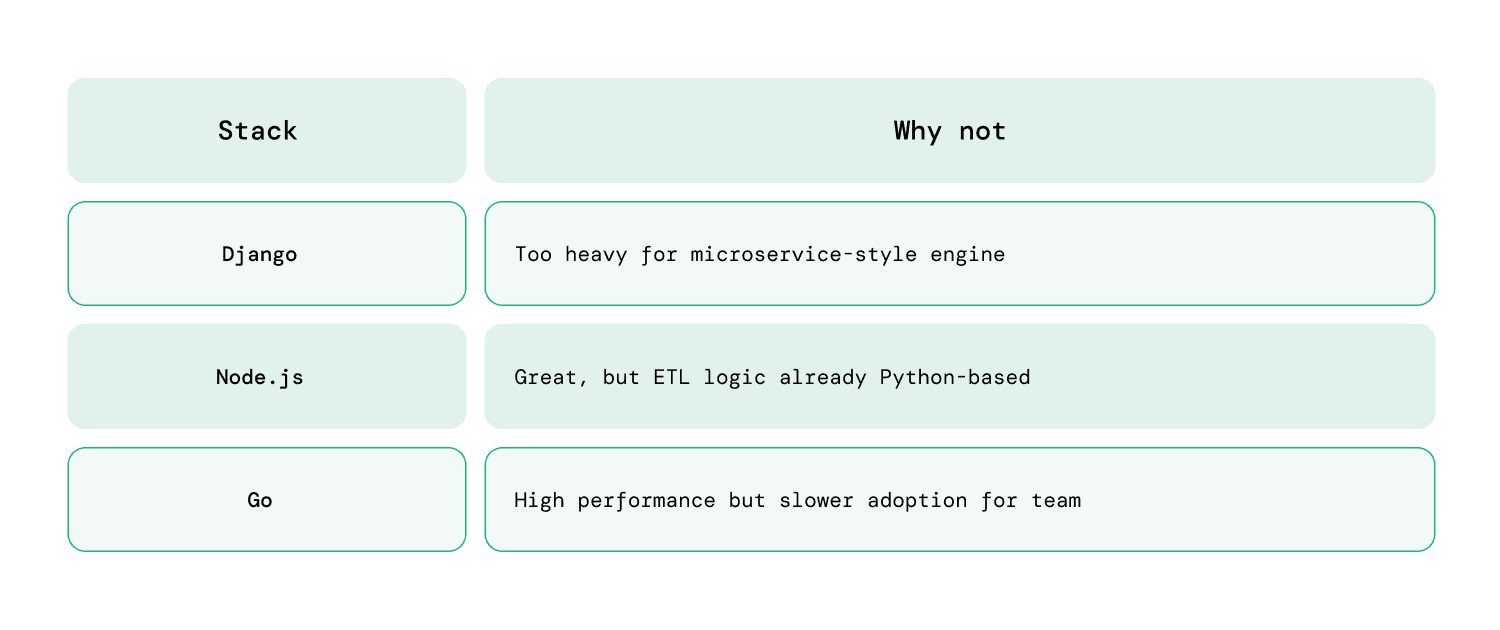
Compared to Alternatives:
3. Queue System (MVP): PostgreSQL Table
MVP must stay simple.
So instead of heavy queue systems like Kafka/RabbitMQ, I used a Postgres message queue table.
Why?
-
Zero extra infra
-
Easy to debug
-
Perfect for low to medium load during MVP
-
Predictable behavior
Table Example:
message_queue
-
id
-
job_type
-
payload
-
status
-
progress
-
created_at
A worker service polls this table every few seconds and processes jobs.
4. Real-Time Updates: Server-Sent Events (SSE)
This is the most important technical choice I made in the MVP.
Instead of polling every few seconds (slow + inefficient), I implemented SSE (Server-Sent Events) directly in FastAPI and Next.js.
Why SSE in MVP?
-
Lightweight
-
Event-based
-
Easy to implement (1–2 days only)
-
Perfect for one-way updates (Engine → UI)
-
Automatic reconnection on browser side
-
No need for WebSockets or Redis Pub/Sub
Use Cases:
-
Job progress %
-
ETL logs
-
Step-by-step pipeline updates
-
Success / Failure notifications
For ETL, this feels modern, smooth, and accurate.
Why not web sockets?
WebSockets are bidirectional but heavier; we only need server→client updates. GraphQL subscriptions require schema + resolver overhead — overkill for simple job progress.
5. Webhook Flow for Final Job Completion
Even though SSE streams progress, the engine still calls a webhook upon completion.
Why use both?
-
SSE = live progress
-
Webhook = final confirmation
This gives strong reliability even if the browser disconnects.
MVP Architecture Diagram (With SSE)
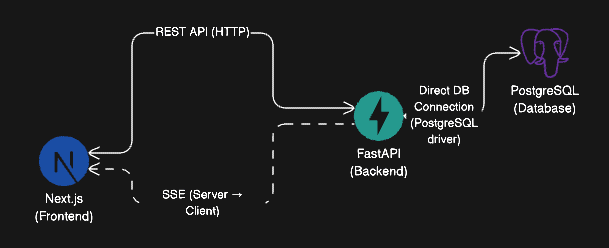
Note: Postgres → (triggers via LISTEN/NOTIFY) → FastAPI → (SSE stream) → Next.js
Summary of MVP Tech Stack
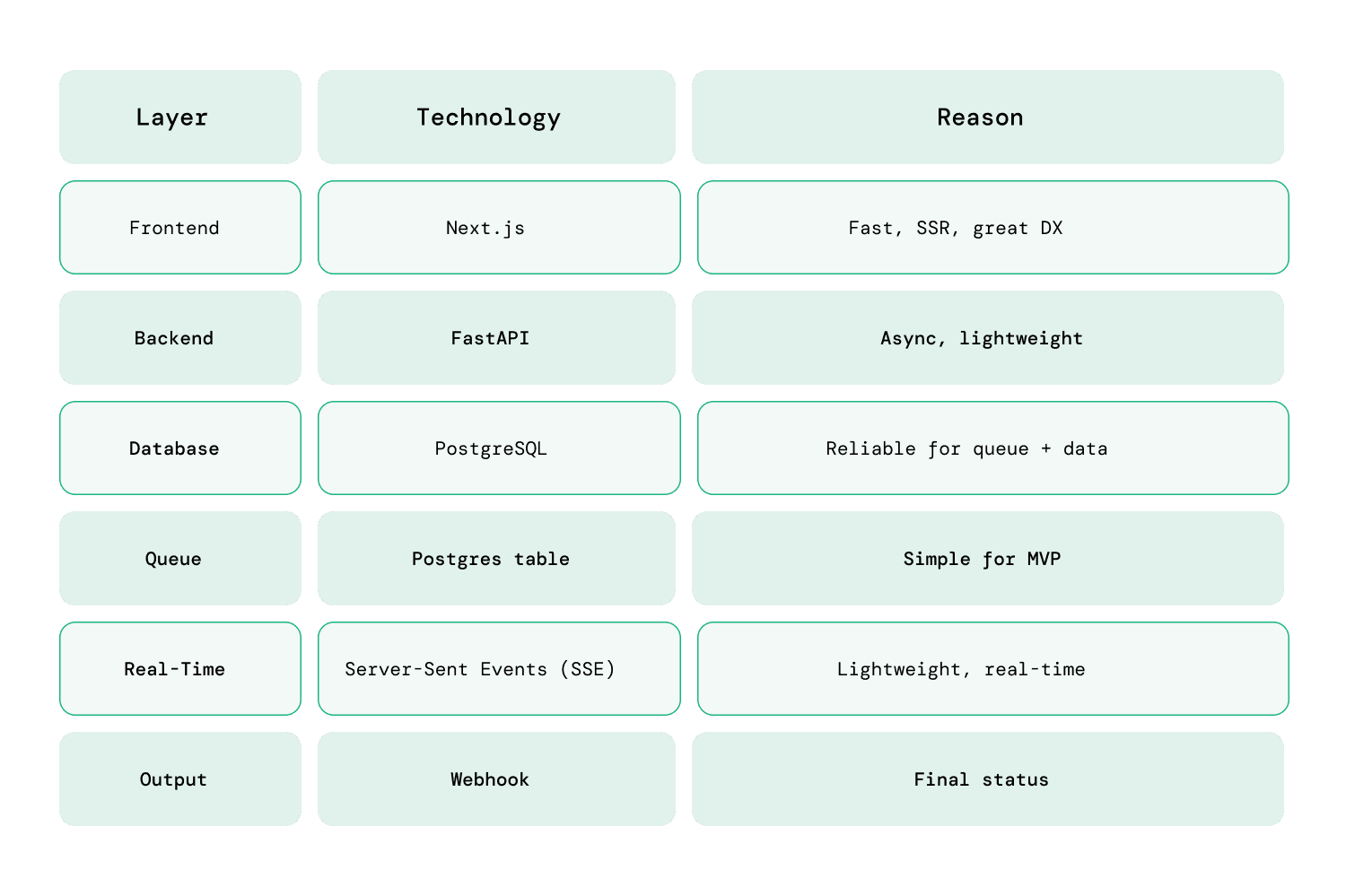 The MVP is fast to deliver, stable, and gives users a delightful real-time experience.
Post-MVP – Future Architecture (Tech Stack Upgrades Only)
Once the product gets traction, the architecture can easily scale without rewriting the MVP.
Below are the tech stack upgrades planned after MVP.
1. Queue System Upgrade
Replace Postgres queue with:
Recommended Choices:
-
Redis Streams → simple, fast, great for medium scale
-
RabbitMQ → stable queue system
-
Kafka → heavy load, real-time streaming, enterprise-grade
2. Real-Time Event System
Move from SSE-only to:
- SSE + Redis Pub/Sub
or
- Kafka → FastAPI → SSE
Still using SSE at UI layer (no change in frontend).
3. Microservices Structure
Split FastAPI engine into:
-
Connector Service
-
Transform Service
-
Scheduler Worker
-
Notification Service
-
Metadata Service
-
File Processing Service
4. Observability
Add modern monitoring stack:
-
Grafana
-
Prometheus
-
Loki
-
ELK Stack
5. Security / Identity
Use:
-
OAuth2 (for connectors)
-
Key Management
-
RBAC for multi-tenant access
Why This Architecture Works
The architecture I designed gives us:
Speed during MVP
No heavy systems. Only essential components.
Real-time experience using SSE
Feels like a premium data product even at MVP stage.
Smooth upgrade path
Every MVP component can evolve without rewrites.
Scalable for enterprise
Kafka, Redis, microservices, observability — all ready for future adoption.
Adding MCP for Chat-Based Application Support
As the ETL product grows, usability becomes a major factor.
End-users such as data analysts, business teams, Power BI/Tableau users often don’t want to manually configure connectors, map tables, or trigger pipelines.
To solve this, the future architecture will include MCP (Model Context Protocol) to offer chat-driven interaction inside the application.
MCP enables LLMs (like ChatGPT or custom on-prem models) to interact directly with:
-
our API
-
our ETL engine
-
our connectors
-
our metadata store
-
user configuration
-
job monitoring and logs
This gives users a conversational UI layer on top of the product.
Why MCP?
MCP provides:
A standard protocol for LLMs to talk to backend systems
Instead of custom integrations, MCP defines how tools, resources, and APIs are exposed to the AI agent.
Secure access to internal operations
Example:
“Create a Zoho Books connection for account X”
“Run the Sales ETL pipeline for last month”
“Show me the progress of Job #12345”
No need to build a manual UI for every function
The AI assistant will guide the user step by step.
Works with multiple LLMs
OpenAI, Anthropic, Azure, self-hosted models.
Great for onboarding & support
Users can simply ask what they want instead of navigating menus.
How MCP Fits Into the System
Below is the high-level integration plan:
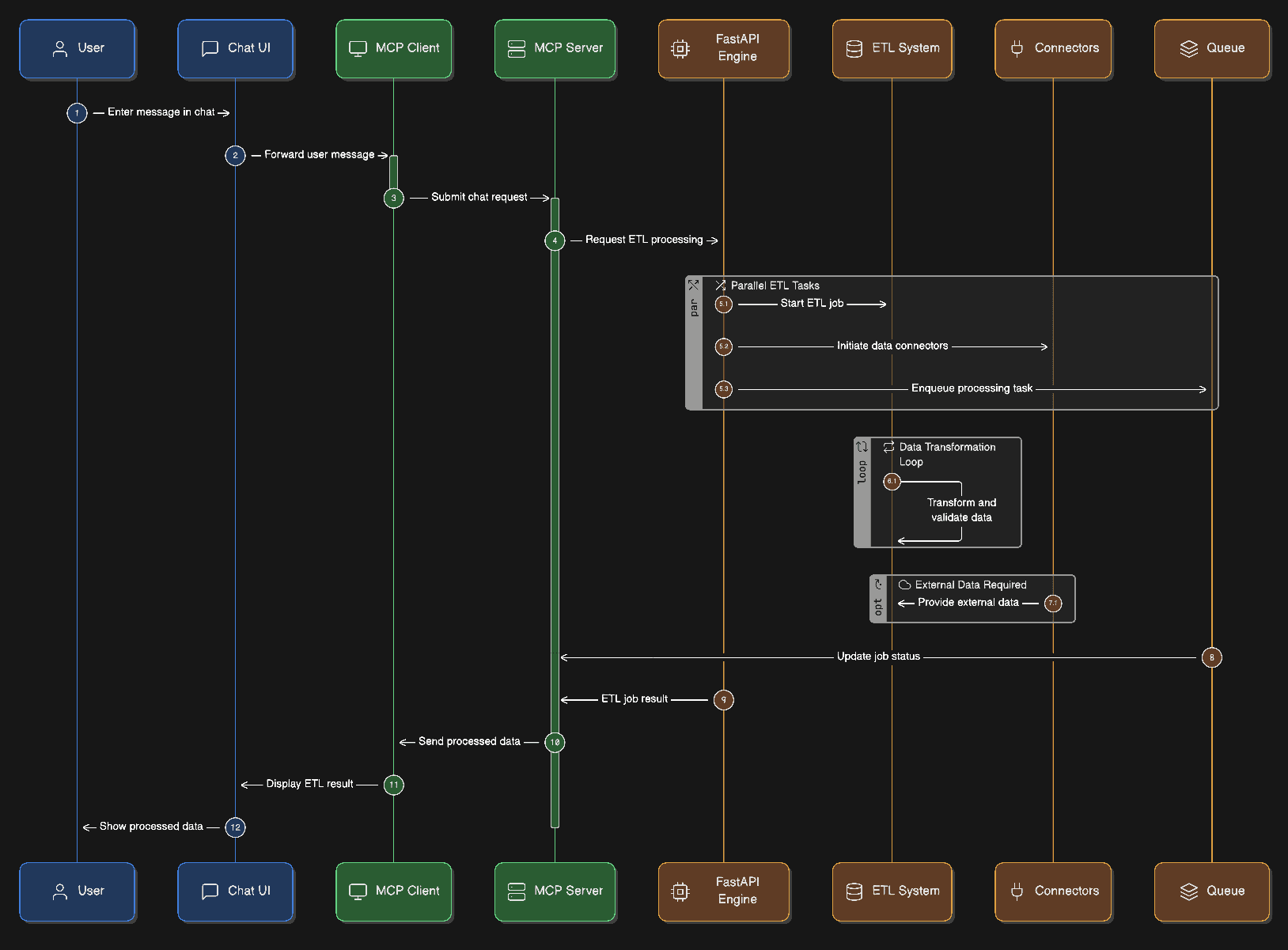
The MCP server will expose:
-
list/connectors
-
trigger ETL job
-
map tables
-
list fields
-
get logs
-
retrieve progress (SSE)
-
check job history
-
generate schema suggestions
MCP Architecture Components
1. Chat UI (Next.js)
A dedicated AI section:
-
inside app
-
or as a floating assistant
-
or as a dedicated /assistant route
2. MCP Client (Browser)
Uses OpenAI’s MCP client libraries to communicate with the backend.
3. MCP Server (Backend Service)
A new service that:
-
exposes ETL engine functions as “tools”
-
reads/writes from Postgres
-
can call FastAPI routes
-
can fetch live updates (SSE)
-
provides structured responses to the LLM
4. LLM Integration
Supports:
-
OpenAI GPT-5 / GPT-4o
-
Local LLM (Ollama)
-
Enterprise secured LLM
5. Permissions & Security Layer
Ensures:
-
role-based access
-
scoped API access
-
audit logs for AI-triggered actions
What Users Will Be Able to Do via Chat
Example Commands:
-
“Connect my Zoho Books account”
-
“Show me yesterday’s failed pipelines”
-
“Run the transformation pipeline for Microsoft ERP Sales data”
-
“Explain why the last job failed”
-
“Map the Customer table to the Analytics schema automatically”
This reduces:
-
UI complexity
-
onboarding effort
-
support load
-
learning curve
Why Add MCP After MVP?
-
MVP should be simple
-
Users should adopt the product first
-
ETL features must be stable
-
Chat assistant requires proper tools & stable APIs
-
MCP works best when backend operations are well-defined
So:
MVP = UI + Engine + Queue + SSE
After MVP = Add MCP, AI assistant, auto-suggestions
How MCP Helps Product Adoption
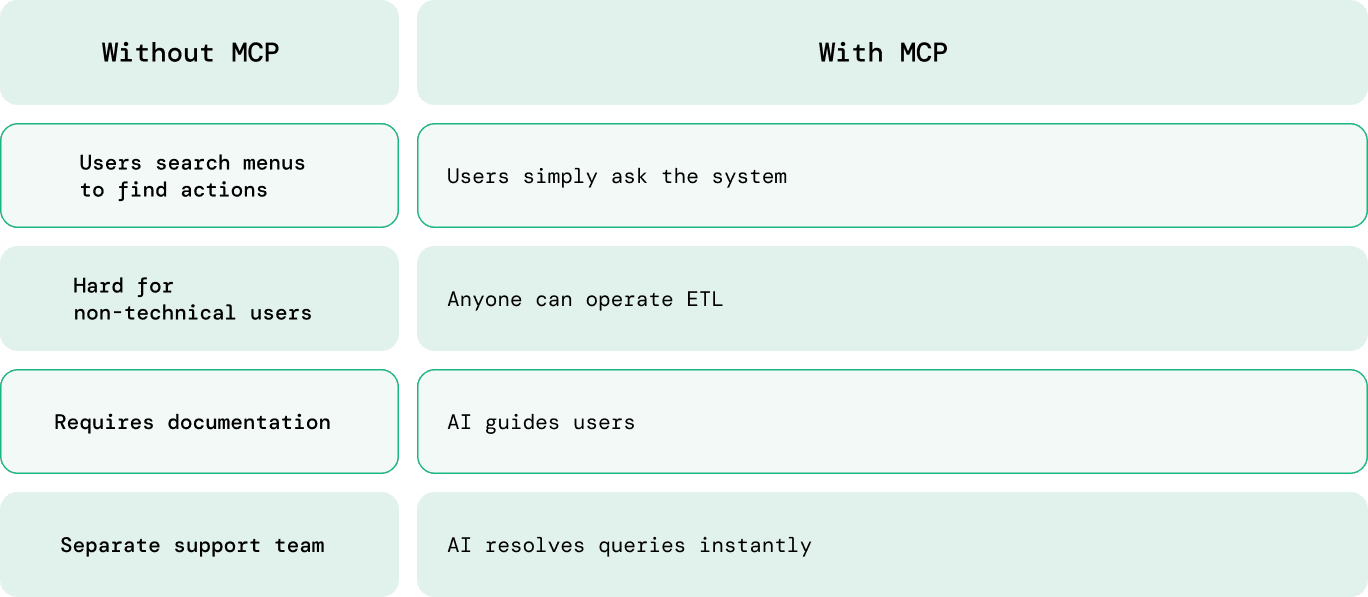 Note: We use MCP-inspired patterns, exposing backend capabilities as structured ‘tools’ (name, params, description) consumable by LLMs via standard APIs. This aligns with emerging protocols like MCP, but is implementable today using REST + JSON Schema.
Conclusion
This ETL platform was architected with a clear principle: build for today’s constraints without compromising tomorrow’s scale. The initial implementation is intentionally simple, but the overall system design is not short-sighted.
Each layer of the architecture has a defined responsibility and a clear evolution path. Queueing, eventing, service boundaries, observability, and AI-driven interaction are treated as progressive enhancements, not afterthoughts. This allows the platform to grow in capability and throughput without destabilizing the core system or forcing large rewrites.
The real value of this approach is architectural clarity. The system remains understandable, debuggable, and operable at every stage of growth. As requirements shift from basic ETL workflows to enterprise-scale data pipelines and AI-assisted operations, the architecture absorbs that change rather than fighting it.
This is the difference between shipping something that works and building a platform that lasts.
If you’re looking for a partner who can design and build MVPs that evolve into long-term platforms, reach out to the Railsfactory team.