Webinar Recap: Highlights from “Rails + AI: Build Apps at Startup Speed”
Catch the highlights from our Rails + AI webinar, including real-world use cases, a PDF chatbot demo, and practical approaches to AI integration in Rails applications.


Pichandal
Technical Content Writer


The first-ever webinar from RailsFactory began with a simple intention - to share, learn, and connect with the community.
As a Rails-first software development company with nearly two decades of experience, RailsFactory has always stayed closely connected to the ecosystem. From organizing community events to sponsoring RubyConf for four consecutive years, the focus has consistently been on contributing and growing with the Rails community.
Rooted in that foundation, the webinar series “Runtime” was launched.
The first session of the series, titled “Rails + AI: Build Apps at Startup Speed,” opened with participants joining from different parts of the world, reflecting a truly global audience.
The session was introduced with a clear objective - helping Rails teams understand how to practically integrate AI into their applications and identify where it can add real value in day-to-day development.
Throughout the session, the focus was to keep the discussion practical and grounded in real implementation rather than theory.
About the Speaker
The session was led by Athira Ramanen, Senior Technical Consultant at RailsFactory. With over 13 years of experience working exclusively with Ruby on Rails, she has been involved in building and delivering full-stack applications across multiple domains.
Her experience working closely with development teams and production systems shaped the focus of the session, which leaned heavily toward practical insights and real-world examples rather than high-level concepts, particularly around implementing AI in Ruby on Rails applications.
What the Webinar Set Out to Cover
The core theme of the webinar was how Rails and AI can be combined to build applications faster. The session aimed to show not only why this combination works, but also how developers can start implementing it in their own projects.
To build context, the speaker began by reflecting on how developer workflows have evolved over time, from searching for solutions on Google, to relying on Stack Overflow, and now to using AI tools that can provide immediate, contextual responses. This shift highlighted how Rails AI integration is changing the way developers write, debug, and optimize code.
Why Rails Is Well-Suited for AI Integration
A significant part of the session was dedicated to explaining why Ruby on Rails remains a strong choice for building AI-powered applications.
Rails provides a ready-made structure through its Model-View-Controller architecture, allowing developers to focus on business logic rather than setup. This structured approach also makes it easier to integrate external services such as AI APIs and adopt AI in Ruby on Rails without introducing unnecessary complexity.
The speaker also highlighted Rails’ rapid development capabilities, built-in scalability features, and strong ecosystem of reusable components, all of which contribute to faster time to market when building new products.
AI Services and How They Fit into Rails Applications
The session introduced commonly used AI services, with a primary focus on large language models such as those provided by OpenAI. These models are capable of understanding natural language, generating responses, summarizing documents, and assisting with content or code generation.
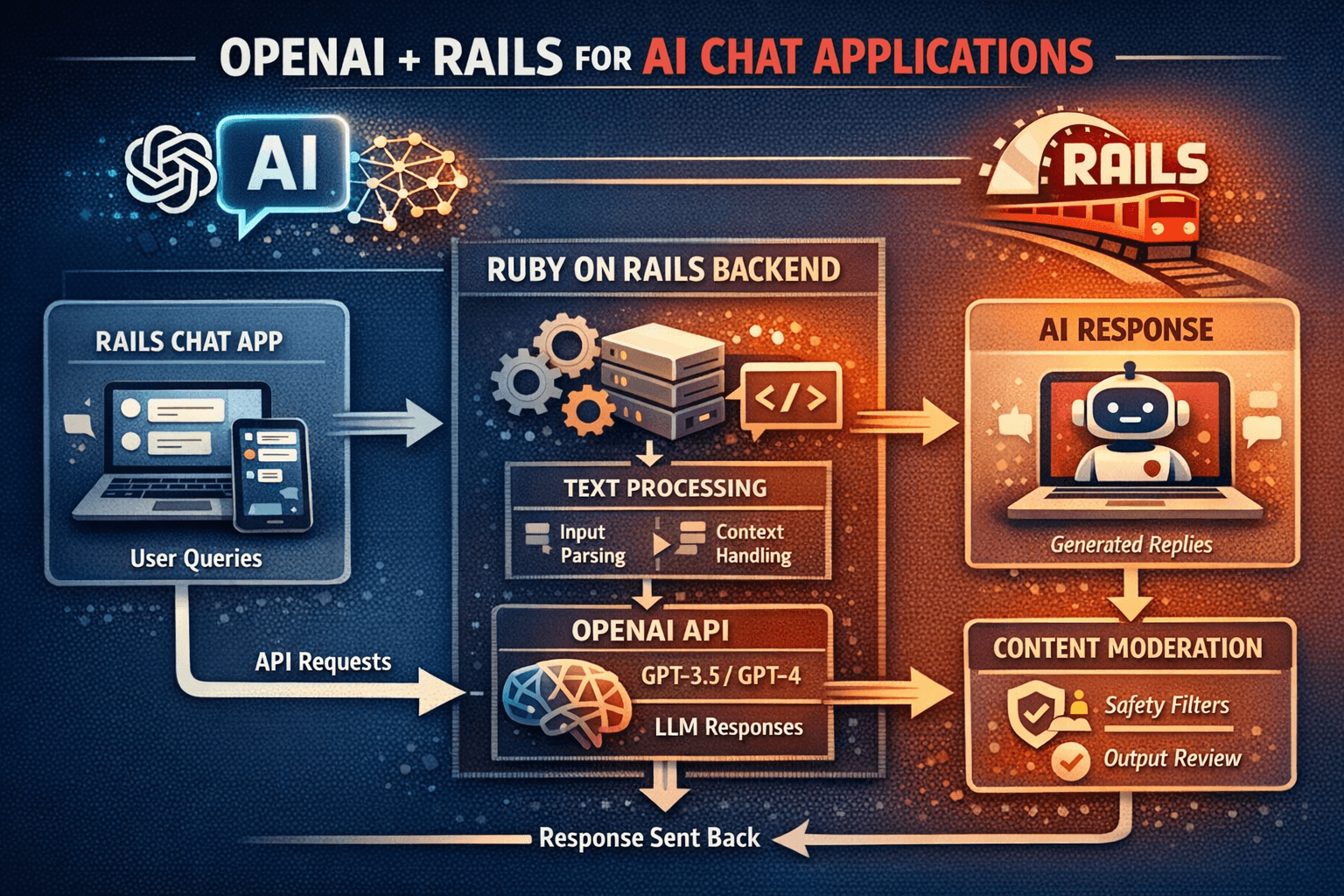
A simple architectural flow was presented to explain how AI fits into a Rails application. In this setup, user input is sent from the Rails app to an AI service through an API. The AI processes the request and returns a response, which is then presented back to the user through the application interface.
This flow formed the foundation for the live demonstration that followed.
Live Demo: Building a PDF Chatbot Using Rails and AI
The most engaging part of the webinar was the live walkthrough of building a document-based chatbot. The application allowed users to interact with a PDF by asking questions and receiving contextual answers based on the document’s content.
The demo illustrated how Rails can be used to manage the application structure, user interactions, and background processing, while AI services handle the language understanding and response generation.
It also demonstrated how developers can integrate AI APIs, manage requests, and present results in a user-friendly format within a Rails interface, making AI in Ruby on Rails applications more practical than complex.
By walking through the implementation step by step, the session showed that building such features does not require a complex architecture and can be achieved within a standard Rails application setup.
Handling Performance and Scalability
During the session, attention was also given to performance considerations, particularly because AI requests can take longer to process than typical application logic.
The speaker explained how background jobs in Rails can be used to handle AI-related processing asynchronously. This ensures that the user interface remains responsive while heavier tasks are processed in the background. The approach also supports scalability, allowing applications to handle increasing numbers of users without compromising performance.
This becomes especially important when scaling Rails AI applications in production environments.
Questions from the Audience
The session concluded with an engaging Q&A segment.
The audience was highly interactive and curious, with several thoughtful questions around real-world implementation. It was clear that attendees were not just exploring the idea, but actively thinking about how to apply AI in Ruby on Rails in their own projects.
Some of the questions included:
-
What would be the best approach in Rails to extract text from a scanned PDF that contains only images?
-
How do you identify which AI model works best for different types of queries?
-
Are you using any gems for handling nearest or similarity-based searches?
-
Can users ask questions in different languages?
-
Is it possible to share the code used in the demo?
Athira addressed each question with practical insights, breaking down both the approach and the considerations behind it. The discussion stayed focused on real use cases, making it valuable for both developers and decision-makers.
Following one of the attendee requests, the code resources from the demo were also shared via follow-up emails with all registrants.
If you’d like to watch the full session, you can access the full Rails + AI webinar recording here.
Closing Thoughts
The session wrapped up by reiterating that Rails and AI are not competing technologies but complementary ones.
Rails provides the stability, structure, and speed required to build applications, while AI introduces new capabilities that enhance how users interact with those applications.
By combining both, development teams can build intelligent features faster, test ideas earlier, and deliver more value without significantly increasing complexity.
For those interested in attending similar sessions, stay connected with us on our social media channels for updates on upcoming webinars in the Runtime series.
And if you’re working on something interesting or exploring new ideas and are open to sharing with the community, please contact Railsfactory team. We’re always looking to collaborate with external speakers - because at the core, the goal is to learn and grow together as a community.