The Complete Guide to AI Integration in Ruby on Rails (2026)
Learn how to integrate AI in Ruby on Rails using the right tools, architecture, and best practices. A complete guide to building scalable Rails AI applications.


Pichandal
Technical Content Writer


AI in Ruby on Rails is no longer experimental.
It’s a practical way to build intelligent applications without owning machine learning infrastructure. In 2026, most teams integrate AI through APIs, and Rails fits naturally into this model as a backend that manages workflows, data, and user interactions. This is exactly where Rails AI applications gain their advantage.
Statistics show that more than 70% of AI applications now rely on APIs instead of in-house models, and LLM-based products have grown nearly 3x since 2023.
This shift has made frameworks like Rails more relevant, especially for teams focused on shipping products quickly.
Instead of training models, Rails applications typically act as an orchestration layer. They receive user input, structure prompts, call AI services, and process responses. This allows developers to focus on product experience rather than model complexity.
This guide breaks down how AI in Ruby on Rails works in real-world scenarios, from architecture and libraries to implementation patterns and scaling considerations.
Is Ruby on Rails Good for AI Applications in 2026?
Yes, Rails is ideal for AI-powered applications when combined with external AI services and APIs. It allows developers to focus on product development while delegating AI complexity to specialized providers.
What Makes Rails a Good Fit
The robust Rails framework brings several advantages when building Rails AI applications:
-
Rapid prototyping for AI MVPs Rails allows teams to quickly build and test AI-driven features like chat interfaces, summarization tools, or recommendation systems without heavy setup.
-
API-first architecture for seamless integration Since most AI services are API-based, Rails fits naturally into this model, making it easy to send prompts, receive responses, and manage workflows.
-
Mature ecosystem for SaaS-scale applications Rails provides built-in solutions for authentication, background jobs, and database management, which are essential for real-world AI products.
In simple words, Rails reduces the effort required to build AI-enabled products by handling everything around the AI such as user flows, data handling, and business logic.
Where Rails Falls Short
Despite its strengths, Rails has clear boundaries when it comes to AI:
-
Not suitable for training large ML models Rails lacks the ecosystem and performance needed for training or fine-tuning machine learning models.
-
Dependence on external AI providers Most AI capabilities in Rails apps come from APIs, which introduces dependencies on third-party services.
-
Limited native ML libraries compared to Python While Ruby has some ML libraries, they are not as mature or widely adopted as Python’s ecosystem.
That said, in most real-world setups, Rails and Python are not competitors, they work together. Rails handles the application layer, while Python manages model-heavy tasks when needed.
Where Rails Actually Shines
Rails is most effective when AI is part of a broader product experience rather than the core computational layer. The below use cases highlight where AI in Ruby on Rails delivers the most value:
-
AI-powered SaaS platforms Rails handles subscriptions, dashboards, and workflows, while AI enhances features like automation or insights.
-
Chatbots and virtual assistants It provides the backend structure for managing conversations, sessions, and integrations.
-
AI content generation tools Rails supports content workflows, editing interfaces, and publishing systems around AI-generated output.
-
Recommendation engines It manages user data and interactions while AI models generate personalized suggestions.
AI in Ruby on Rails: How It Actually Works
At a practical level, AI integration in Rails is about structuring how your application communicates with external intelligence.
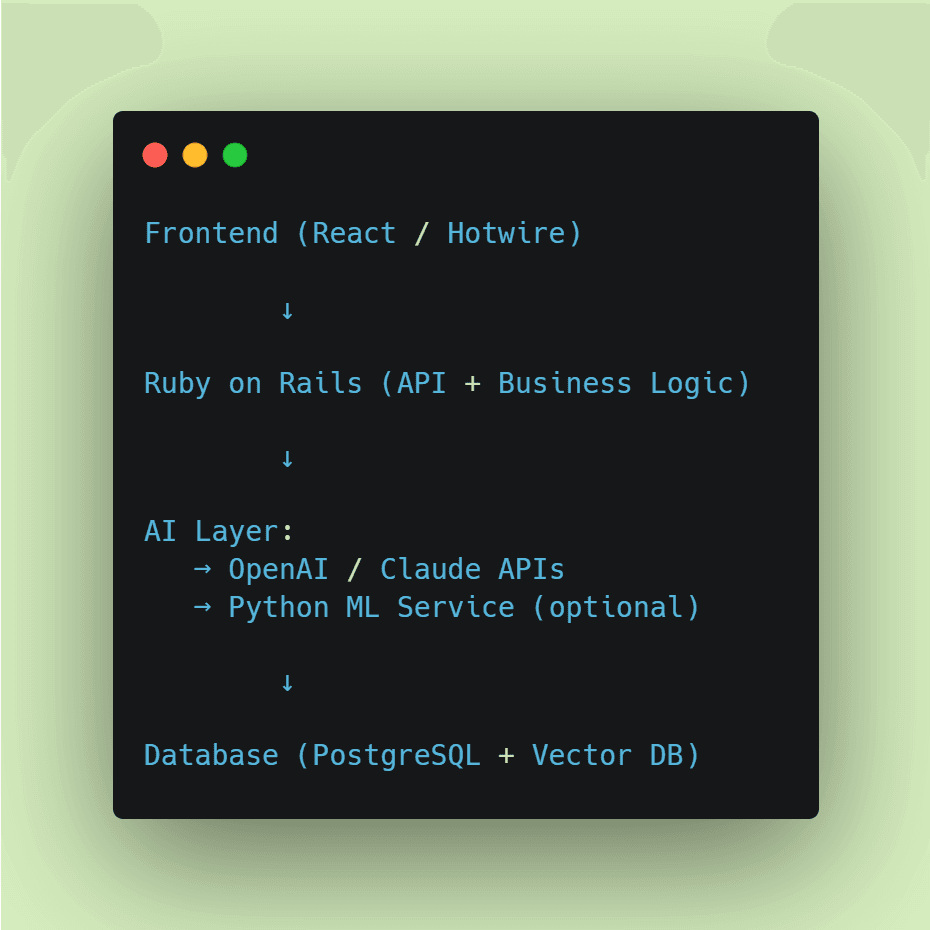
A typical interaction starts when a user triggers an AI feature, such as generating content or asking a question. Rails processes that input, formats it into a prompt, and sends it to an AI API. The response is then cleaned, optionally stored, and returned to the user.
Architecture Overview
This layered structure is typical in most Rails AI applications.
Core Components in a Rails AI App
Instead of mixing everything in controllers, most production apps separate responsibilities:
-
Controllers: Handle requests and validation
-
Service objects: Manage AI calls
-
Background jobs: Process long tasks asynchronously
-
Vector databases: Enable semantic search and embeddings
This structure keeps the system maintainable as AI features expand.
Also, this pattern is common across most Ruby AI applications because it keeps the system modular and easier to scale.
What AI Libraries Work with Rails?
Rails works with AI through Ruby gems and external APIs like OpenAI, LangChain, and vector databases.
What Developers Actually Use
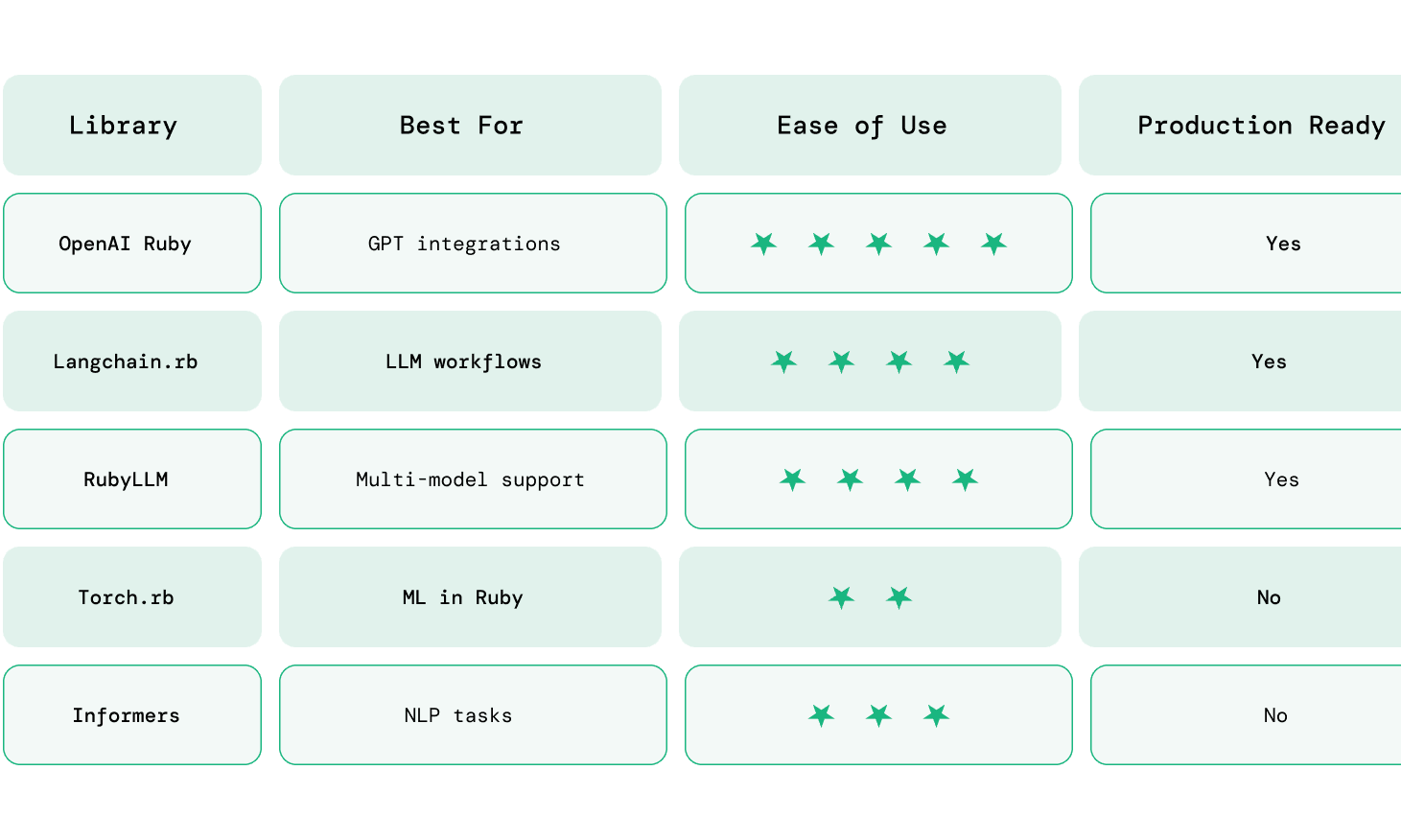
In real-world Rails applications, a small set of AI libraries dominates because they are stable, well-supported, and easy to integrate. These tools form the foundation of most Rails AI applications today.
OpenAI Ruby Gem This is the most widely used library for integrating GPT models into Rails apps. It’s commonly used for chatbots, content generation, summarization, and any feature that relies on natural language processing via APIs.
Langchain.rb Useful for building more advanced AI workflows, such as multi-step reasoning, chaining prompts, or maintaining conversational memory. It’s often used when simple API calls are not enough.
RubyLLM Provides a unified interface to interact with multiple LLM providers. This is helpful if you want flexibility to switch between providers like OpenAI or Anthropic without changing your core logic.
Torch.rb / Informers These libraries enable running machine learning or NLP tasks directly in Ruby. However, they are mostly used for experimentation or niche use cases rather than production-scale Rails applications.
5. Step-by-Step: Adding AI to a Rails App
Adding AI to a Rails app is more than just calling an API. A clean setup ensures your integration is secure, maintainable, and scalable from the start.
Here is the common setup for integrating AI in Ruby on Rails applications.
Step 1: Add the Required Gem
Start by adding the OpenAI client to your Rails application.
# Gemfile

gem 'ruby-openai'
Then install dependencies:
bundle install
Step 2: Store API Key Securely
Never hardcode API keys. Store them using environment variables.
export OPENAI_API_KEY=your_api_key_here
Or use Rails credentials:
rails credentials:edit

openai_api_key: your_api_key_here
Step 3: Initialize the OpenAI Client
Create a reusable client configuration.
# config/initializers/openai.rb

OpenAIClient = OpenAI::Client.new(

   access_token: ENV['OPENAI_API_KEY']

)
This avoids reinitializing the client multiple times.
Step 4: Create a Service Object for AI Logic
Keep AI-related logic out of controllers.
# app/services/ai_service.rb

class AiService

  def self.generate(prompt)

    response = OpenAIClient.chat(

      parameters: {

        model: "gpt-4o-mini",

        messages: [{ role: "user", content: prompt }]
      }
    )

    response.dig("choices", 0, "message", "content")

  end

end
This keeps your application modular and easier to maintain.
Step 5: Call AI from Controller
Now connect your service to a controller action.
# app/controllers/ai_controller.rb

class AiController < ApplicationController

  def generate

    prompt = params[:prompt]

    result = AiService.generate(prompt)

    render json: { response: result }

  end

end
Step 6: Add a Simple Frontend Input (Optional)
You can test with a basic form or API request.
Example (Rails view or Postman request):
-
Endpoint: /ai/generate
-
Method: POST
-
Body: { "prompt": "Write a product description" }
Step 7: Handle Errors and Edge Cases
AI APIs can fail or return unexpected responses, so add safeguards.
-
Handle API timeouts
-
Validate input prompts
-
Add fallback messages
-
Log errors for debugging
Example:
def self.generate(prompt)

  response = OpenAIClient.chat(

    parameters: {

      model: "gpt-4o-mini",

      messages: [{ role: "user", content: prompt }]
    }
  )

  response.dig("choices", 0, "message", "content") || "No response generated"

rescue => e

  Rails.logger.error("AI Error: #{e.message}")

  "Something went wrong"

end
Step 8: Move Heavy Tasks to Background Jobs
For longer AI tasks (e.g., document processing), use background jobs.
rails generate job AiJob

class AiJob < ApplicationJob

  queue_as :default

  def perform(prompt)

    AiService.generate(prompt)

  end

end
This prevents blocking user requests.
Step 9: Optimize for Cost and Performance
As usage grows, optimize early:
-
Cache repeated prompts (Redis)
-
Use smaller models for simple tasks
-
Limit token usage in prompts
-
Track API usage
Step 10: (Optional) Add Embeddings for Advanced Features
If you’re building search or recommendations:
-
Use embeddings API
-
Store vectors in PostgreSQL (pgvector)
-
Retrieve relevant data before calling AI
By following these steps, you’ll have:
-
A clean AI integration inside Rails
-
Scalable architecture using services and jobs
-
A foundation ready for advanced features like chat, search, or automation
6. Performance & Scaling Considerations
As AI features become a core part of your application, performance and cost quickly become critical. Unlike traditional Rails features, AI introduces external dependencies, variable response times, and usage-based pricing, all of which need to be managed proactively.
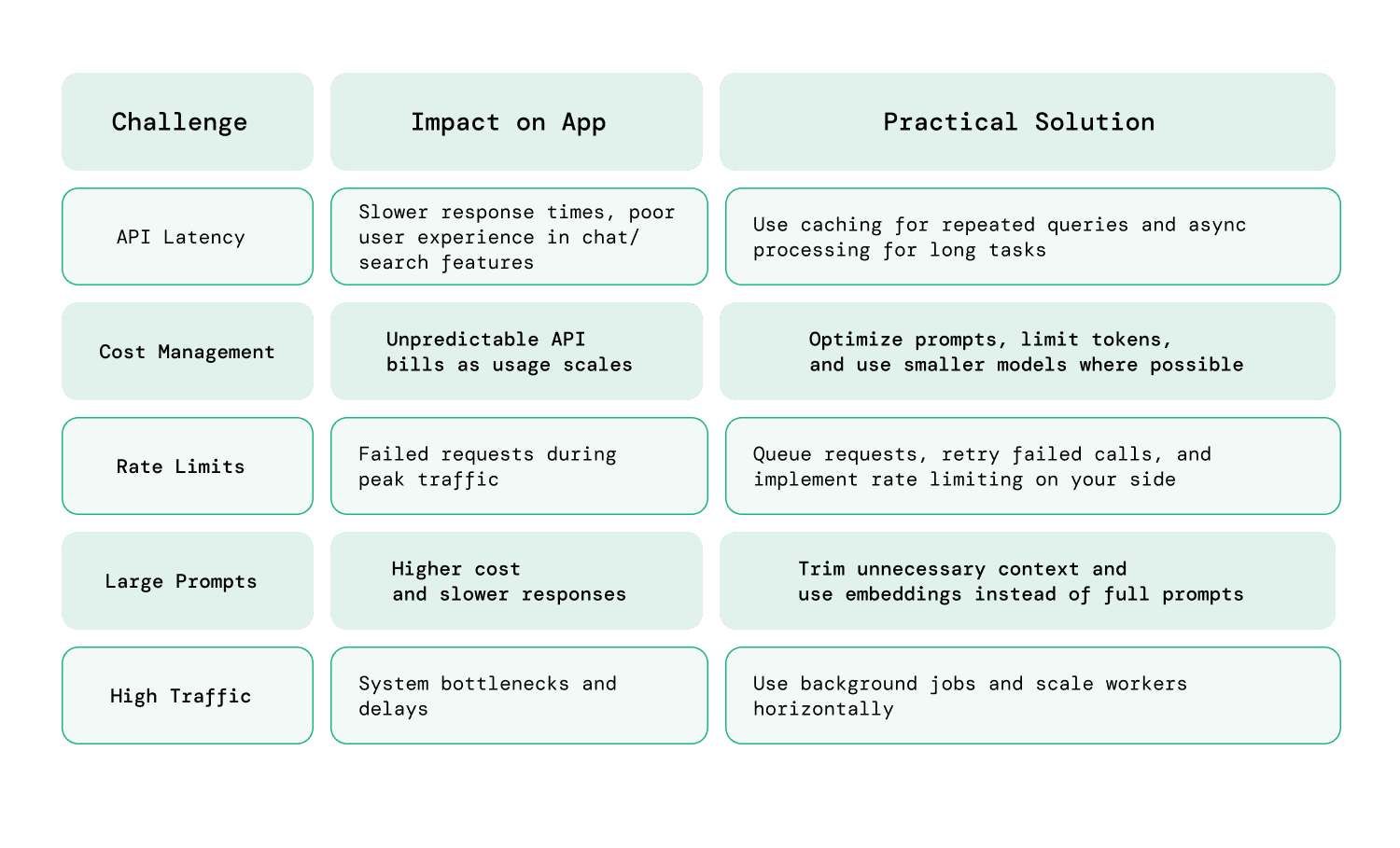
Key Challenges
When working with ai in ruby on rails, most teams encounter a similar set of bottlenecks:
-
API latency AI responses are not instant. Depending on the model and prompt size, response times can range from a few hundred milliseconds to several seconds. This directly impacts user experience, especially in real-time features like chat or search.
-
Cost management AI APIs are priced based on usage (tokens, requests, or compute time). As your application scales, costs can grow unpredictably if prompts and responses are not optimized.
-
Rate limits AI providers enforce request limits to prevent abuse. High-traffic applications can hit these limits quickly, leading to failed requests or degraded performance.
-
High traffic and concurrent requests As usage grows, multiple users hitting AI endpoints simultaneously can create bottlenecks, especially if requests are processed synchronously.
Solutions
To scale Rails AI applications effectively, you need a combination of architectural and optimization strategies:
-
Caching responses (Redis) For repeated or predictable queries, caching AI responses can significantly reduce both latency and cost. For example, frequently asked questions or common prompts can be served instantly without calling the API again.
-
Queueing jobs for async processing -Long-running AI tasks should not block user requests. Using background job processors like Sidekiq allows you to handle these tasks asynchronously, improving responsiveness and reliability.
-
Using cheaper models where possible Not every task requires a high-end model. For example:
-Use advanced models for critical outputs
-Use smaller, faster models for simple transformations or internal tasks
- Scale background workers and queue processing Use tools like Sidekiq to distribute workloads across workers and handle spikes in traffic without affecting response times.
As AI features grow, performance tuning becomes important. In some cases, a rails upgrade may be necessary to take advantage of newer features, improved background processing, and better overall performance.
Practical Scaling Tips
Beyond the basics, a few practical adjustments can make a noticeable difference:
Limit prompt size Shorter prompts reduce both cost and response time without significantly affecting output quality in many cases.
Batch requests when possible Instead of making multiple API calls, combine related inputs into a single request where applicable.
Implement fallback strategies If an API call fails or times out, return a fallback response instead of breaking the user experience.
Monitor usage actively Track API usage, latency, and error rates to identify bottlenecks early.
Security and Data Privacy in Rails AI Apps
Security becomes critical when integrating AI into Rails applications because most AI features rely on external APIs. This means user inputs and application data may be sent outside your system, making proper handling essential to avoid data leaks and compliance risks.
To build secure and reliable AI in Ruby on Rails applications, focus on a few core practices:
-
Avoid sending sensitive data to AI APIs Do not include personally identifiable information (PII), financial details, or confidential business data in prompts. If required, mask or anonymize the data before sending it to the AI service.
-
Use environment variables for API keys Store API keys using environment variables or Rails credentials instead of hardcoding them. This reduces the risk of accidental exposure in code repositories or logs.
-
Implement rate limiting Restrict how frequently users can make AI requests. This helps prevent abuse, protects your system from spikes in traffic, and keeps API costs under control.
-
Log and monitor AI usage Track requests, responses, and errors to identify unusual patterns or failures. Monitoring also helps with debugging and understanding how AI features are being used in production.
Simply put, security in Rails AI applications is largely about controlling data flow. Since AI processing happens externally, your responsibility is to carefully manage what is sent, how it is processed, and what is returned to users.
Conclusion: Building AI Applications with Rails
AI in Ruby on Rails focuses on applying existing AI models within applications, rather than building and managing machine learning systems from scratch.
Rails fits naturally into this approach. It handles user interactions, business logic, and workflows, while AI models provide intelligence where needed. This separation allows teams to move faster without taking on the complexity of building and maintaining machine learning systems.
At the same time, building reliable AI features requires thoughtful decisions around architecture, cost, performance, and data handling. Small choices like how you structure prompts, manage API usage, or handle user data, can have a significant impact as your application scales.
For teams focused on shipping products, Rails continues to be a practical and efficient choice. It may not be where AI models are created, but it’s often where AI becomes usable, scalable, and valuable to end users.
If you’re planning to build or scale a Rails AI application, having the right technical approach can make a significant difference in performance, cost, and long-term maintainability.
If you’d like a second perspective or are looking to hire expert Rails developers for implementation, feel free to contact our team at RailsFactory.
FAQs
1. Can Ruby on Rails be used for AI development?
Yes, Ruby on Rails can be used to build AI-powered applications by integrating with external AI services. While it’s not used for training models, it works well for building interfaces, workflows, and APIs around AI features.
2. Is Ruby on Rails good for AI startups?
Yes, Rails is well-suited for AI startups because it enables rapid development and seamless integration with AI APIs. It allows teams to quickly build and iterate AI-powered features without investing heavily in infrastructure. Rails also provides built-in support for authentication, background jobs, and database management, which helps startups focus on delivering product value rather than managing complexity.
3. What AI libraries work with Ruby on Rails?
Common libraries include the OpenAI Ruby gem, Langchain.rb, and RubyLLM. These tools help integrate large language models, build workflows, and manage AI interactions within Rails applications.
4. What is the future of Ruby on Rails?
The future of Ruby on Rails is stable and evolving, with a stronger focus on AI integration, developer productivity, and scalable architectures. In 2026, Rails is not trying to compete with low-level or ML-heavy frameworks, it is positioning itself as a fast, reliable layer for building real-world applications.
5. Do you need Python for AI in Rails apps?
No, most Ruby on Rails AI applications do not require Python. Rails can integrate directly with AI APIs using Ruby libraries. Python is only needed if you plan to train custom models or handle advanced machine learning tasks.