Application Modernization Services: The Complete 2026 Guide
From legacy systems to modern apps - explore application modernization strategies, benefits, and practical approaches in this 2026 guide.


Pichandal
Technical Content Writer


Application modernization services help organizations update legacy systems to improve performance, scalability, and security. It becomes essential in 2026 due to rising user expectations, cloud adoption, and the increasing cost and risk of maintaining legacy systems.
According to Market Analysis from SkyQuest, investment in application modernization is poised to grow from $17.58 Billion in 2025 to over $55 Billion by 2033, driven by the need for SaaS-based solutions and business agility.
Organizations today face growing pressure to deliver faster, more reliable digital experiences. Legacy systems often struggle to meet these expectations.
-
68% of security breaches involving legacy systems in 2025 originated from a compromised third-party component or library that was no longer supported.
-
Application modernization is the #1 priority for 71% of CIOs surveyed in Gartner’s 2026 agenda.
These trends make it clear that modernization is less of an option and more of a necessity. In this article, we break down strategies, benefits, enterprise use cases, and a step-by-step modernization approach.
What are app modernization services?
App modernization services involve transforming existing applications to align with current business needs and technology standards. This can include updating codebases, migrating infrastructure, or redesigning system architecture.
Unlike simple migration, modernization focuses on improving how applications function, not just where they run. It often combines consulting, execution, and ongoing optimization.
These services typically cover:
-
Code refactoring or rebuilding
-
Cloud migration and optimization
-
UI/UX improvements
-
Integration with modern tools and APIs
What is legacy application modernization (step-by-step)?
Legacy application modernization involves a structured process that evaluates, prioritizes, and incrementally upgrades systems without disrupting business operations.
Modernizing legacy systems is not a one-time effort. It’s a phased, structured process that balances technical improvements with business continuity. This is especially important in enterprise application modernization, where systems are deeply interconnected and critical to daily operations.
Step-by-step process for modernizing legacy applications
1. Assess current systems
Start by evaluating the existing application landscape, including architecture, code quality, dependencies, and infrastructure. Identify performance bottlenecks, security gaps, and outdated components.
In enterprise application modernization, this step often includes mapping integrations across multiple systems.
2. Define business goals
Clarify what you want to achieve, whether it’s reducing operational costs, improving scalability, enhancing user experience, or enabling faster releases.
Clear goals ensure modernization efforts stay aligned with business priorities rather than becoming purely technical upgrades.
3. Choose the right strategy
Select a modernization approach based on system complexity, timelines, and risk tolerance. For example, low-risk systems may be rehosted, while critical applications may require refactoring or rearchitecting.
In enterprise application modernization, hybrid strategies are often used across different applications.
4. Prioritize applications
Not all systems need to be modernized at once. Rank applications based on business impact, technical debt, and urgency.
High-value, customer-facing, or high-maintenance systems are usually prioritized first to maximize ROI.
5. Execute modernization
This is where the actual transformation happens. Depending on the strategy, teams may refactor code, migrate to the cloud, adopt microservices, or rebuild components.
Execution in enterprise environments typically happens in phases to minimize disruption.
6. Testing and validation
Thorough testing ensures that modernized applications function correctly and deliver expected improvements. This includes functional testing, performance testing, and security validation.
Automation plays a key role here, especially in large-scale enterprise application modernization projects.
7. Deployment and continuous monitoring
Deploy updated applications using CI/CD pipelines to ensure smooth releases. Post-deployment, monitor performance, user behavior, and system stability to identify further optimization opportunities.
Modernization doesn’t end at deployment. It’s an ongoing process that evolves based on real-world usage and performance insights.
Application modernization strategies
The right modernization strategy depends on business goals, system complexity, and timelines, ranging from quick cloud migration to complete system rebuilding.
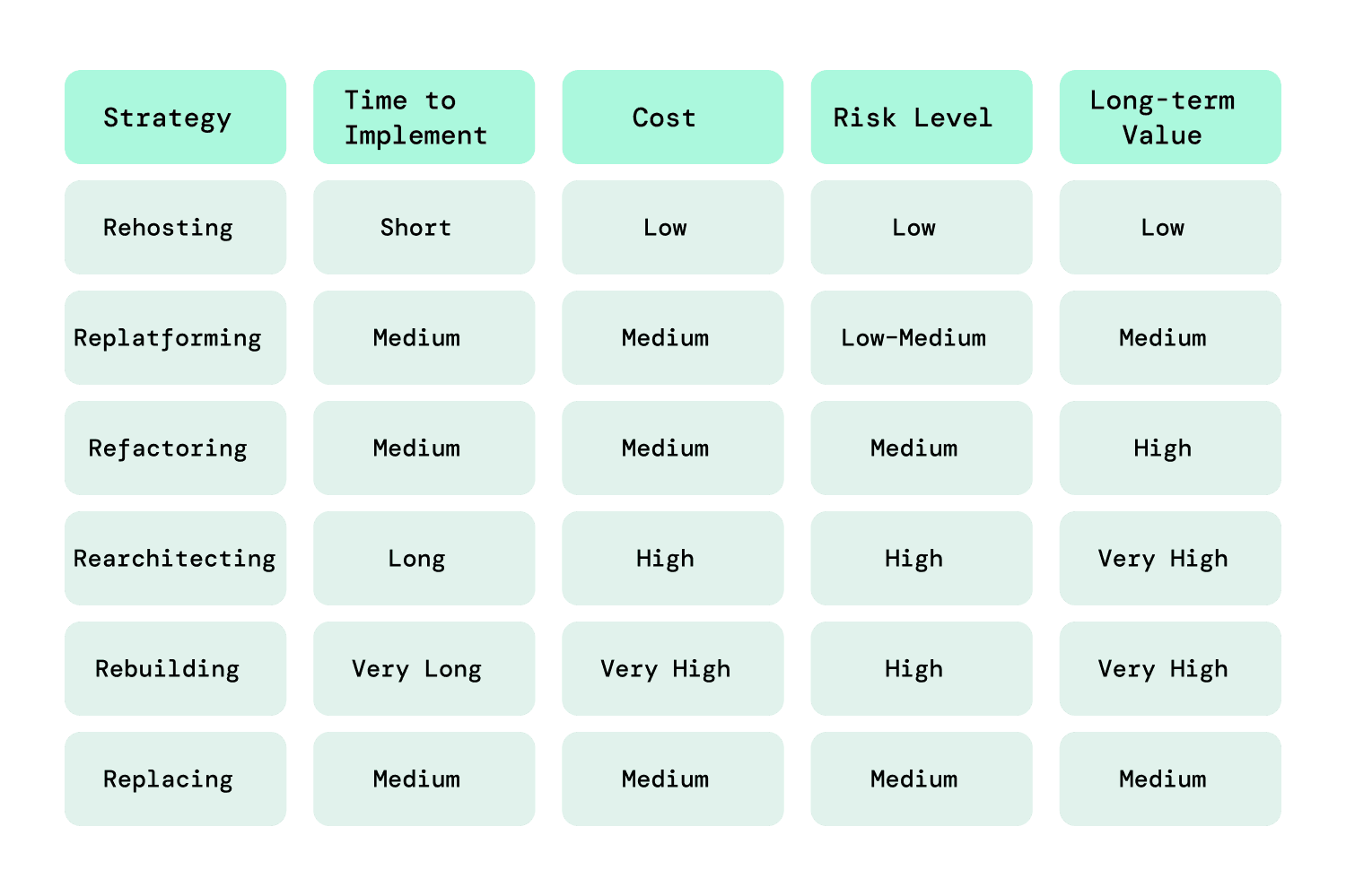
Different applications require different approaches. Choosing the right strategy impacts not just cost and timelines, but also long-term scalability, performance, and maintainability. In enterprise application modernization, it’s common to apply multiple strategies across different applications based on their role and complexity.
1. Rehosting (Lift and Shift)
Rehosting involves moving applications from on-premise infrastructure to the cloud without modifying the core code or architecture. It is often the first step in modernization for organizations looking to exit data centers quickly.
-
Best suited for: Stable applications with minimal change requirements
-
Advantages: Fast migration, low risk, minimal disruption
-
Limitations: Does not reduce technical debt or improve architecture
-
Typical use case: Legacy internal tools that need infrastructure cost optimization
2. Replatforming
Replatforming introduces targeted optimizations while moving applications to a modern platform. This could involve upgrading databases, switching to managed services, or improving runtime environments.
-
Best suited for: Applications that need performance improvements without major redesign
-
Advantages: Better performance and scalability than rehosting
-
Limitations: Partial modernization, some legacy issues remain
-
Typical use case: Customer-facing apps needing faster response times
3. Refactoring
Refactoring focuses on improving the internal structure of the application code without altering its core functionality. This may include breaking large components into smaller modules or improving inefficient logic.
-
Best suited for: Applications with strong business value but outdated or inefficient code
-
Advantages: Improves maintainability, performance, and developer productivity
-
Limitations: Requires deep code-level expertise and time investment
-
Typical use case: Systems that need frequent updates or feature additions
4. Rearchitecting (Monolith to Microservices)
Rearchitecting involves redesigning the application’s architecture to align with modern patterns such as microservices, APIs, or event-driven systems. This enables better scalability and flexibility.
-
Best suited for: High-growth applications with scalability and integration challenges
-
Advantages: Enables independent scaling, faster deployments, and better resilience
-
Limitations: High complexity, requires strong architectural planning
-
Typical use case: Core business platforms handling large user volumes
In enterprise application modernization, rearchitecting is often applied selectively to critical systems rather than across the entire application landscape.
5. Rebuilding (Rewrite from scratch)
Rebuilding involves completely redeveloping the application using modern technologies. This approach is chosen when the existing system is too outdated, poorly documented, or difficult to maintain.
-
Best suited for: Applications with severe technical debt or obsolete technology stacks
-
Advantages: Clean architecture, modern UX, full control over features
-
Limitations: High cost, longer timelines, and potential business risk
-
Typical use case: Legacy platforms that can no longer support business growth
6. Replacing (SaaS or third-party solutions)
Replacing means retiring the existing application and adopting a SaaS or third-party product that fulfills the same function.
-
Best suited for: Non-core business functions (HR, CRM, accounting)
-
Advantages: Eliminates maintenance, faster deployment
-
Limitations: Limited customization, vendor lock-in risks
-
Typical use case: Standard business processes that don’t require differentiation
How to choose the right strategy
Selecting the right modernization strategy requires balancing business impact, technical complexity, and long-term scalability goals.
There’s no universal playbook. Most organizations, especially in enterprise application modernization, use a portfolio-based approach, where each application is evaluated individually.
Key decision factors:
-
Business criticality: How important is the application to revenue or operations?
-
Technical debt level: Is the code maintainable or highly outdated?
-
Scalability needs: Will the application need to handle future growth?
-
Time constraints: Is quick migration required or is long-term transformation the goal?
-
Budget availability: Can the organization invest in deeper transformation?
Strategy comparison
What are the benefits of application modernization?
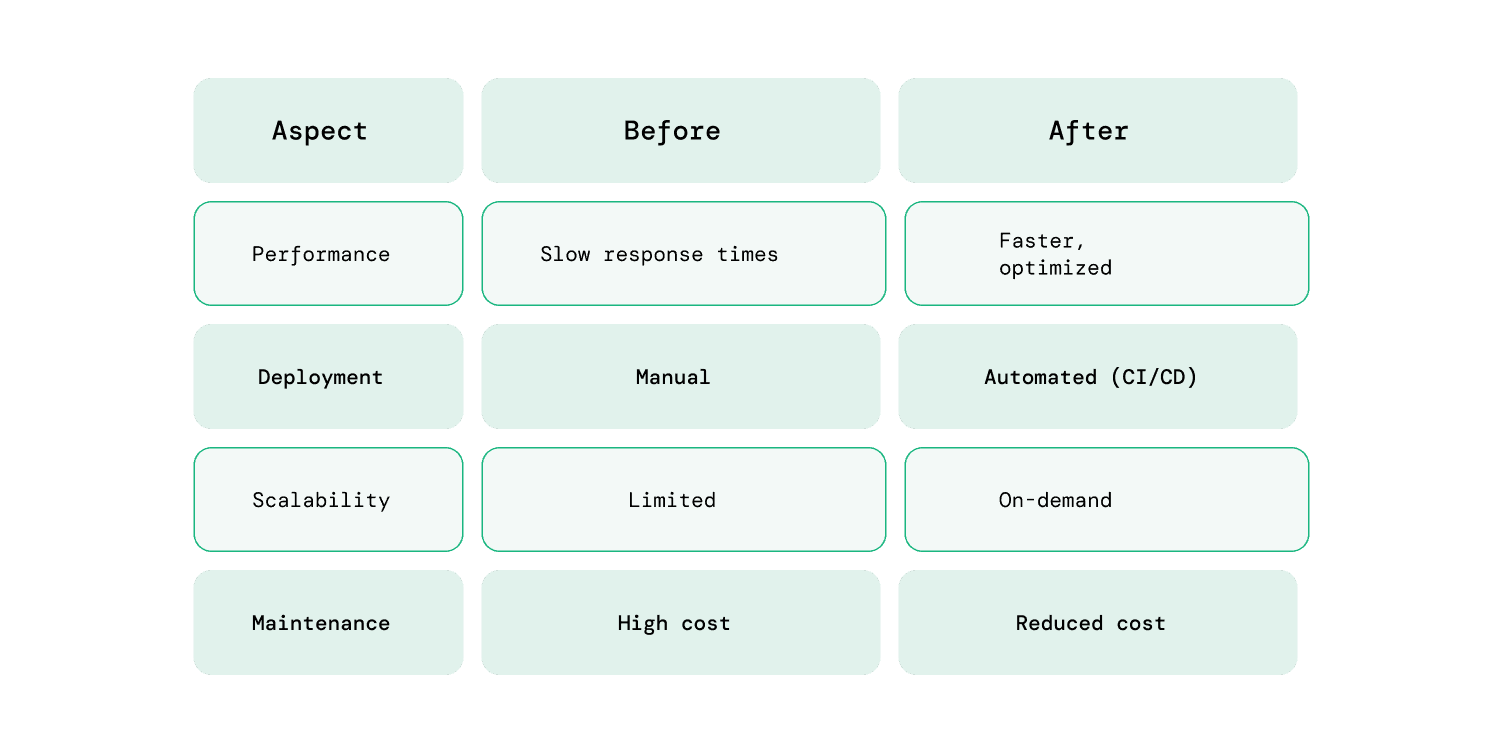
App modernization services delivers both technical and business advantages by replacing outdated systems with more efficient, scalable, and maintainable solutions. These improvements directly impact how quickly teams can build, deploy, and scale applications in response to changing business needs.
Improved application performance and uptime
Modernized applications are optimized for current infrastructure, often leveraging cloud environments and distributed architectures. This results in faster response times, reduced latency, and improved system reliability.
Applications that previously struggled with peak loads can scale more efficiently, reducing downtime and ensuring consistent performance for users.
Enhanced security and compliance readiness
Legacy systems often lack modern security standards, making them vulnerable to breaches and compliance risks. Modernization introduces updated security protocols, encryption standards, and access controls.
It also makes it easier to comply with evolving regulations by integrating security practices directly into the development and deployment process.
Reduced infrastructure and maintenance costs
Maintaining legacy systems can be expensive due to outdated hardware, inefficient code, and frequent manual interventions. Modernized applications reduce these costs by leveraging cloud infrastructure and automation.
Organizations can shift from high fixed costs to more flexible, usage-based models, improving overall cost efficiency.
Faster development and release cycles
Modern architectures, combined with CI/CD pipelines, enable faster development, testing, and deployment. Teams can release updates more frequently and respond quickly to user feedback or market changes.
This shift significantly reduces time-to-market and improves overall development efficiency.
Better user experience and engagement
Modern applications are designed with user expectations in mind, offering faster load times, responsive interfaces, and seamless interactions across devices.
Improved performance and usability lead to higher user satisfaction, increased engagement, and better retention rates.
Before vs After modernization
Enterprise application modernization
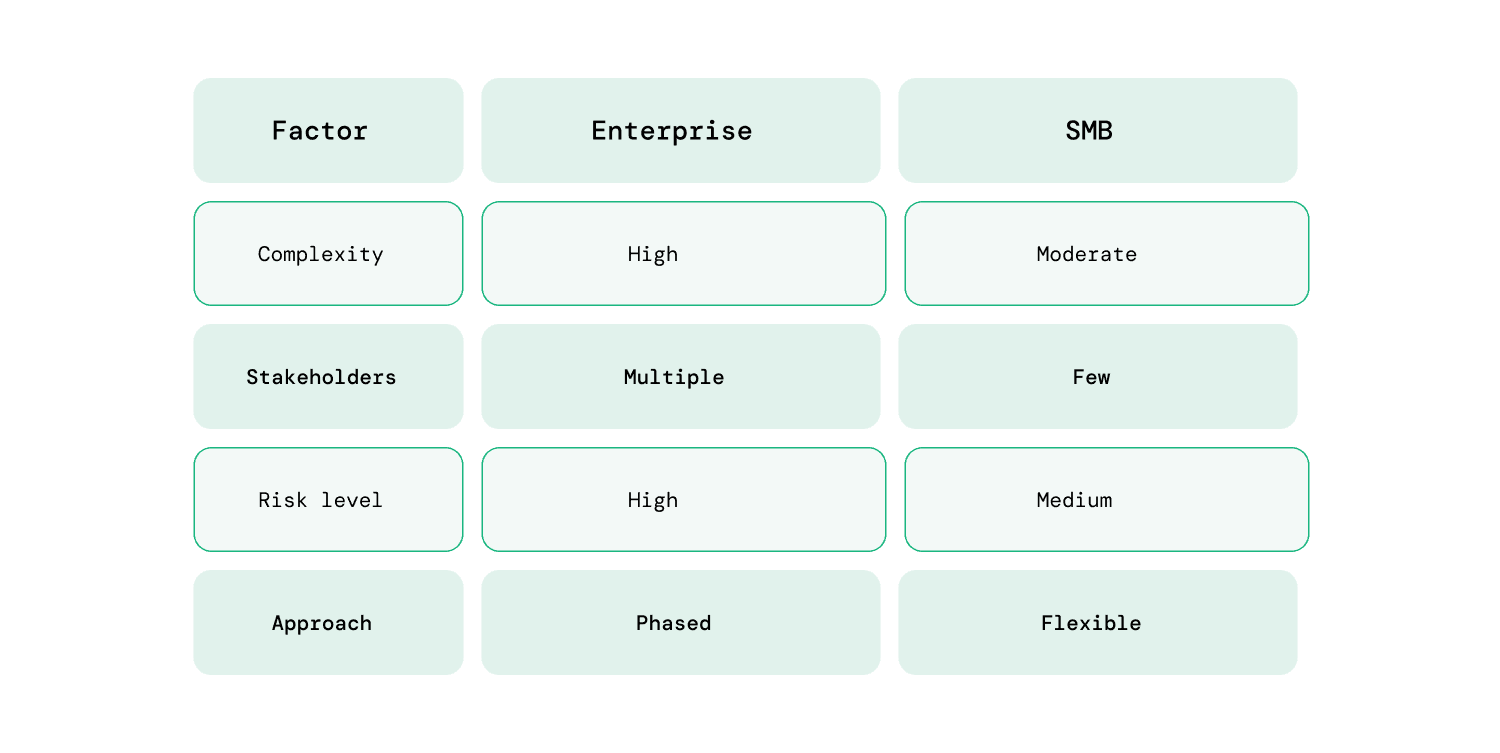
Enterprise application modernization is not just about upgrading individual applications, whereas it involves modernizing an entire ecosystem of interconnected systems. Unlike smaller environments, enterprises must balance transformation with stability, ensuring that critical operations continue without disruption.
What makes enterprise application modernization different
Modernization at the enterprise level introduces unique considerations that go beyond standard approaches.
-
System interdependencies: Applications are tightly connected, making isolated changes difficult
-
Scale of operations: Even small changes can impact thousands of users or processes
-
Stakeholder involvement: Multiple teams and departments are involved in decision-making
-
Compliance requirements: Strict regulatory and security standards must be maintained
How enterprises approach modernization at scale
Instead of a linear step-by-step process, enterprises take a portfolio-based and phased approach.
Portfolio-based decision making
Applications are evaluated as part of a broader portfolio rather than in isolation. In enterprise application modernization, this is critical because changes in one system often impact multiple others.
Instead of asking “How do we modernize this app?”, enterprises ask:
-
Where does this application sit in the overall system landscape?
-
What dependencies will be affected if we change it?
This approach helps organizations:
-
Identify hidden dependencies between systems
-
Avoid breaking downstream processes
-
Allocate budgets based on business impact, not assumptions
As a result, modernization efforts are more strategic and less reactive.
Phased modernization strategy
Enterprises avoid large-scale, all-at-once transformations due to the high risk of disruption. Instead, modernization is executed in controlled phases.
This typically involves:
-
Starting with low-risk or high-visibility applications to demonstrate early value
-
Running pilot projects to validate tools, architecture decisions, and workflows
-
Gradually expanding modernization efforts based on learnings
Each phase builds confidence and reduces uncertainty. More importantly, it allows teams to adjust strategy mid-way instead of committing to a rigid long-term plan.
Hybrid strategy execution
In enterprise application modernization, no single strategy works across all systems. Applications vary in complexity, business value, and technical condition.
That’s why enterprises adopt a hybrid approach:
-
Rehosting is used for stable systems where speed is a priority
-
Refactoring or rearchitecting is applied to core systems that require scalability and flexibility
-
Replacing is preferred for standardized, non-core functions
This mix ensures that effort is aligned with value, avoiding over-engineering low-impact systems while investing deeply where it matters most.
Strong governance and alignment
Modernization at scale requires clear governance to ensure consistency and control across teams and systems.
This includes:
-
Defining standards for architecture, security, and deployment
-
Establishing clear ownership for each application or service
-
Aligning modernization goals with business objectives and KPIs
Without governance, teams may adopt inconsistent approaches, leading to fragmentation instead of modernization.
Focus on continuity and risk management
Enterprises cannot afford disruptions during modernization. Systems often support critical operations, making stability a top priority.
To manage this, organizations:
-
Use incremental releases instead of large deployments
-
Implement rollback mechanisms in case of failures
-
Ensure data consistency across old and new systems during transition
Modernization is designed to run alongside existing operations, ensuring that users experience improvements without disruption.
Enterprise vs SMB modernization
What challenges do businesses face in application modernization?
Despite its benefits, application modernization comes with practical challenges that can slow down progress or increase risk if not addressed early. Most of these challenges are not purely technical, they involve coordination, planning, and execution at scale.
Data migration complexity
Migrating data from legacy systems to modern platforms is one of the most sensitive parts of modernization. Issues like inconsistent data formats, missing records, or incompatible schemas can lead to data loss or corruption.
In practice, teams need to:
-
Map old data structures to new formats carefully
-
Run multiple validation checks during migration
-
Plan for rollback in case of failures
Even small errors here can have significant downstream impact, especially in enterprise systems.
Downtime and business continuity risks
Modernization efforts can disrupt ongoing operations if not managed properly. Systems that are actively used by customers or internal teams cannot afford extended downtime.
To reduce this risk, organizations often:
-
Use phased rollouts instead of full deployments
-
Run parallel systems during transition
-
Schedule releases during low-traffic periods
The goal is to ensure that modernization happens without affecting user experience or business operations.
Skill gaps in modern technologies
Legacy systems are often built on older technologies that current teams are familiar with. Modernization introduces new tools, frameworks, and architectures that teams may not have experience with.
This creates challenges such as:
-
Slower development cycles due to learning curves
-
Increased reliance on external expertise
-
Difficulty in maintaining modernized systems post-deployment
Upskilling teams or bringing in experienced partners becomes essential in such cases.
Budget overruns and unclear cost estimates
Modernization projects can exceed initial budgets due to unforeseen complexities. Hidden dependencies, rework, or extended timelines often increase costs.
Common reasons include:
-
Underestimating the effort required for refactoring or rearchitecting
-
Additional costs for cloud infrastructure and tools
-
Extended testing and validation phases
-
Clear scoping and phased execution help manage these risks more effectively.
Resistance to organizational change
Modernization is not just a technical shift. It changes how teams work. New processes, tools, and workflows can face resistance from stakeholders and teams used to existing systems.
This may lead to:
-
Delays in adoption
-
Misalignment between teams
-
Reduced efficiency during transition
Strong communication and involving stakeholders early can help reduce resistance.
Final Thoughts
Application modernization in 2026 is no longer a one-time upgrade. It’s an ongoing capability that directly impacts performance, scalability, and long-term business growth. As systems become more complex and user expectations continue to rise, organizations that delay modernization risk higher costs, slower innovation, and reduced competitiveness.
For enterprises, the stakes are even higher. Enterprise application modernization requires a structured, portfolio-driven approach that balances transformation with stability. Success depends on making the right strategic decisions, prioritizing high-impact systems, and executing in phases without disrupting critical operations.
If you’re evaluating how to approach your application modernization journey, having the right guidance can make a significant difference. Hiring experienced developers in legacy app modernization and modern architecture can help you avoid common pitfalls and move faster with confidence. With nearly two decades of experience, RailsFactory has worked with organizations across industries to modernize applications in a practical, outcome-driven way and can support you in navigating your next steps.
FAQs:
1. Why is application modernization important?
Application modernization is important because it helps businesses improve performance, reduce technical debt, enhance security, and stay competitive in a fast-changing digital landscape.
2. What does “legacy applications” mean?
Legacy applications are older software systems built on outdated technologies that are still in use but may be difficult to maintain, scale, or integrate with modern tools.
3. What are the benefits of legacy app modernization?
Legacy app modernization improves system performance, reduces maintenance costs, enhances security, and enables faster development and innovation.
4. What is enterprise application modernization?
Enterprise application modernization is the process of updating large-scale, complex systems across an organization while ensuring business continuity, scalability, and compliance.
5. What are the main application modernization strategies?
The main strategies include rehosting, replatforming, refactoring, rearchitecting, rebuilding, and replacing applications based on business needs and technical complexity.
6. How long does application modernization take?
Application modernization timelines vary from a few months to over a year depending on application complexity, chosen strategy, and organizational scale.
7. How do you choose the right application modernization approach?
The right approach depends on business goals, system complexity, budget, and scalability needs, often requiring a mix of strategies across different applications.