Next-Gen Browser Automation: Exploring WebDriver BiDi with Selenium
Explore how WebDriver BiDi transforms Selenium with real-time, bidirectional communication and deeper browser insights for smarter, faster testing.


Quinee Bhattacharjee
Lead Software Development Engineer in Testing


Introduction to WebDriver BiDi
Before diving into WebDriver BiDi, let’s first understand the evolution of browser automation protocols and why it’s being hailed as the future of browser automation. We’ll explore how the traditional WebDriver protocol works, how Chrome DevTools Protocol (CDP) fits in, and how WebDriver BiDi with Selenium bridges the gap, bringing the best of both worlds for faster, event-driven testing experiences.
1. WebDriver Classic Protocol: The Foundation of Browser Automation
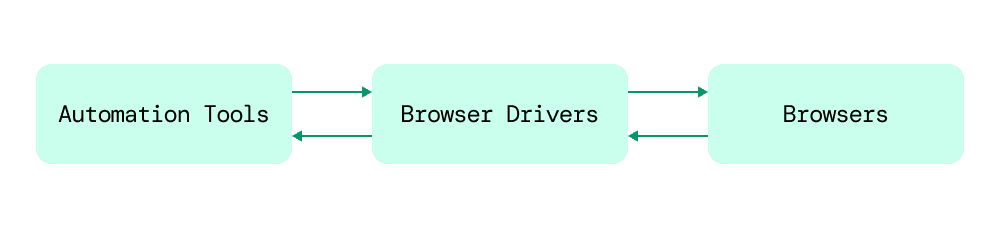
WebDriver Classic, a W3C standard, has been the backbone of Selenium-based automation for years. It communicates with browsers by sending HTTP commands to browser-specific drivers (e.g., ChromeDriver, GeckoDriver), which in turn control the browser via internal protocols.
Now, let’s look at the strengths and weaknesses of WebDriver Classic before we move on to explore how newer protocols like Chrome DevTools Protocol (CDP) and WebDriver BiDi with Selenium are shaping the future of browser automation.
Strengths
- Standardized across all major browsers
- Great for cross-browser automation
- Ideal for simulating user behavior
- Widely supported in tools like Selenium, Appium, WebDriverIO, and Nightwatch
Limitations
- Not event-driven: relies on HTTP long polling to check browser state (e.g., whether a page is loaded)
- Browser cannot push real-time events to the test code
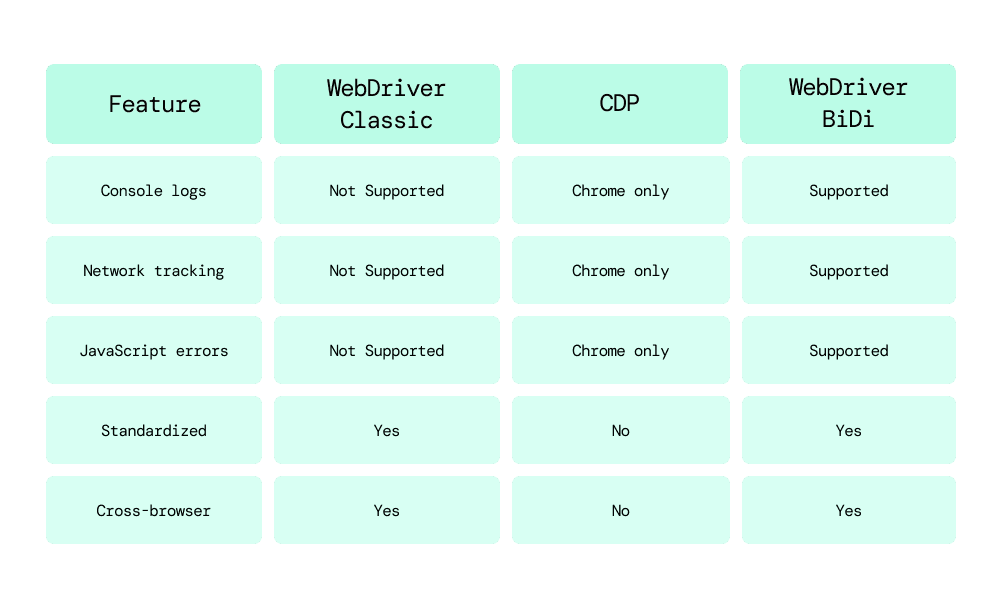
- Doesn’t support low-level debugging operations like: Monitoring console logs Network interception Emulating devices or geolocations
- High-level control only; lacks granularity
2. Chrome DevTools Protocol (CDP): Debugger-Level Control for Chromium Browsers
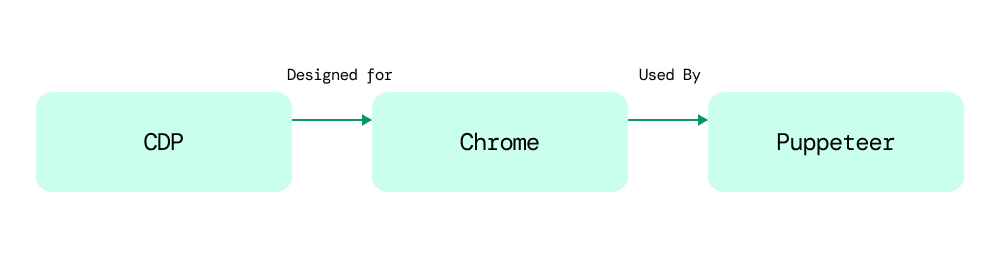
CDP is a protocol developed by Chrome that enables low-level interactions via WebSocket connections, no browser drivers needed.
Strengths
- Event-driven and bidirectional
- Supports advanced features: Console and JS error logs Network traffic monitoring
- Device emulation and more
Limitations
- Works only with Chromium-based browsers
- Non-standard and tied to specific Chrome versions
- API stability is not guaranteed; often breaks across Chrome updates
- Built primarily for debugging, not testing
3. WebDriver BiDi: Best of Both Worlds
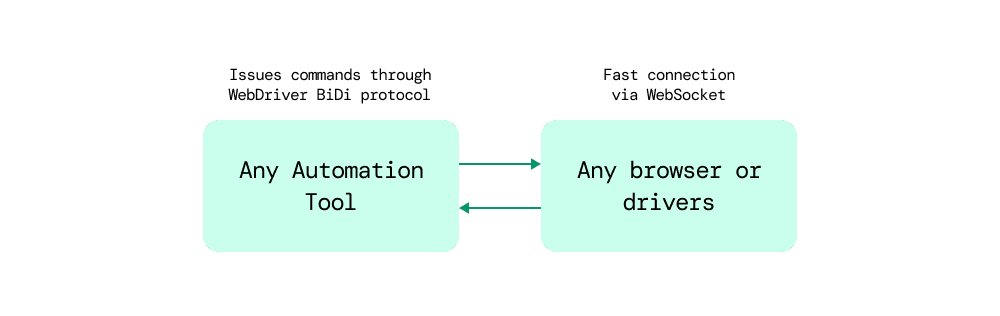
WebDriver BiDi (Bidirectional) is the next-gen browser automation protocol under development by the W3C. It combines the standardization and cross-browser support of WebDriver Classic with the real-time, low-level capabilities of CDP, making WebDriver BiDi Selenium a powerful upgrade for testers seeking modern automation features.
Key Benefits
-
WebSocket-based communication: WebDriver BiDi uses WebSockets as its underlying transport protocol, enabling fast, real-time, two-way communication between the client and the browser. This makes it highly responsive and ideal for event-driven testing with Selenium BiDi, such as capturing live events as they happen.
-
Cross-browser and W3C-standard: Built and maintained under the W3C’s guidance, WebDriver BiDi is designed to be a unified standard across all major browsers. This ensures better interoperability, long-term support, and reduced vendor lock-in compared to vendor-specific solutions like Chrome DevTools Protocol (CDP).
-
Supports low-level control by allowing to capture: Unlike WebDriver Classic, WebDriver BiDi offers deeper access to browser internals, allowing testers to listen to and capture various runtime events without intrusive polling. Some of the key capabilities include:
Console logs: Capture logs from the browser console in real time, useful for debugging and verification.
JavaScript errors: Detect and report uncaught exceptions or runtime script errors.
Network events: Monitor network activity such as requests, responses, and failures to validate API calls and performance.
Note: WebDriver BiDi is still evolving and may not be fully supported across all browsers yet.
Feature Comparison
Capturing Console Logs with WebDriver BiDi in Selenium
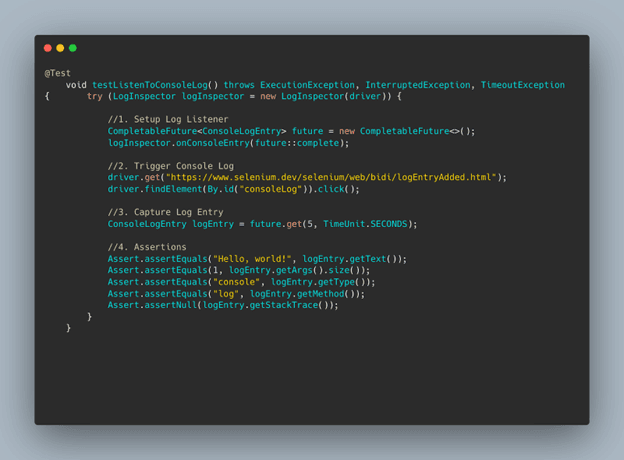
Here’s a practical test scenario using Selenium's BiDi support to capture console logs.
Key Components Used
LogInspector: Listens to browser console logs (from selenium.bidi.log)
CompletableFuture: Used for handling async log capturing
ConsoleLogEntry: Represents the actual log data (from selenium.bidi.log)
Test Flow Overview
1. Setup Log Listener
-
Initialize LogInspector inside a try-with-resources block
-
Register a CompletableFuture to capture logs asynchronously
2. Trigger Console Log
-
Navigate to a test web page
-
Click a button that writes "Hello, world!" to the console
3. Capture Log Entry:
-
Waits up to 5 seconds for the console log entry to appear
-
If not received within 5 seconds, throws TimeoutException
4. Assertions:
- Verifies the log message text is "Hello, world!"
- Checks there's 1 argument in the log entry
- Confirms the log type is "console" and method is "log"
- Ensures there's no stack trace associated with this log entry
The Bigger Picture: Why BiDi-powered Selenium Matters
WebDriver BiDi represents a significant leap forward in the evolution of browser automation. By merging the strengths of traditional WebDriver (standardization and cross-browser compatibility) with the real-time, low-level access capabilities of the Chrome DevTools Protocol (CDP), it powers BiDi-powered Selenium to deliver a modern, unified solution for automation needs.
Key advantages it brings to the table include:
Real-time, event-driven automation
Enables instantaneous interaction and monitoring through bidirectional communication, making automation more efficient and responsive
Standardized, cross-browser support
As a W3C-driven initiative, WebDriver BiDi ensures consistent behavior and support across all major browsers, reducing fragmentation and maintenance overhead.
Low-level access to browser internals
Provides fine-grained control over browser events such as console logs, JavaScript errors, and network activity
When to Use WebDriver BiDi
WebDriver BiDi is particularly valuable in testing scenarios where enhanced observability and real-time interaction with the browser are essential. Consider using WebDriver BiDi in the following situations
- Need for console or network inspection in tests
- Real-time monitoring of browser events
- Cross-browser, reliable automation with debugging capabilities
We believe, by now, you have a better picture of what makes WebDriver BiDi a game-changer for Selenium automation.
And if you’re looking to fine-tune your testing setup or streamline automation, our team at RailsFactory is always happy to help.