From Zero to Metrics: Instrumenting Python Apps with Prometheus
Start monitoring a Python Flask app with Prometheus and Grafana. Learn metric types, PromQL queries, Docker setup, and common instrumentation mistakes.


Urvish Shah
Lead Technical Consultant


This is the story of that change, and the small setup I would still hand to someone starting from zero: a Flask service, prometheus_client, Prometheus, and Grafana. The pictures below are drawn to explain the idea. They are not a screenshot of a production dashboard.
The question I kept failing
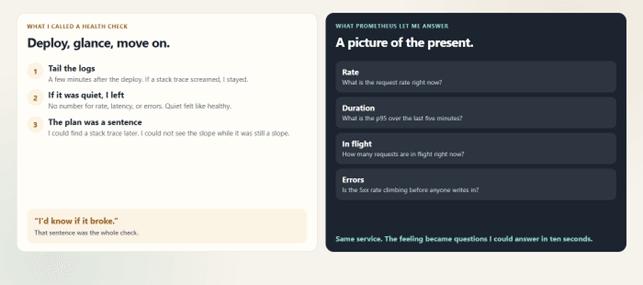
For a long time my health check was a feeling. I would deploy, tail the logs for a few minutes, and if nothing screamed, I would move on. “I'd know if it broke” felt like a plan. It was not.
The failure was not a dramatic outage. It was quieter than that. Someone would ask a simple question — what is the p95 over the last five minutes, how many requests are in flight right now, is the error rate climbing before anyone writes in — and I could not answer it in ten seconds. I could find a stack trace after the fact. I could not see the slope while it was still a slope.
That is the gap Prometheus closed for me. Not a smarter debugging trick. A picture of the present.
Logs were never the enemy
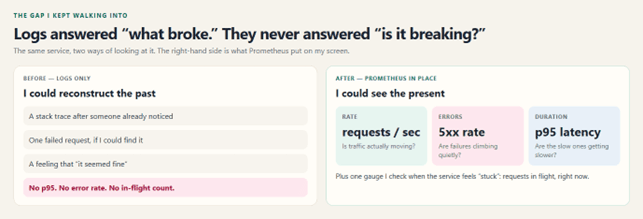
I still read logs. A stack trace is how I learn which request failed and why. Logs answer “what happened to this one?” Metrics answer “what is the service doing, and how is that changing?”
These are the questions I could not pull out of a log file without a project:
- What is the request rate right now?
- What is the p95 latency over the last five minutes?
- How many requests are currently in flight?
- Is the HTTP 5xx rate rising before users start reporting it?
You can grind some of that out of logs. I tried. It is slower, easier to get wrong, and useless at 2 a.m. when you want a number, not a search query. Once those measurements were time series, the same questions became PromQL.
What “in place” actually means
I used to say “we have Prometheus” when what we had was a library name in a requirements file. That is not the same thing as having it in place.
In place means the process updates a small set of metrics, exposes them, and Prometheus is successfully scraping that target on a schedule. The samples are stored. I can query them. Grafana is pointed at that Prometheus, not at a hope. If a rule fires, Alertmanager is the thing that decides who hears about it.
The importance, for me, showed up in ordinary weeks rather than in heroics. I stopped discovering a slow burn from a complaint. I could see rate, errors, and duration before I opened a log. When the picture was calm, I trusted that and went back to the work. When one of those three moved, I already knew which logs were worth reading.
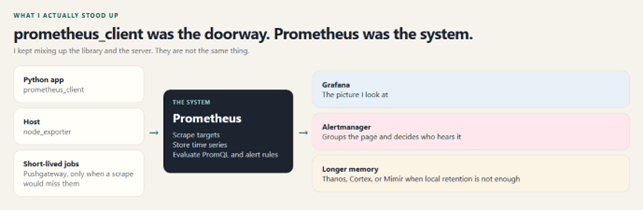
One correction I had to make out loud: Prometheus is not a Python tracking library. It is the monitoring and alerting system. prometheus_client is the library that lets a Python process expose metrics. Mixing those two up is how I spent an afternoon wondering why “installing Prometheus” had not drawn a graph.
The day the pull model clicked
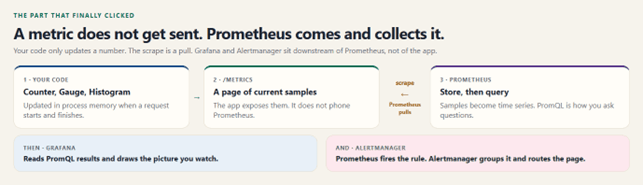
I assumed the application had to send metrics to Prometheus. It does not. For a normal service, Prometheus comes to the application.
The code updates a Counter, Gauge, or Histogram in memory. Those current values are rendered at /metrics. On each scrape interval, Prometheus sends an HTTP GET, stores the samples as time series, and lets me ask questions with PromQL. Grafana visualizes those queries. Alerting rules are evaluated by Prometheus; Alertmanager groups, silences, and routes whatever fires.
A time series is a metric name, a set of labels, and values over time. That is why “request rate for this route, this status, the last five minutes” is a normal question instead of a research project.
A five-second scrape is pleasant in a demo because the graph moves while you watch. In production I pick the interval from how fresh I need the data, how many targets I have, and what I am willing to store. Faster is not free.
The four numbers, and which ones I actually used
I did not need a taxonomy before I needed a decision. Something happened on a request. Which kind of number should remember it?
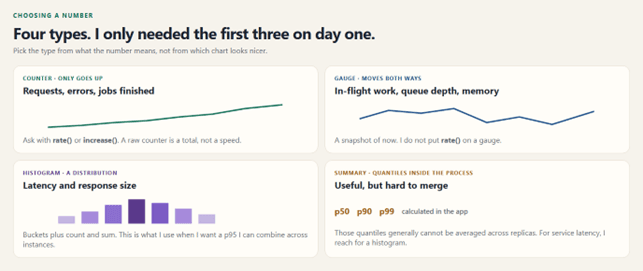
A counter only increases, aside from a reset when the process restarts. Total requests, total errors, total bytes. The useful question is not the raw total. It is rate() or increase() over a window.
A gauge goes up and down. In-flight requests, queue depth, memory, open connections. It is a snapshot. I do not wrap it in rate() and pretend that means something.
A histogram drops each observation into buckets and also keeps a count and a sum. That is what I want for latency, because I can aggregate buckets across instances and then ask for a quantile. A summary calculates quantiles inside the process. Those precomputed quantiles generally cannot be combined across replicas in a meaningful way, so for service latency I stay with a histogram.
Native histograms are the newer shape of that same idea. The classic four types were enough to get the service observable. I would rather start there than wait for a perfect model.
The library was only the doorway
Once /metrics existed, I was standing in a larger system, whether I had planned to or not.
-
Prometheus server scrapes targets, stores time series, runs PromQL, and evaluates alert rules.
-
Exporters such as node_exporter and cAdvisor speak Prometheus for things that are not my Python process.
-
Pushgateway is for short-lived jobs that may be gone before a scrape. It is not a second architecture for normal services.
-
Alertmanager receives alerts and handles grouping, deduplication, silencing, inhibition, and routing.
-
Grafana is where I look. It queries Prometheus. It is not the database.
-
Thanos, Cortex, or Mimir enter the picture when local retention or a single cluster is no longer enough.
How I instrumented the Python service
There are three ways I have actually used, and I pick the smallest one that answers the question.
-
Manual metrics when the number is specific to the business, or when I am learning and want every line visible.
-
Framework middleware when I want the standard HTTP rate, error, and latency metrics without hand-writing them.
-
Multiprocess mode when the app runs under several Gunicorn workers. That is a setup decision, not a flag I remember after the incident.
The walkthrough below is the manual path, on purpose. Flask keeps each metric visible. I defined the metrics once, at import time. Defining them inside the request handler is how you meet a duplicate-registration error on the second request.
I also labeled by the route template, not the raw URL. /orders/18472 and /orders/18473 must not become two time series. They are both /orders/
The setup I would still hand someone
Create a virtual environment and install the two libraries.
python -m venv .venv

source .venv/bin/activate        # Windows: .venv\Scripts\activate

pip install flask prometheus-client
This is the whole application. The business endpoint is deliberately boring. The interesting part is the before/after hooks and /metrics.
  import time

from flask import Flask, Response, request

from prometheus_client import (

    CONTENT_TYPE_LATEST,

    Counter,

    Gauge,

    Histogram,

    generate_latest,
)

app = Flask(__name__)

  REQUEST_COUNT = Counter(

    "app_requests_total",

    "Total HTTP requests",

    ["method", "route", "status"],
)

REQUEST_LATENCY = Histogram(

    "app_request_latency_seconds",

    "HTTP request latency in seconds",

    ["route"],
)

IN_PROGRESS = Gauge(

    "app_requests_in_progress",

    "HTTP requests currently being processed",
)

@app.before_request

 def before_request():

    if request.path == "/metrics":

        return

    request._start_time = time.perf_counter()

    IN_PROGRESS.inc()

@app.after_request

def after_request(response):

if request.path == "/metrics":

    return response

    elapsed = time.perf_counter() - request._start_time

    route = request.url_rule.rule if request.url_rule else "unknown"

  REQUEST_LATENCY.labels(route=route).observe(elapsed)

    REQUEST_COUNT.labels(

        method=request.method,

        route=route,

        status=str(response.status_code),

    ).inc()

    IN_PROGRESS.dec()

    return response

 @app.get("/")

def home():

    return {"status": "ok"}

@app.get("/metrics")

def metrics():

   return Response(generate_latest(), mimetype=CONTENT_TYPE_LATEST)

   if __name__ == "__main__":

   app.run(host="0.0.0.0", port=5000)
Three things are being remembered. How many requests finished, and with which status. How long they took. How many are in flight at this moment. The /metrics scrape itself is ignored so the monitoring of the app does not become traffic of the app.
Prometheus does not need a client library on the network side. It only needs the URL. Inside Docker Compose that URL is the service name, not localhost. Localhost inside the Prometheus container is Prometheus itself.
global:

  scrape_interval: 5s

  scrape_configs:

  - job_name: "flask-demo-app"

    static_configs:

 - targets: ["app:5000"]
The files I keep next to each other:
prometheus-demo/

├── app.py

├── requirements.txt

├── Dockerfile

├── prometheus.yml

└── compose.yaml
FROM python:3.12-slim

WORKDIR /app

COPY requirements.txt .

RUN pip install --no-cache-dir -r requirements.txt

COPY app.py .

CMD ["python", "app.py"]
Flask

prometheus-client
services:

  app:

    build: .

    ports:

      - "5000:5000"

    prometheus:

    image: prom/prometheus

    ports:

      - "9090:9090"

    volumes:

      - ./prometheus.yml:/etc/prometheus/prometheus.yml:ro

    depends_on:

      - app

    grafana:

    image: grafana/grafana

    ports:

      - "3000:3000"

    depends_on:

      - prometheus
docker compose up --build
I check the target before I open Grafana
This habit has saved me more time than any dashboard theme. Open Prometheus and look at Status, then Targets. The Flask job should be UP. If it is DOWN, the graph in Grafana will be empty and no amount of panel editing will fill it. Fix the address, the port, or the network, then query app_requests_total. If samples are there, the path works.
Only then do I add Prometheus as a data source in Grafana. The URL depends on where Grafana is running. When both services run in separate containers on the same Docker network, Grafana uses Prometheus's container name and port. When accessing Prometheus from my laptop through its published port, I use localhost instead. I've pointed Grafana to the wrong endpoint more than once.
The queries I open first
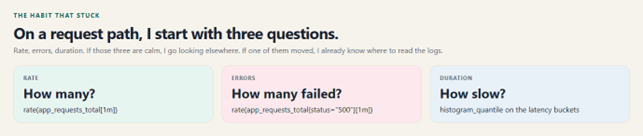
Requests per second:
rate(app_requests_total[1m])
HTTP 500s per second:
rate(app_requests_total{status="500"}[1m])
p95 latency. The sum by (le) matters. I aggregate the buckets across series first, then ask for the quantile. Doing it the other way around lies.
histogram_quantile(

  0.95,

  sum by (le) (

    rate(app_request_latency_seconds_bucket[5m])

  )

)
In-flight requests, as a gauge, with no rate():
app_requests_in_progress
That is the RED method for a request-driven service: rate, errors, duration. I do not start with a hundred metrics. A small set I understand is a set I will actually alert on.
What I would not repeat
-
Unbounded labels. User ids, emails, raw URLs, and request ids will quietly explode the number of time series.
-
A route label that includes the id. Keep the template: /orders/{id}.
-
Invented units. Prometheus conventions are seconds and bytes. I follow them so the next person can use the metric without a translator.
-
Classic histogram buckets chosen at random. The p95 is only as honest as the buckets around it.
-
Gunicorn with several workers and no multiprocess setup. Each worker has its own memory. Prometheus will otherwise scrape one of them and miss the rest.
-
Debugging Grafana while the target is DOWN.
Having Prometheus in place also means someone owns the alerts. A graph nobody watches is a diary. A rule that pages on a real change in rate, errors, or duration is the point of collecting the number.
Why I would not go back
The thing I wanted, looking back, was not more logs. It was the ability to say, out loud and quickly, whether the service was healthy. Prometheus gave me that without asking the application to become a monitoring product. The process keeps doing its work and exposes a page. Prometheus visits that page. I ask the stored history a few careful questions.
Start there. Instrument the request path. Measure rate, errors, and duration. Keep the labels boring. Confirm the target is UP. Then let the model grow with the service, not ahead of it.
References I checked this against
The mechanics in this note follow the official Prometheus and client_python documentation.
Prometheus overview — https://prometheus.io/docs/introduction/overview/
Instrumentation practices — https://prometheus.io/docs/practices/instrumentation/
Metric naming — https://prometheus.io/docs/practices/naming/
Histograms and summaries — https://prometheus.io/docs/practices/histograms/