Understanding and preventing automation debt
Discover how automation debt develops through hardcoding, workarounds, and poor monitoring, and learn how to keep production workflows maintainable.


Abinashini K
Junior Software Developer


Automation is supposed to make our work easier.We automate a manual process, save time, reduce repetitive work, and move on to the next problem.
But what happens when that automation stays in production for months or years?
The workflow grows. Requirements change. People who built it move to other projects. New integrations are added. Temporary fixes become permanent. Nobody remembers why certain conditions exist.
Eventually, the automation still works—but nobody wants to touch it.
What Is Automation Debt?
Automation debt is the maintenance and complexity that accumulate when automated processes are built quickly without enough consideration for future changes, monitoring, documentation, and failure scenarios.
It is similar to technical debt.
A quick solution may work perfectly today, but the cost of maintaining and changing it increases over time.

It still works.
But making one small change becomes risky.
How Does Automation Debt Happen?
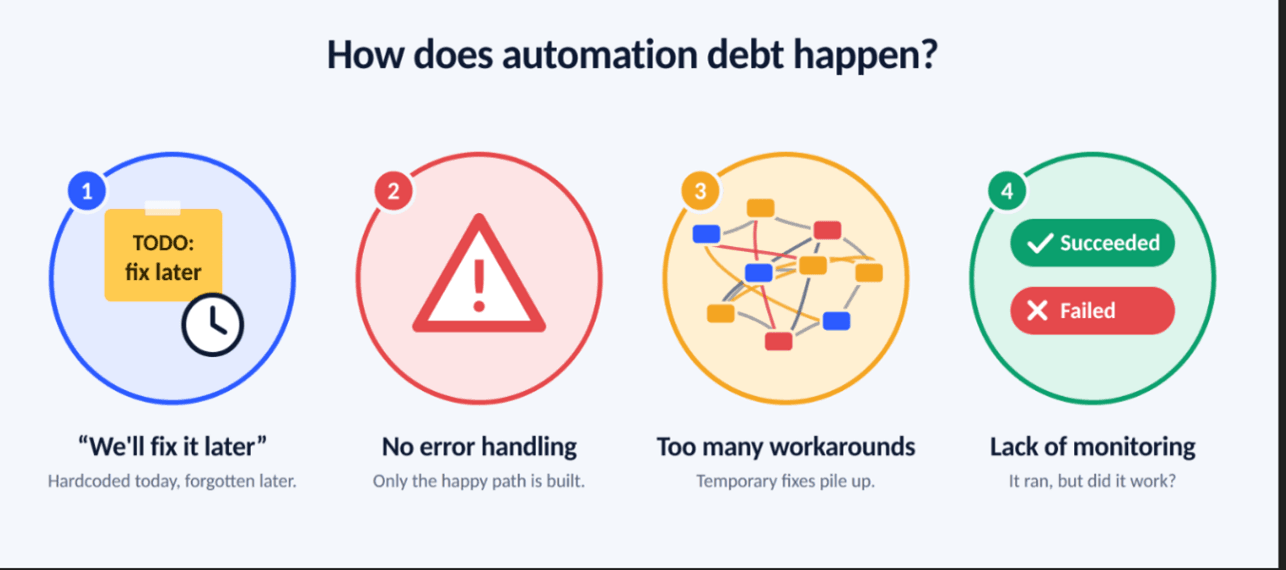
1. We'll fix it later
This is probably the biggest contributor.
A developer knows that hardcoding a value isn't ideal, but the automation needs to go live quickly.
So the value is hardcoded.
Later becomes next week.
Next week becomes next month.
Eventually, nobody remembers that it is hardcoded.
2. No Error Handling
An automation is often designed around the happy path:
Input → Process → Success
But production doesn't work like that.
-
APIs fail.
-
Servers become unavailable.
-
Files are missing.
-
Connections expire.
-
Data is incorrect.
A production-ready automation needs to answer:
What happens when this step fails?
3. Too Many Workarounds
A temporary workaround can slowly become part of the architecture.
For example:
Original process
Get file → Process file → Upload result
After several production issues:
Get file → Retry → Check file → Wait → Retry again → Process → Validate → Upload → Check upload → Send notification
The automation may now be reliable—but also difficult to understand and maintain.
4. Lack of Monitoring
An automation can technically be running while the business process is failing.
A flow might show:
Run Status: Succeeded
But the actual result could be:
Business Result: Failed
This is why monitoring should not only ask:
Did the automation run?
It should ask:
Did the expected business outcome happen?
What Does Automation Debt Look Like?
Some warning signs are easy to recognize:
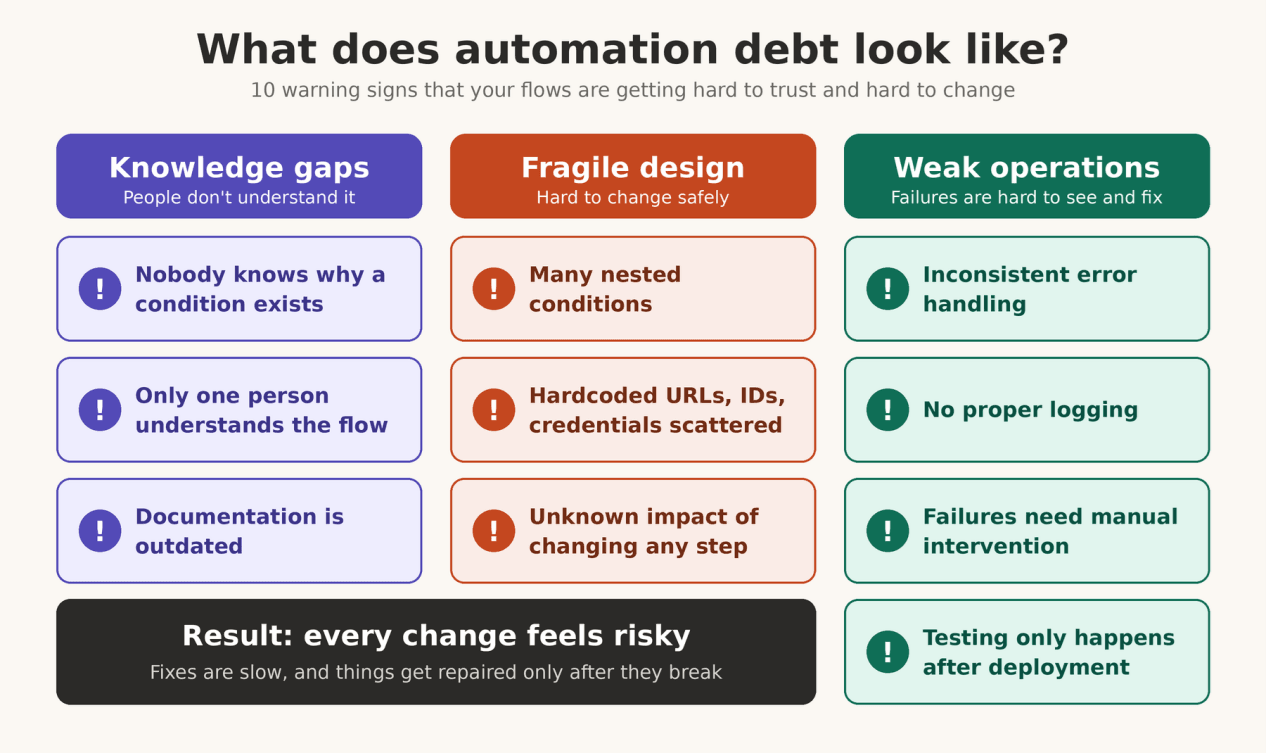
If several of these sound familiar, you probably already have some automation debt.
How Can We Prevent It?
Automation doesn't need to be perfect from day one.
But it should be designed with the future in mind.
1. Use configuration instead of hardcoding
Keep environment-specific values in configuration wherever possible.
Instead of:
Production URL = https://... Use configuration so the automation can move between environments without modifying the logic.
2.Preparing Automation for Failure
Don't only design:
Success → Success → Success
Design:
Success → Continue
and
Failure → Retry → Recover / Notify
3.Add meaningful logging
When something fails, someone should be able to understand.
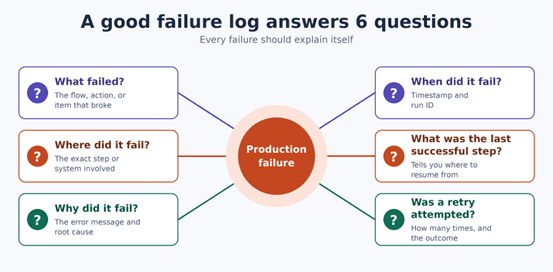
Good logging can turn a 2-hour investigation into a 10-minute investigation.
4.Keep automations simple
More automation doesn't necessarily mean better automation.
If a workflow becomes extremely complex, consider splitting it into smaller, reusable components.
5.Document the “why”
Documentation shouldn't only explain what a flow does.
It should also explain why important decisions exist.
For example:
This retry exists because the external API occasionally returns a temporary 500 response.
That sentence can save another developer from removing an important piece of logic six months later.
Can Automation Debt Be Removed?
Yes—but it requires treating automation like software.
Regularly review production automations.
Ask:
-
Is this flow still needed?
-
Are all steps still required?
-
Are there obsolete workarounds?
-
Are failures properly handled?
-
Are dependencies still valid?
-
Can the workflow be simplified?
-
Is monitoring sufficient?
-
Can another developer understand it?
Automation should have a lifecycle:
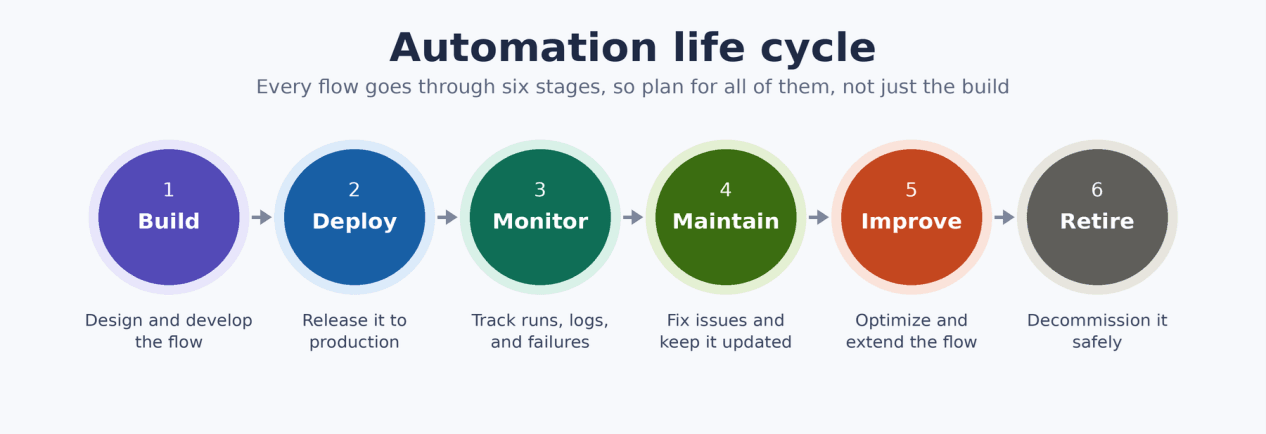
Not:
Build → Deploy → Forget
Final Takeaways
Automation is not finished when it successfully runs.
It is finished when it can run reliably, handle failure, be understood by others, and evolve with the business.
The goal shouldn't be to create the automation with the fewest steps.
The goal should be to create automation that remains maintainable long after the person who built it has moved on.
Because the biggest automation problem isn't always a failed workflow.
Sometimes, it's a workflow that works—but nobody understands anymore.