Adding OpenAI API to a Ruby on Rails App: Step-by-Step Guide
Learn how to add AI in Ruby on Rails using OpenAI. This step-by-step guide covers setup, API calls, and building real-world Rails AI features.


Pichandal
Technical Content Writer


Adding AI in Ruby on Rails is no longer complex. With the right setup, Rails teams can integrate OpenAI quickly and reliably. Drawing from practical implementation approaches followed by our team at RailsFactory, this guide walks you through the exact steps to build AI-powered features in Ruby on Rails applications.
Why is AI in Ruby on Rails becoming essential in 2026?
AI is quickly moving from optional to expected in modern applications. Features like content generation, smart search, and chat interfaces are now common across SaaS products.
-
Up to 78% of organizations use AI in at least one function (2025–2026)
-
Developers report productivity gains of 25–39% when using AI tools.
In fact, AI integration in Rails apps is shifting from experimentation to a standard feature of expectation across modern SaaS platforms.
For Rails teams, this means Ruby AI is less about novelty and more about staying competitive.
What do you need before integrating OpenAI in Rails?
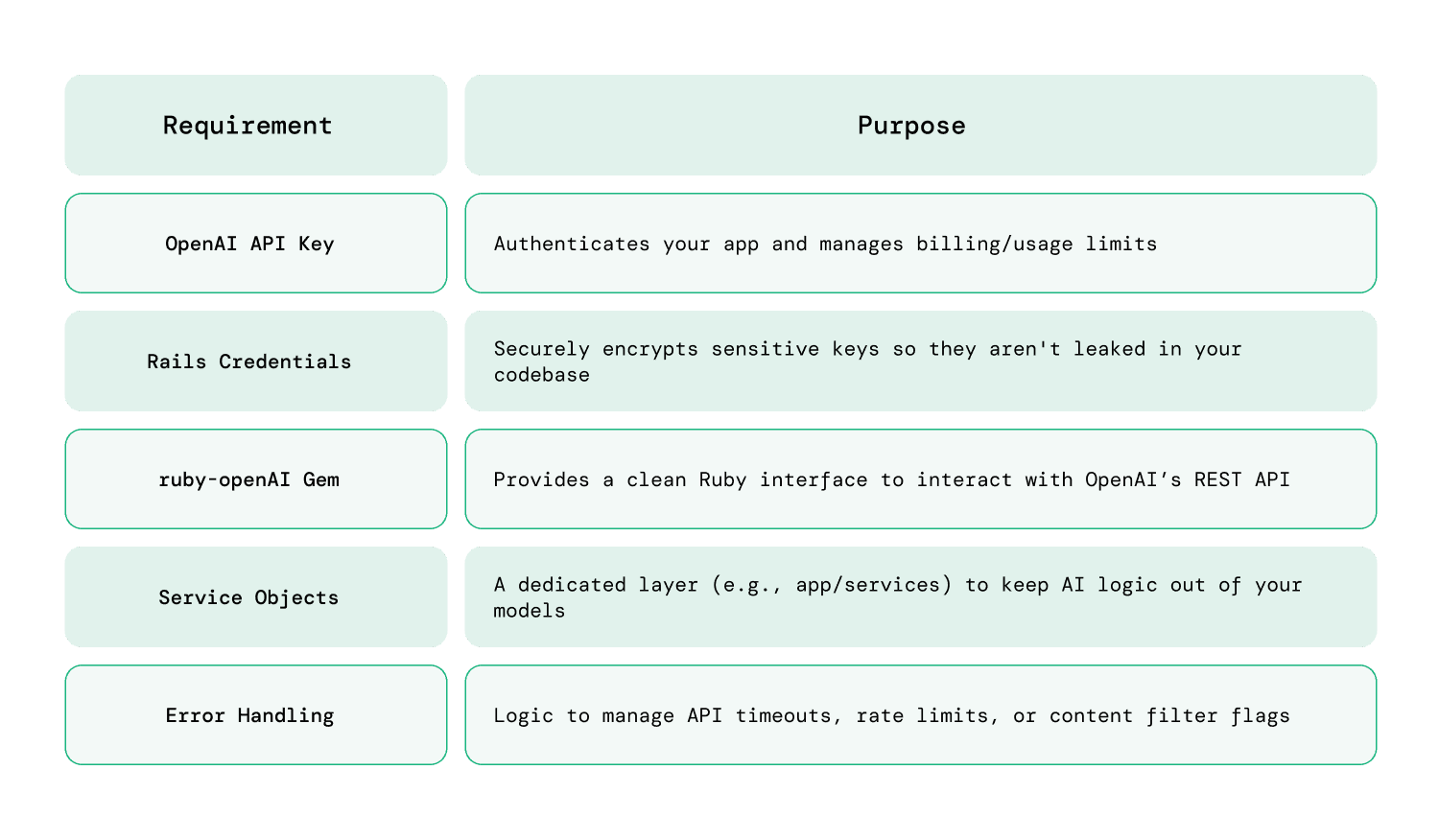
Before you start, make sure the basics are in place:
-
Modern Rails Environment: Rails 7.0+ is recommended (for better asynchronous support).
-
Ruby 3.2+: Essential for the performance gains and compatibility with modern AI gems.
-
OpenAI API Key: Obtained via the OpenAI Developer Dashboard.
-
Background Processing: A tool like Sidekiq or Solid Queue (standard in Rails 8) is highly recommended, as AI responses can often take several seconds to generate.
Setup checklist
How do you securely store your OpenAI API key in Rails?
Security is critical when working with external APIs.
Option 1: Using Rails credentials
EDITOR="code --wait" bin/rails credentials:edit
Add:
openai:

  api_key: your_api_key_here
Access it in code:
Rails.application.credentials.dig(:openai, :api_key)
Option 2: Using .env (dotenv gem)
OPENAI_API_KEY=your_api_key_here
Access:
ENV['OPENAI_API_KEY']
Never expose API keys in client-side code or repositories; always use environment-based storage in Rails.
Installing Required Gems for Ruby AI integration
You have two common approaches when integrating OpenAI into a Rails application, and the right choice depends on how much control and flexibility your use case requires.
Option 1: Official/OpenAI-compatible gem
-
Faster setup with minimal configuration, making it ideal for getting started quickly
-
Cleaner and more readable syntax that fits naturally into Rails conventions
-
Easier long-term maintenance with fewer moving parts and less boilerplate code
Option 2: HTTP clients (Faraday, HTTParty)
-
Greater control over request structure, headers, and API behavior
-
Ability to customize request handling for retries, logging, and middleware
-
Better suited for advanced integrations that require fine-tuned API interactions
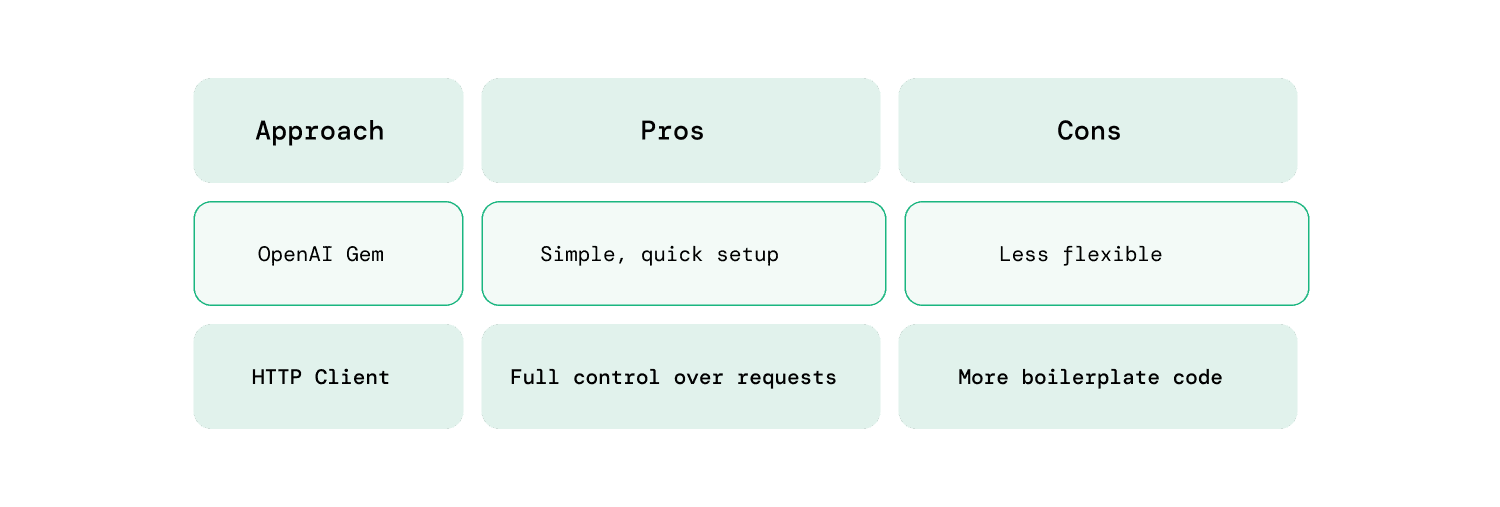
Most Rails applications benefit from using a dedicated gem unless they require highly customized API request handling.
How do you make your first OpenAI API call in Rails?
The best practice is to isolate AI logic in a service class.
Step 1: Create a service file
app/services/openai_service.rb
Step 2: Add basic implementation
require 'net/http'
require 'uri'
require 'json'

class OpenaiService
  API_URL = "https://api.openai.com/v1/chat/completions"

  def self.generate_response(prompt)
    uri = URI(API_URL)

    request = Net::HTTP::Post.new(uri)
    request["Authorization"] = "Bearer #{ENV['OPENAI_API_KEY']}"
    request["Content-Type"] = "application/json"

    request.body = {
      model: "gpt-4o-mini",
      messages: [{ role: "user", content: prompt }]
    }.to_json

    response = Net::HTTP.start(uri.hostname, uri.port, use_ssl: true) do |http|
      http.request(request)
    end

    parsed = JSON.parse(response.body)
    parsed.dig("choices", 0, "message", "content")
  end
end
A simple Rails service object can handle OpenAI communication in under 30 lines of code.
Building a simple Rails AI feature
Once your OpenAI setup is ready, the next step is to connect it to an actual user-facing feature. In most Rails applications, this means taking user input, sending it to the AI service, and rendering the response in a clean, usable format. The goal here is not complexity, but creating a working flow you can build on.
Let’s create a basic AI-powered content generator to demonstrate how Rails AI works in practice.
Step 1: Controller
class AiController < ApplicationController
  def generate
    prompt = params[:prompt]
    @result = OpenaiService.generate_response(prompt)
  end
end
Step 2: View (form)
<%= form_with url: generate_path, method: :post do %>
  <%= text_area_tag :prompt %>
  <%= submit_tag "Generate" %>
<% end %>

<% if @result.present? %>
  <p><%= @result %></p>
<% end %>
Step 3: Route
post '/generate', to: 'ai#generate'
You can ship a working Rails AI feature with a controller, service, and simple form in under an hour.
To complete the flow, the controller receives user input, passes it to the service layer, and returns the AI-generated output to the view. From here, you can refine the UI, improve prompts, or extend the feature into more advanced use cases like chat interfaces or automation workflows.
How should you structure AI logic in a Rails app?
As your app grows, structure becomes important.
Recommended approach
-
Keep API logic in app/services
-
Avoid calling APIs directly in controllers
-
Use background jobs for heavy tasks
Suggested structure
app/
  services/
    openai_service.rb
  jobs/
    ai_processing_job.rb
Separating AI logic into services improves testability, scalability, and long-term maintainability of Rails applications.
How do you handle errors, limits, and costs?
AI APIs are powerful, but they come with real-world constraints that can impact performance, reliability, and budget if not handled properly. Building safeguards early ensures your Rails AI features remain stable as usage grows.
Common challenges
-
Rate limits: APIs restrict how many requests you can send within a given timeframe, which can affect high-traffic applications
-
API downtime: External services may occasionally fail or respond slowly, impacting user experience
-
Unexpected costs: Frequent or large requests can quickly increase usage costs if not monitored carefully
Best practices
- Add proper error handling to avoid breaking the user experience:
rescue StandardError => e
  Rails.logger.error(e.message)
  "Something went wrong"
end
-
Track token usage to understand how much each request costs and identify optimization opportunities
-
Set usage limits per user or feature to prevent excessive API calls and control overall spending
-
Log API responses and failures for debugging, monitoring patterns, and improving reliability over time
-
Introduce timeouts and retries to handle slow or failed API responses more gracefully
In simple words, without monitoring usage and errors, Rails AI integrations can quickly become unreliable and expensive.
What are real-world use cases of Rails AI?
This is where Rails AI moves from concept to real value. Instead of building complex AI systems, most teams focus on practical features that improve user experience or reduce manual effort. These are the use cases developers are actively searching for and implementing today.
-
AI-powered email and blog content generation: Automatically generate drafts for emails, blogs, product descriptions, or notifications, helping teams reduce writing time and maintain consistency across communication.
-
Customer support chatbots and auto-responses: Build intelligent chat interfaces that handle FAQs, resolve basic issues, and assist users in real time, reducing support workload and improving response speed.
-
Internal tools for teams (summaries, reports, insights): Convert long documents, meeting notes, or datasets into concise summaries, making it easier for teams to process information and make quicker decisions.
-
Smart search and contextual recommendations: Enhance search functionality by understanding user intent and delivering more relevant results, along with personalized recommendations based on behavior.
-
AI-powered form filling and data extraction: Extract structured data from unstructured inputs like PDFs, emails, or user submissions, reducing manual data entry and improving accuracy.
Most successful Rails AI implementations focus on solving small, high-impact problems rather than building complex AI systems from scratch.
Conclusion
Adding AI in Ruby on Rails is now straightforward and practical. With a secure API setup, a simple service object, and clear structure, you can quickly introduce intelligent features into your application.
As of 2026, Ruby AI is less about experimentation and more about improving real product workflows. Start small, focus on useful use cases, and build from there.
If you're planning to scale AI features or modernize application, it may be worth considering hiring experienced Rails developers to ensure your foundation is ready for what comes next. At RailsFactory, as an AI-Native Ruby on Rails development company, we often support these transitions with hands-on development and real-world implementation experience. You can reach out if you need additional support or extra hands for your development efforts.
FAQs:
1. Can you use Ruby for AI?
Yes, you can use Ruby for AI by integrating external APIs like OpenAI. While Ruby isn’t a primary AI/ML language, it works well for building AI-powered features inside web applications through API-based approaches.
2. Is OpenAI API the same as ChatGPT?
Not exactly. ChatGPT is a product/interface built on top of OpenAI models, while the OpenAI API allows developers to directly integrate those models into applications like Ruby on Rails apps.
3. Is Ruby on Rails still relevant in 2026?
Yes, Ruby on Rails remains highly relevant in 2026, especially for building SaaS products quickly. With the rise of AI-Native Ruby on Rails development, Rails continues to evolve to support modern application needs.
4. Which OpenAI API is best to use?
For most Rails applications, chat-based models (like GPT-style APIs) are the best choice. They are flexible and can handle content generation, chatbots, summarization, and more with a single interface.
5. How do you integrate OpenAI with a Ruby on Rails app?
You can integrate OpenAI by storing your API key securely, creating a service object, and making API requests using a gem or HTTP client. The response can then be rendered in your Rails views or APIs.
6. Do you need machine learning knowledge to use AI in Rails?
No, you don’t need deep machine learning knowledge. Most AI-Native Ruby on Rails development relies on using APIs, where the AI models are already trained and ready to use.
7. Is integrating OpenAI in Rails expensive?
It depends on usage. OpenAI APIs are usage-based, so costs scale with the number of requests and tokens processed. With proper monitoring and limits, it can remain cost-effective for most applications.