Mastering Ruby Concurrency: Threads, GVL & Thread Safety (Part 1)
Learn about Ruby threads, the Global VM Lock (GVL), Mutex, and thread safety with practical examples.


Saikat Kumar Dey
Technical Consultant


Modern Ruby on Rails applications often perform multiple tasks within a single request. Whether it's fetching data from a database, calling external APIs, or processing background jobs, executing everything sequentially can slow down your application.
This is where concurrency comes in.
In this article, we'll build a solid understanding of Ruby concurrency by exploring RubyThreads, the Global VM Lock (GVL), Thread Safety, and Mutex. By the end, you'll understand why Threads improve performance, how to write thread-safe code, and where Rails uses Threads in production.
Let's start with a simple question:
What exactly is Ruby concurrency?
Before diving into Ruby, let's understand concurrency with a simple real-life example.
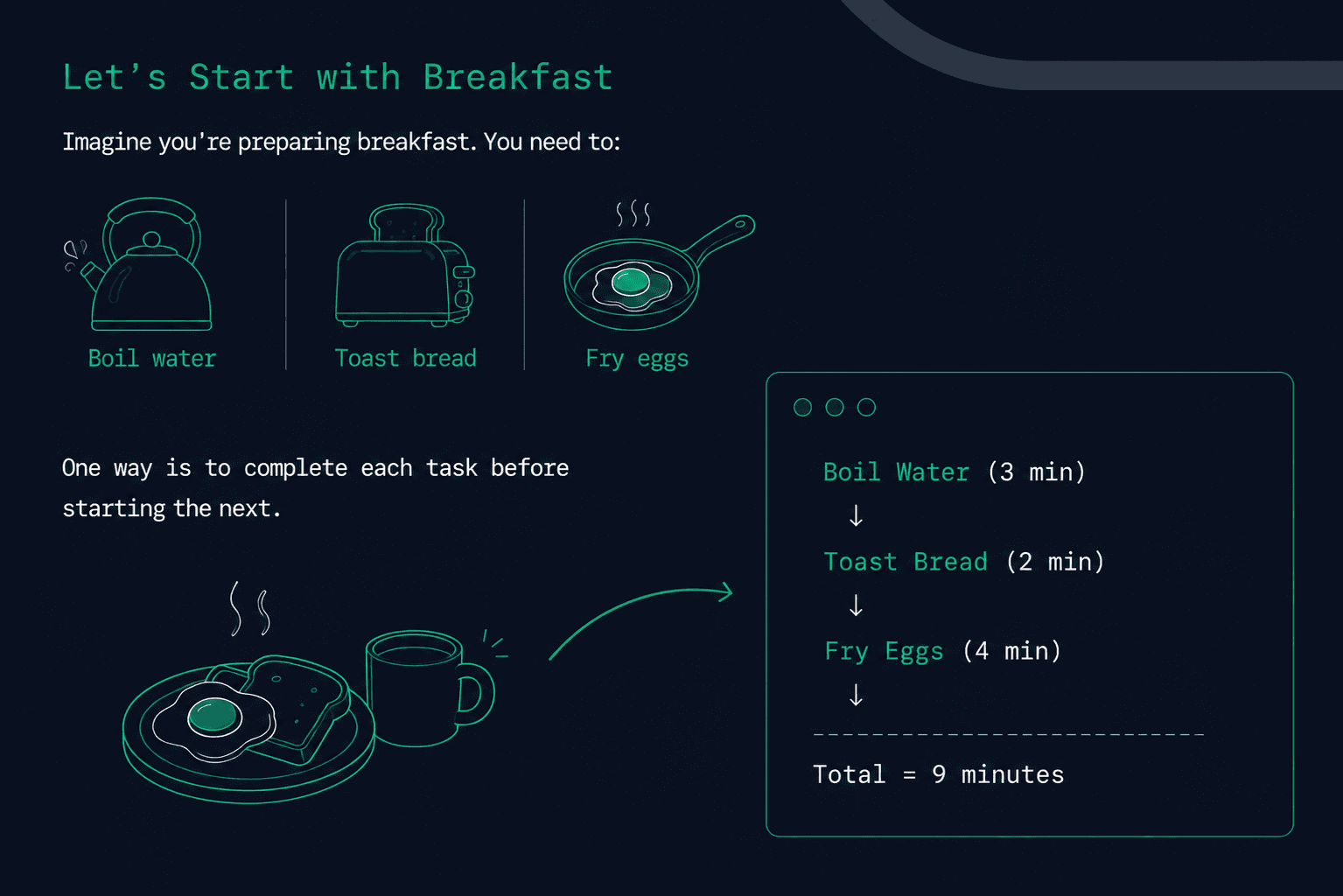
A better approach is to use your waiting time wisely.
While the water is boiling, you can toast the bread. While the bread is toasting, you can fry the eggs.
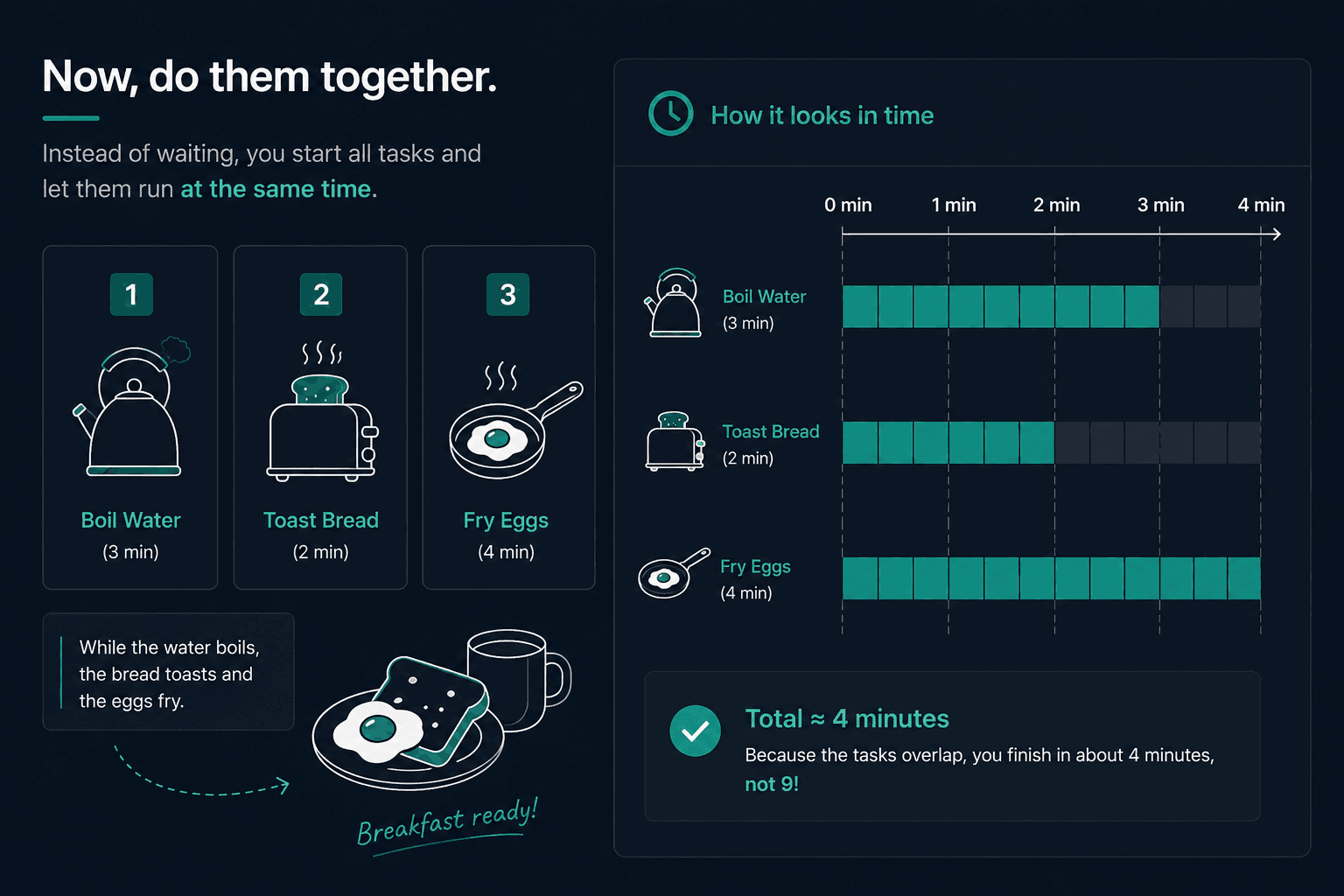
Did any individual task become faster?
No.
The overall time decreased because you stopped wasting time waiting.
This is the idea behind concurrency.
Ruby concurrency is about making progress on multiple independent tasks by efficiently utilizing waiting time.
Concurrency is often confused with parallelism, but they are not the same.
- Ruby Concurrency means multiple tasks make progress during the same period of time.
- Parallelism means multiple tasks actually execute at the same time, usually on different CPU cores.
For most Rails applications, the goal is not to make individual operations faster. Instead, it's to avoid keeping the CPU idle while waiting for external resources such as databases, APIs, or files.
Let's see how this applies to a real Rails application.
A Real Rails Example
Imagine you're building an e-commerce application.
When a user opens a product page, your application might need to load several pieces of data.
- Product details: Fetch details from the database
- Customer reviews: Load reviews from the database or API
- Recommended products: Find products the customer might like
- Shipping information: Get shipping details from a third-party API
If these tasks run one after another, the user has to wait for long to finish.
A straightforward implementation might look like this:
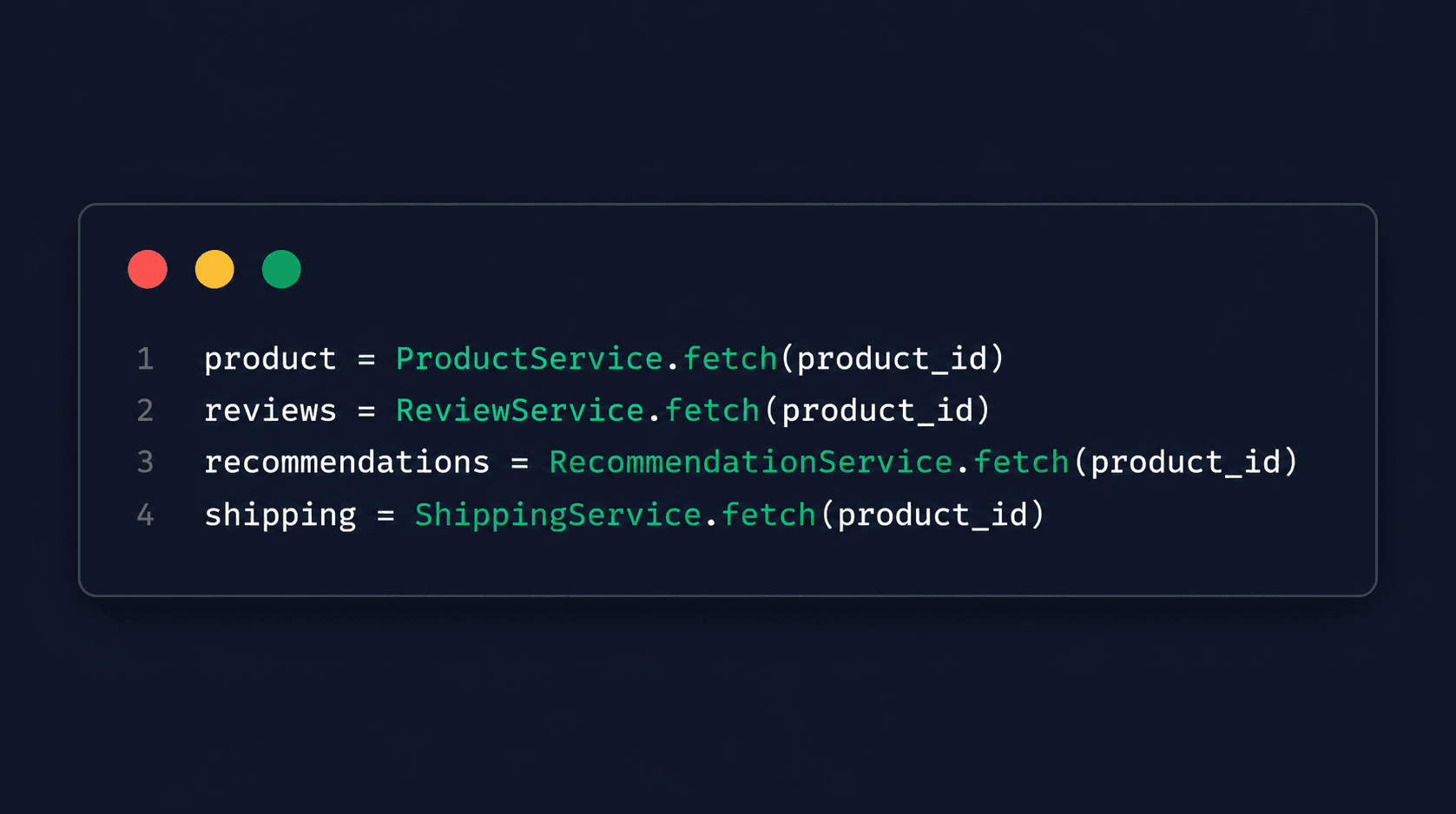
This code is simple and easy to understand. However, there's one problem.
Each request waits for the previous one to finish before the next one begins.
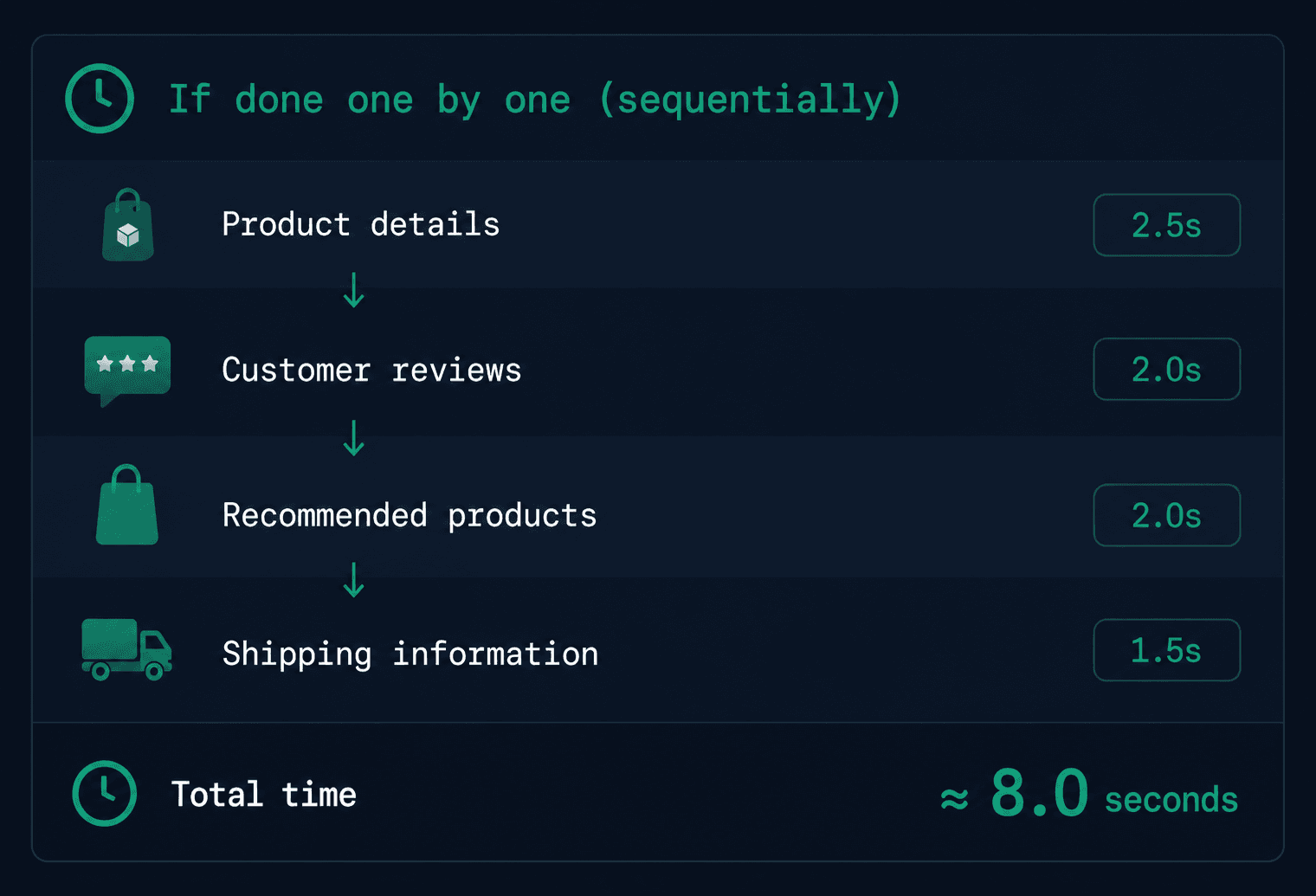
But notice something important.
These operations are completely independent.
- Fetching reviews doesn't depend on fetching product details.
- Shipping information doesn't depend on recommendations.
- Each service can work independently.
So instead of waiting for one request to finish before starting the next, why not send all four requests together?
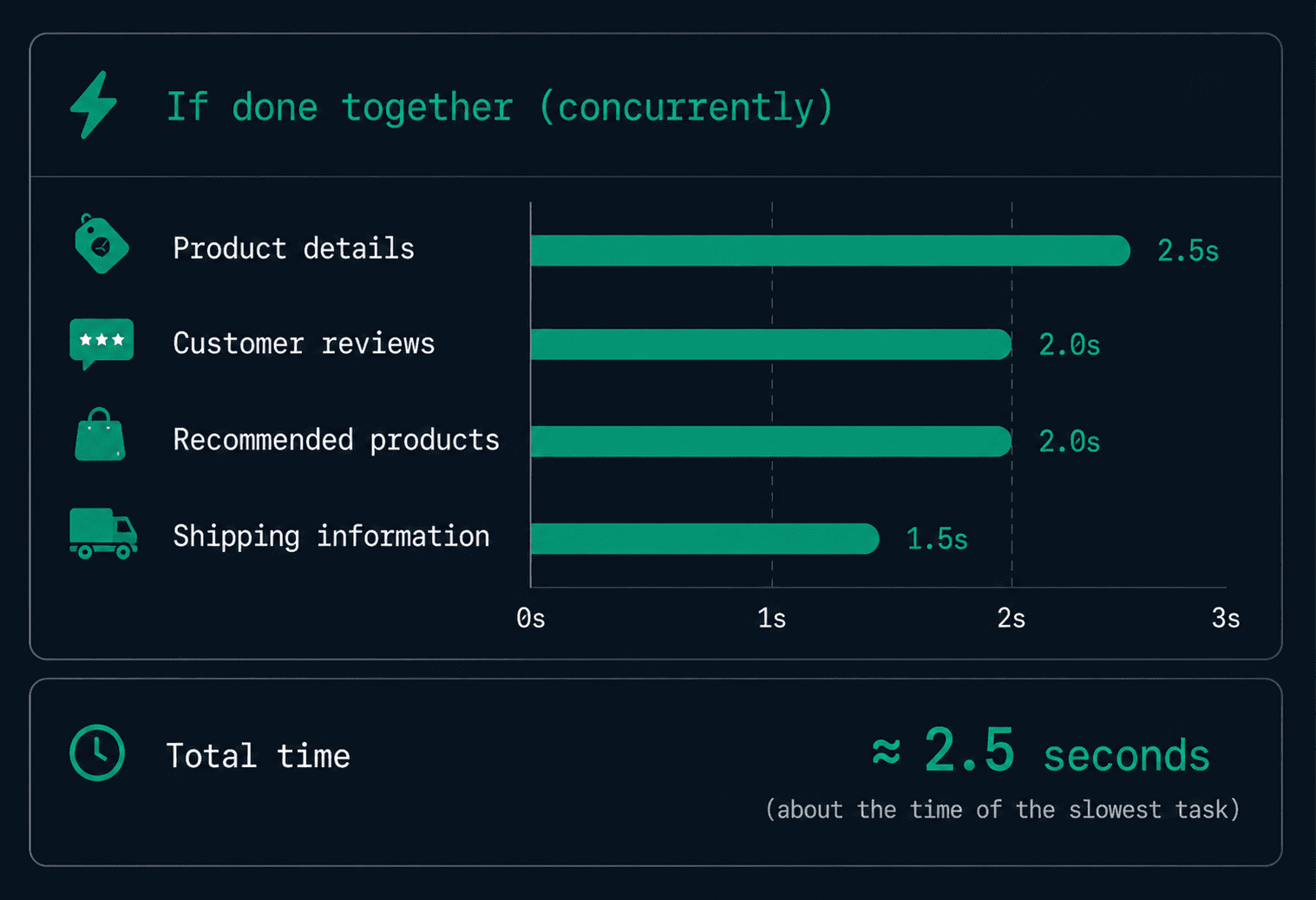
None of the services became faster. The improvement comes from executing independent tasks concurrently instead of sequentially.
So how do we achieve this in Ruby?
This is where Ruby thread comes in.
Ruby Thread
Ruby provides the Thread class to execute independent tasks concurrently.
Instead of waiting for one task to finish before starting the next, we can create multiple Ruby thread and let them run independently.
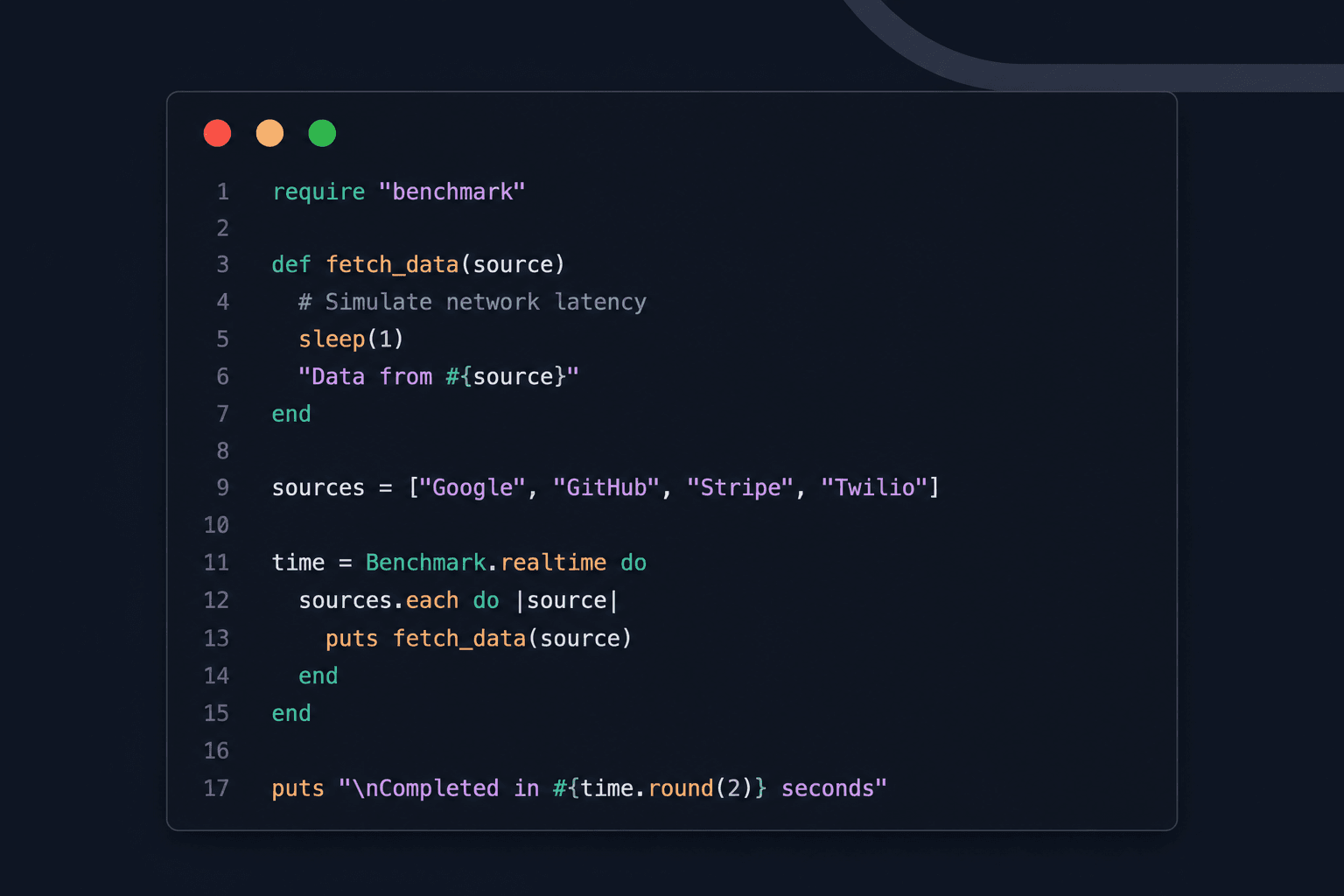
Let's simulate fetching data from multiple external services.
We'll use sleep(1) to represent a blocking I/O operation such as calling an API or querying a database.
Sequential Execution
Output
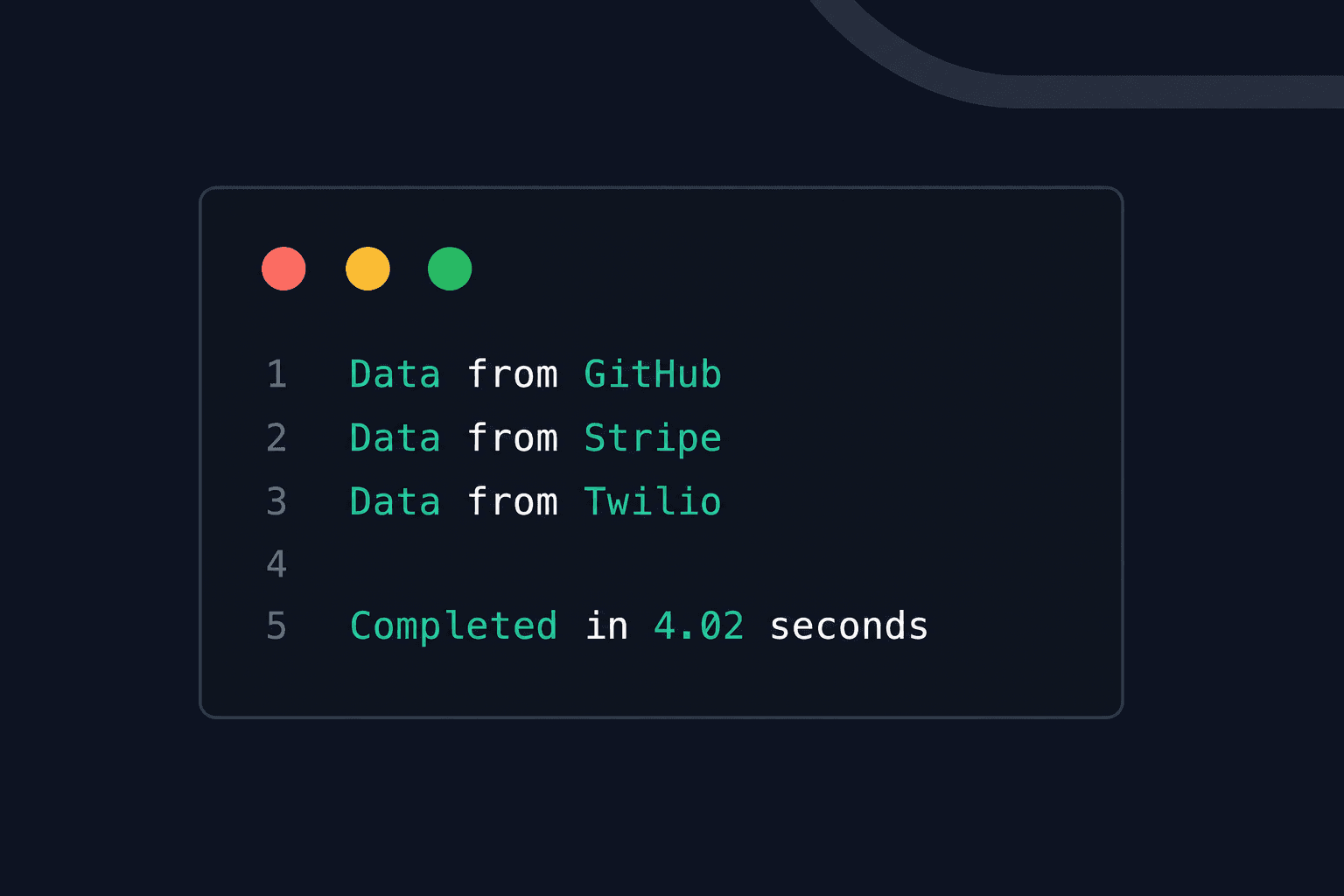
Each request takes approximately one second. Since they execute one after another, the total execution time is around four seconds.
Now let's solve the same problem using Ruby thread.
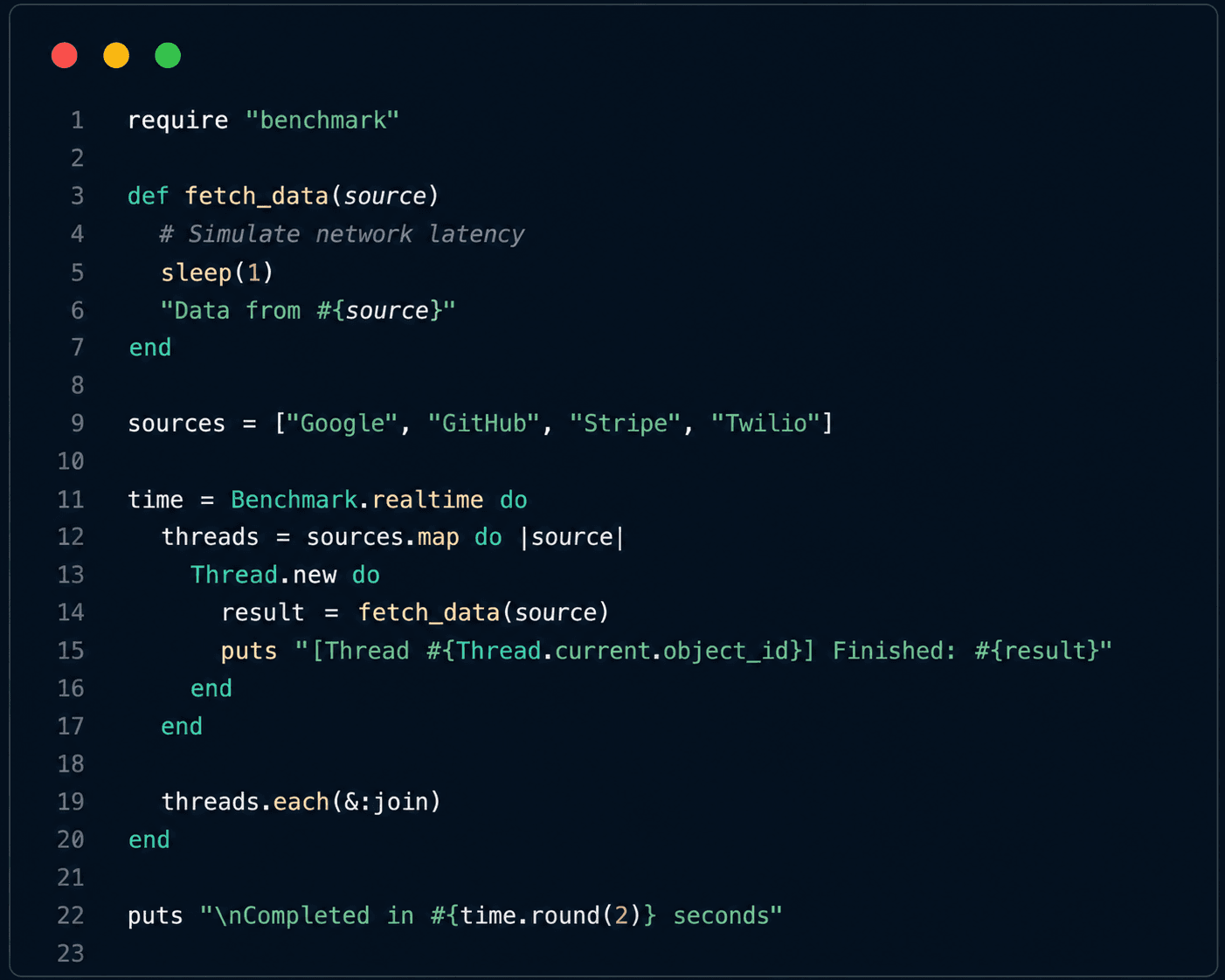
Concurrent Execution Using Ruby Threads
Example Output
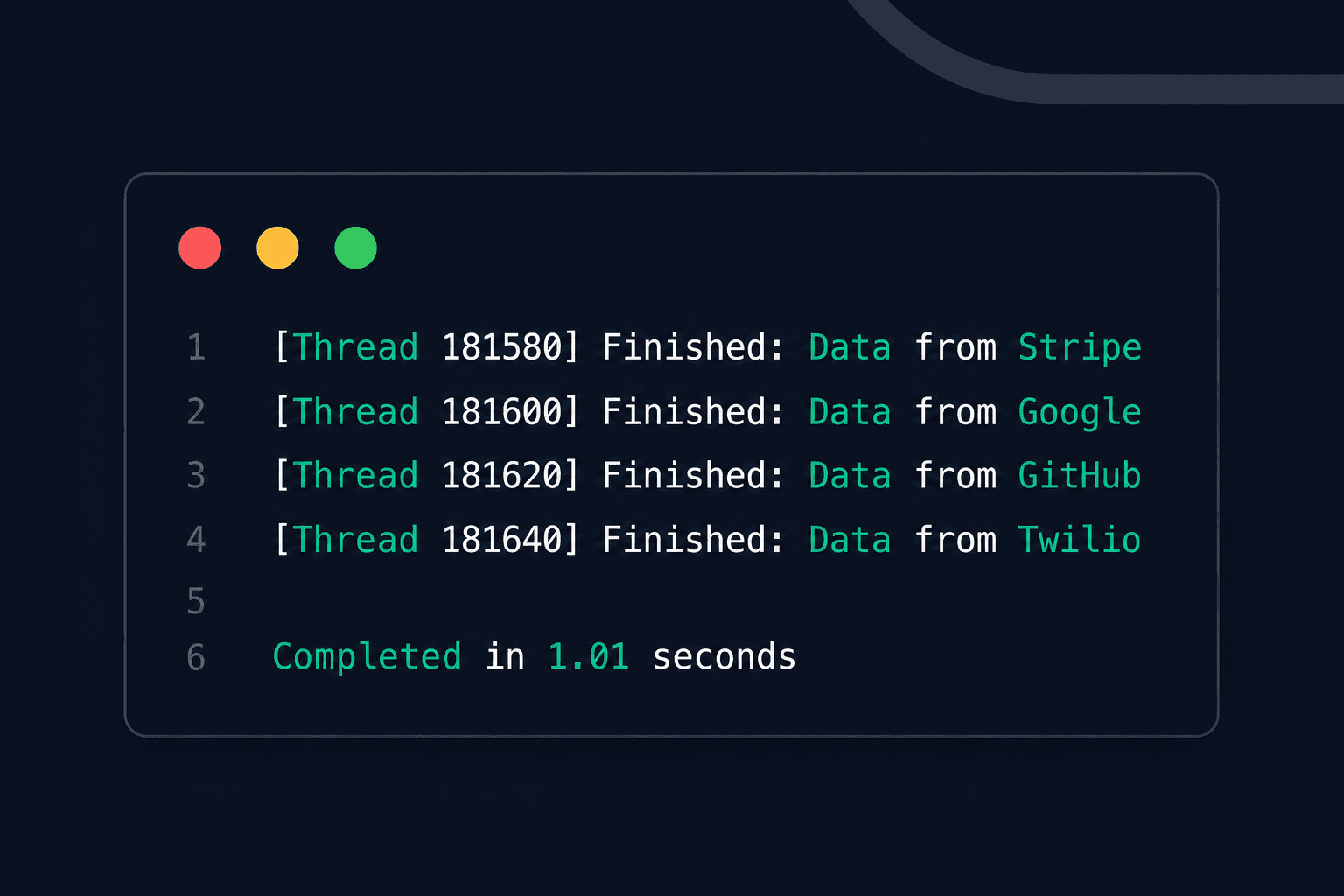
The output order may vary every time you run the program, and that's perfectly normal. Since each Thread executes independently, whichever finishes first prints its result first.
The important part is the execution time.
Our sequential program took around 4 seconds.
The threaded version finished in about 1 second.
Nothing about the individual tasks became faster. Each task still spent one second waiting.
The improvement came from allowing all four tasks to wait at the same time instead of making each one wait for the previous task to complete.
Understanding the Code
Let's look at the two most important lines.
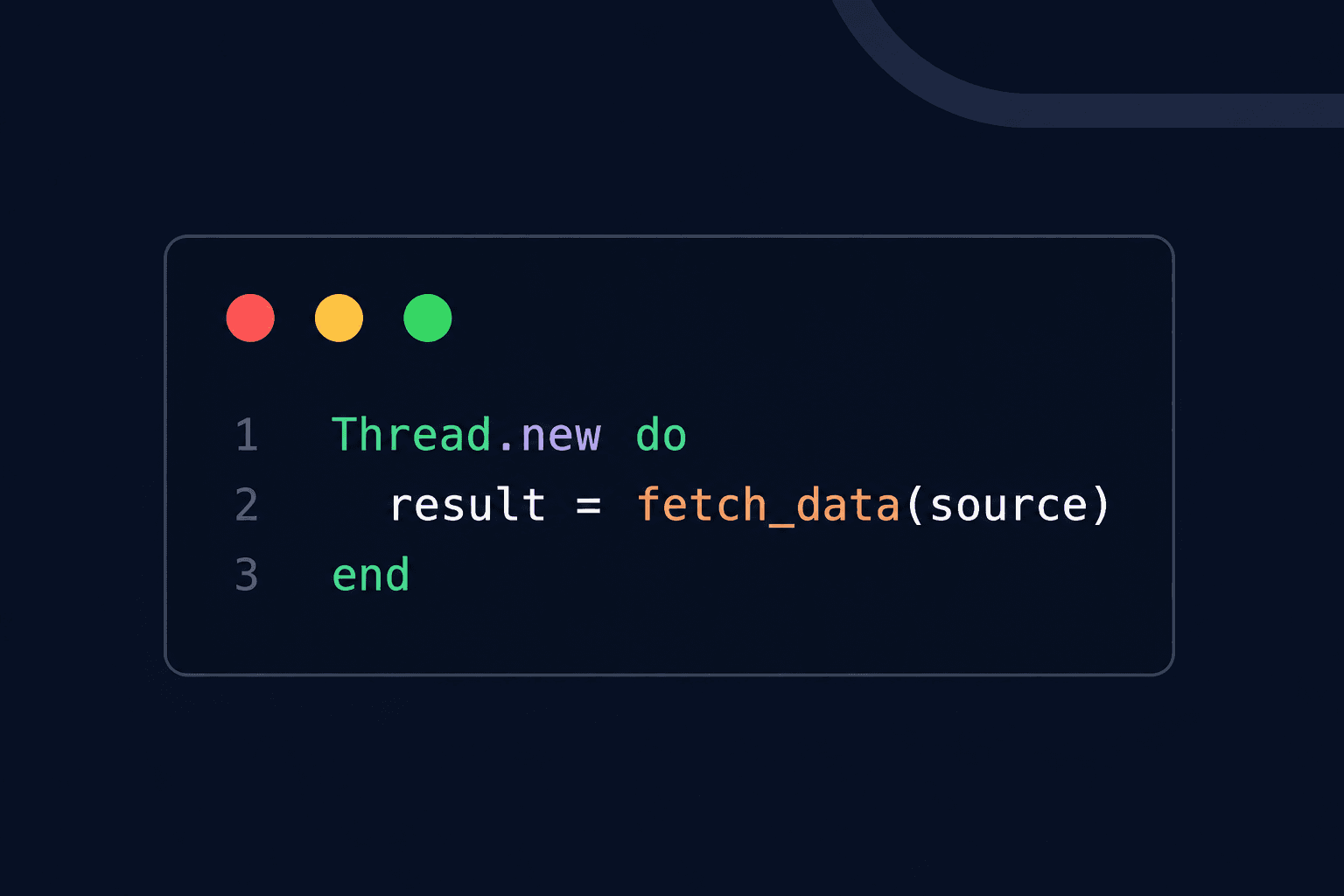
Thread.new creates a new Ruby thread and immediately starts executing the block.
In our example, one Thread is created for each data source.
Next, notice this line: threads.each(&:join)
The join method tells the main Ruby thread to wait until every child thread has finished.
Without joining, the main program could exit before the background threads complete their work.
You can think of join as saying:
"Don't continue until everyone has finished their assigned task."
At this point, Ruby thread seems like an easy way to improve performance.
But there's something important we haven't discussed yet.
If you've read about Ruby concurrency before, you may have heard that MRI Ruby allows only one Thread to execute Ruby code at a time because of something called the Global VM Lock (GVL).
So how did our program become four times faster?
Let's understand what the GVL is and why Ruby threads still work so well for I/O-bound operations.
Understanding the Global VM Lock (GVL)
The GVL is a mechanism used by MRI (Matz's Ruby Interpreter) that ensures only one thread executes Ruby code at any given moment within a Ruby process.
At first, this sounds like Ruby thread shouldn't improve performance at all.
But that's not the complete picture.
What Happens During an API Call?
Let's revisit our fetch_data method.
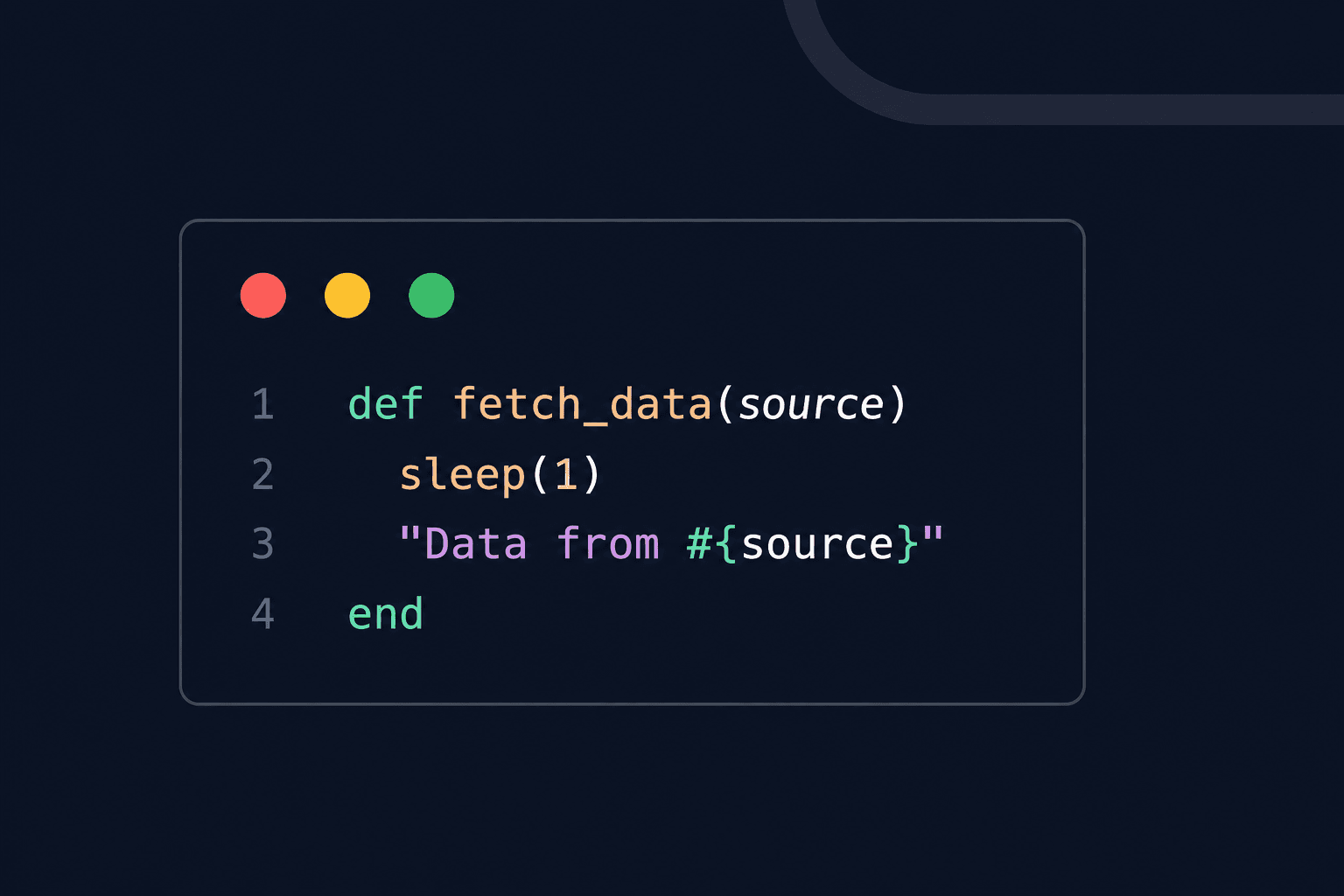
In our example, sleep(1) represents waiting for an external resource.
In a real Rails application, this could be:
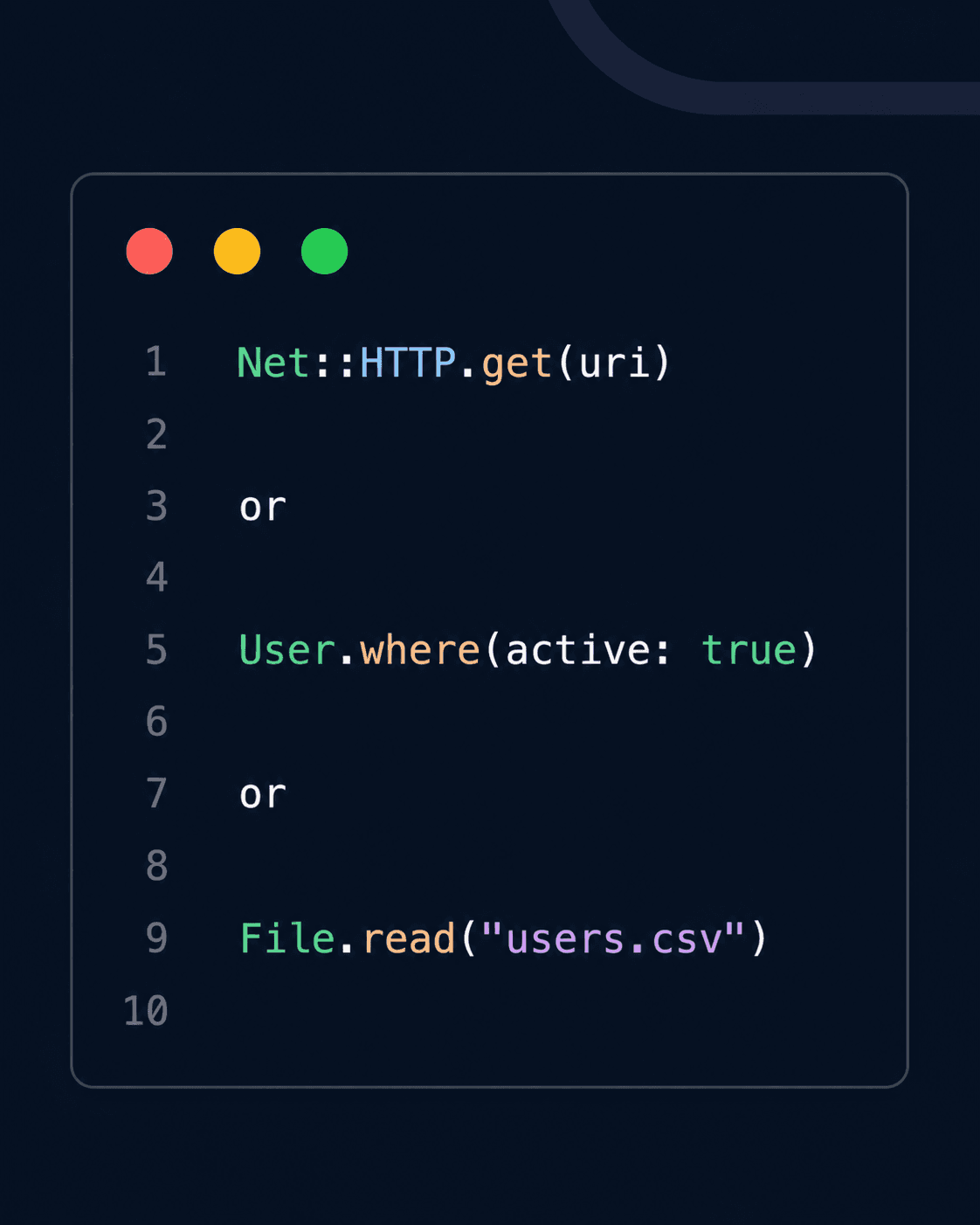
Although these operations look like normal Ruby code, a large portion of their execution time is actually spent waiting.
A step-by-step timeline of a single thread making an external request looks something like this:
- Start Ruby code
- Send request (The Ruby code sends a request to an external service (API, database, etc.).)
- Waiting for response...
- Response received
- Continue executing Ruby code
While waiting for I/O (like network or database), the thread is idle.
This is where concurrency helps!
However, during the waiting period, Ruby isn't busy performing calculations. It's simply waiting for another system to respond.
So What Does Ruby Do?
Instead of keeping the CPU idle, Ruby temporarily allows another thread to run.
Here is how it works:
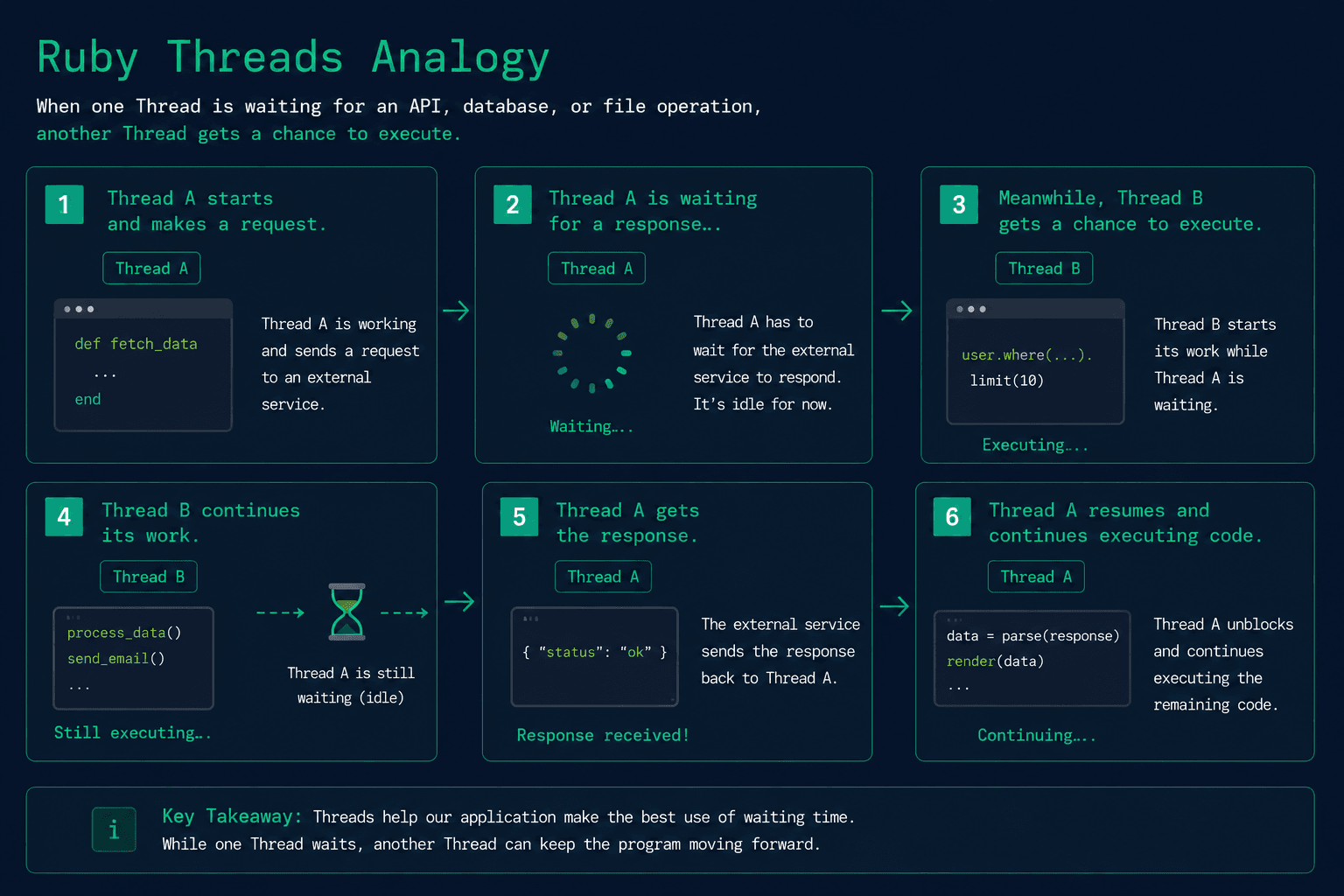
This is why Threads work so well for I/O-bound operations.
I/O-bound vs CPU-bound
Not all tasks spend time waiting. Some tasks spend most of their time performing calculations.
For example:
I/O-bound task
Net::HTTP.get(uri)
Most of the execution time is spent waiting for the network. Threads can use this waiting time to perform other work.
CPU-bound task
resize_image(image)
Here, the CPU is busy resizing the image from start to finish. There is no waiting.
Since the Thread is continuously executing Ruby code, it keeps holding the GVL, leaving little opportunity for other Threads to make progress.
A Simple Rule to Remember
If your application spends most of its time waiting, Threads can significantly improve performance.
Examples include:
- Calling external APIs
- Database queries
- Reading or writing files
- Sending emails
- Accessing Redis
If your application spends most of its time performing calculations, Threads are much less effective because only one Thread can execute Ruby code at a time.
Examples include:
- Image processing
- Video encoding
- Data compression
- Scientific calculations
- Machine learning
Now that we understand why Threads work so well for I/O-bound tasks, there's another important question to answer.
What happens when multiple Threads try to modify the same piece of data at the same time?
This introduces a new challenge known as thread safety.
Ruby Thread Safety and Race Conditions
So far, we've seen how Threads can improve the performance of I/O-bound operations.
However, concurrency also introduces a new challenge.
What happens if multiple Ruby threads try to modify the same data at the same time?
Let's find out with a simple example.
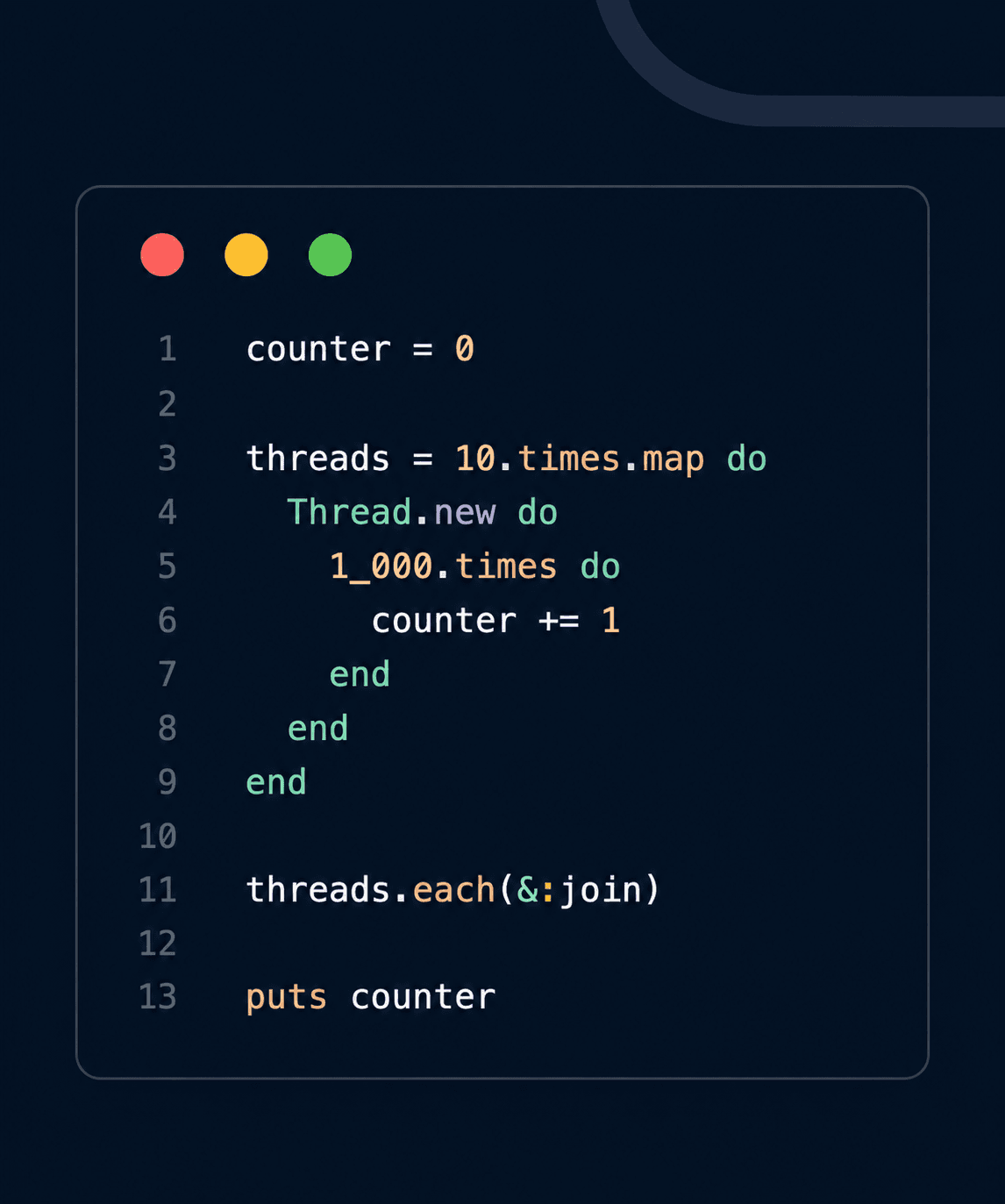
What do you expect the output to be?
Each of the 10 Threads increments the counter 1,000 times.
10 × 1,000 = 10,000
So we would expect: 10000
But if you run the program multiple times, you might see something like:
9823 or 9957 or 9991
The result isn't consistent. So where did the missing increments go?
The Problem
Most of us think this line: counter += 1 is a single operation. It isn't.
Ruby performs it in three steps:
- Read the current value.
- Add one.
- Write the new value back.
Now imagine two Ruby threads executing these steps at almost the same time.
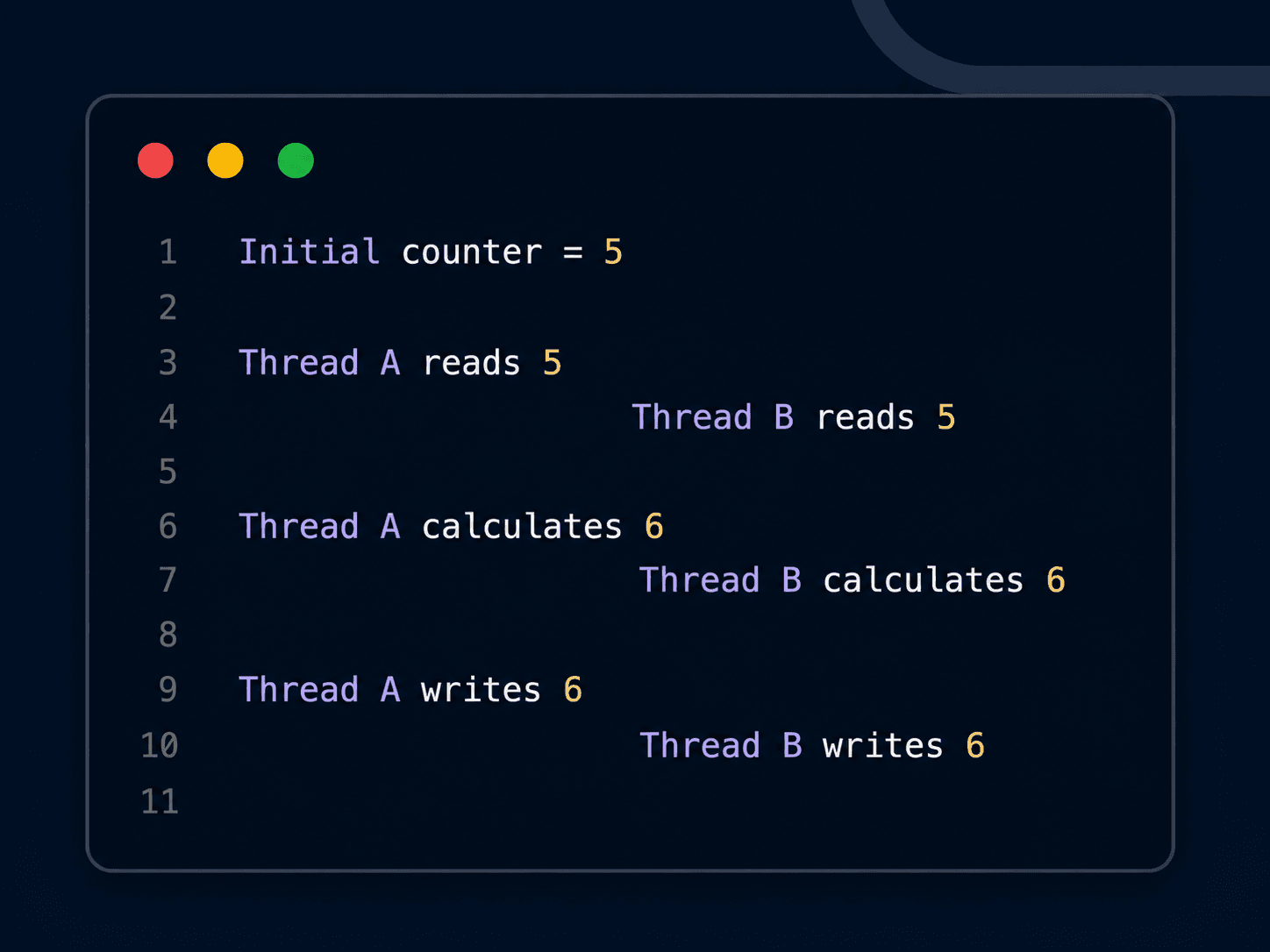
The final value becomes: 6 instead of 7 One update has been overwritten. This is called a race condition.
A race condition occurs when multiple Threads access and modify shared data simultaneously, causing unpredictable results.
What Is Thread Safety?
A piece of code is considered thread-safe if it behaves correctly even when multiple Threads execute it concurrently.
Our counter example is not thread-safe because every Thread modifies the same variable without any coordination.
Fortunately, Ruby provides a simple solution for this problem: Mutex.
A Mutex allows only one Thread to access a critical section of code at a time, ensuring shared data remains consistent.
Preventing Race Conditions with Mutex
Ruby provides the Mutex class to synchronize access to shared resources.
Mutex stands for Mutual Exclusion, meaning it allows only one Thread to execute a protected block of code at a time.
Let's update our previous example.
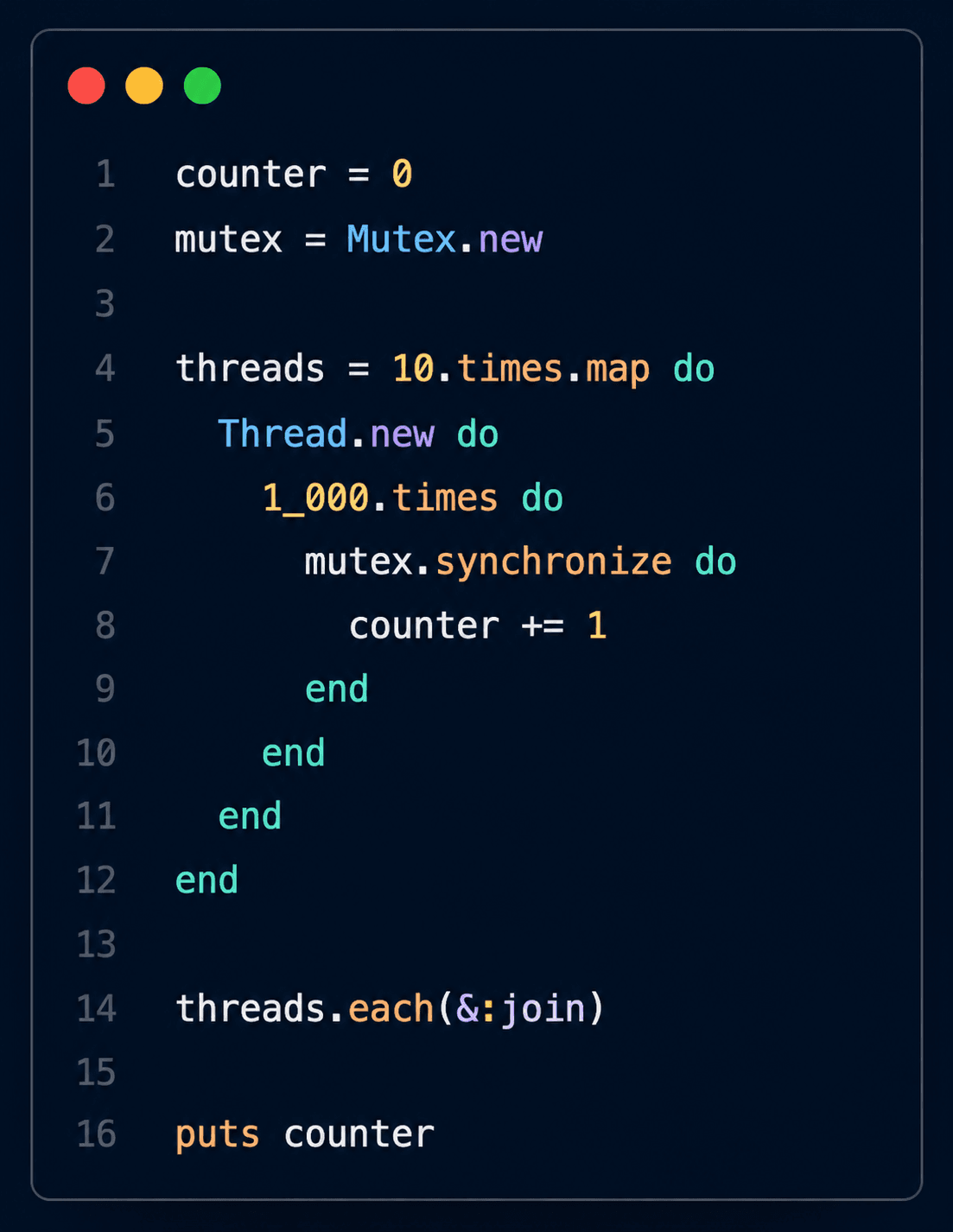
Output: 10000
No matter how many times you run the program, the result will consistently be: 10000
How Does Mutex Work?
The key line is:
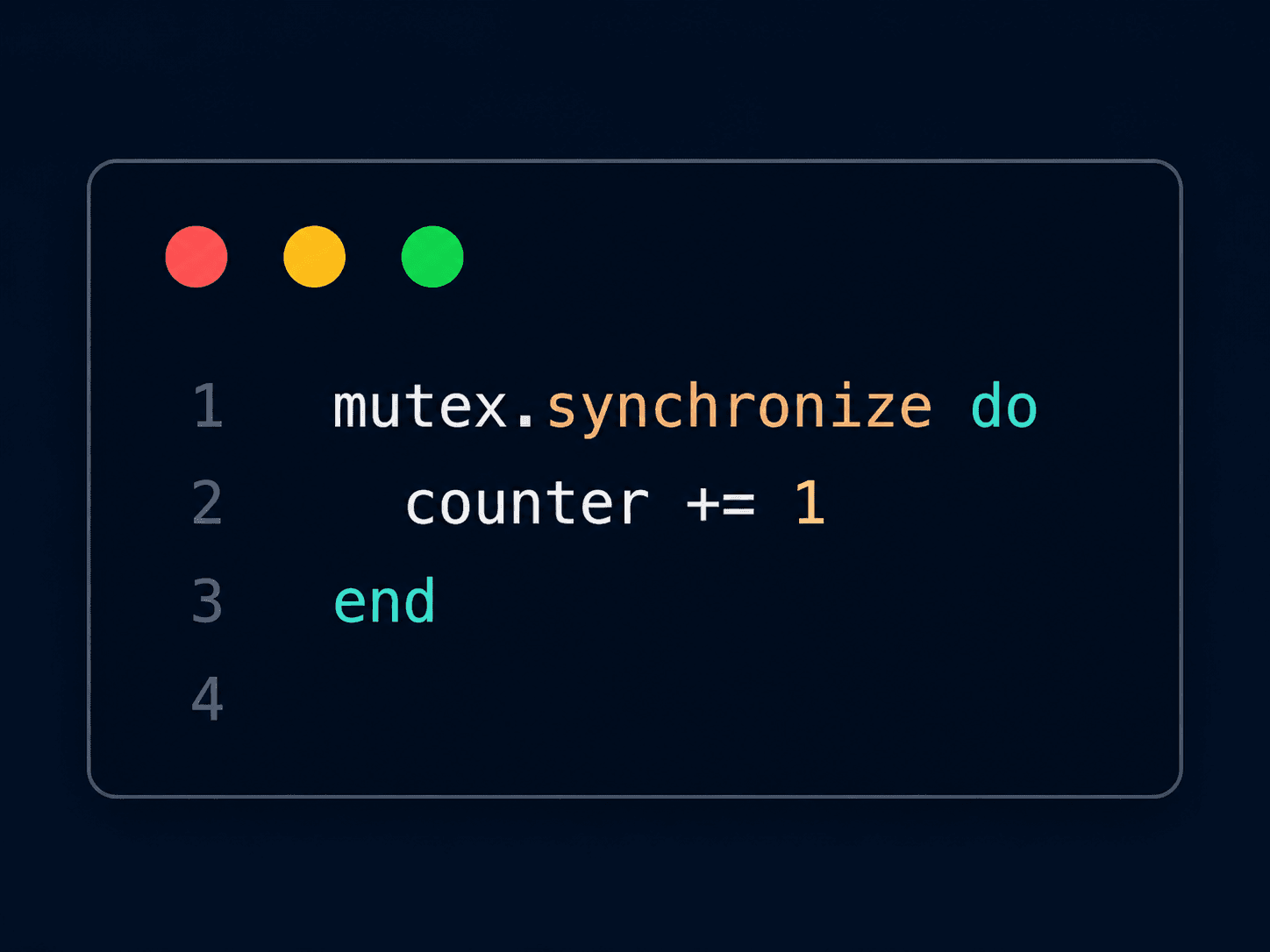
When a Thread reaches mutex.synchronize, it first tries to acquire the lock.
- If the lock is available, the Thread enters the block and executes the code.
- If another Thread already holds the lock, it waits until the lock is released.
Think of a public restroom with only one key:

A Mutex works in exactly the same way.
Here's what happens when two Threads try to update the counter:
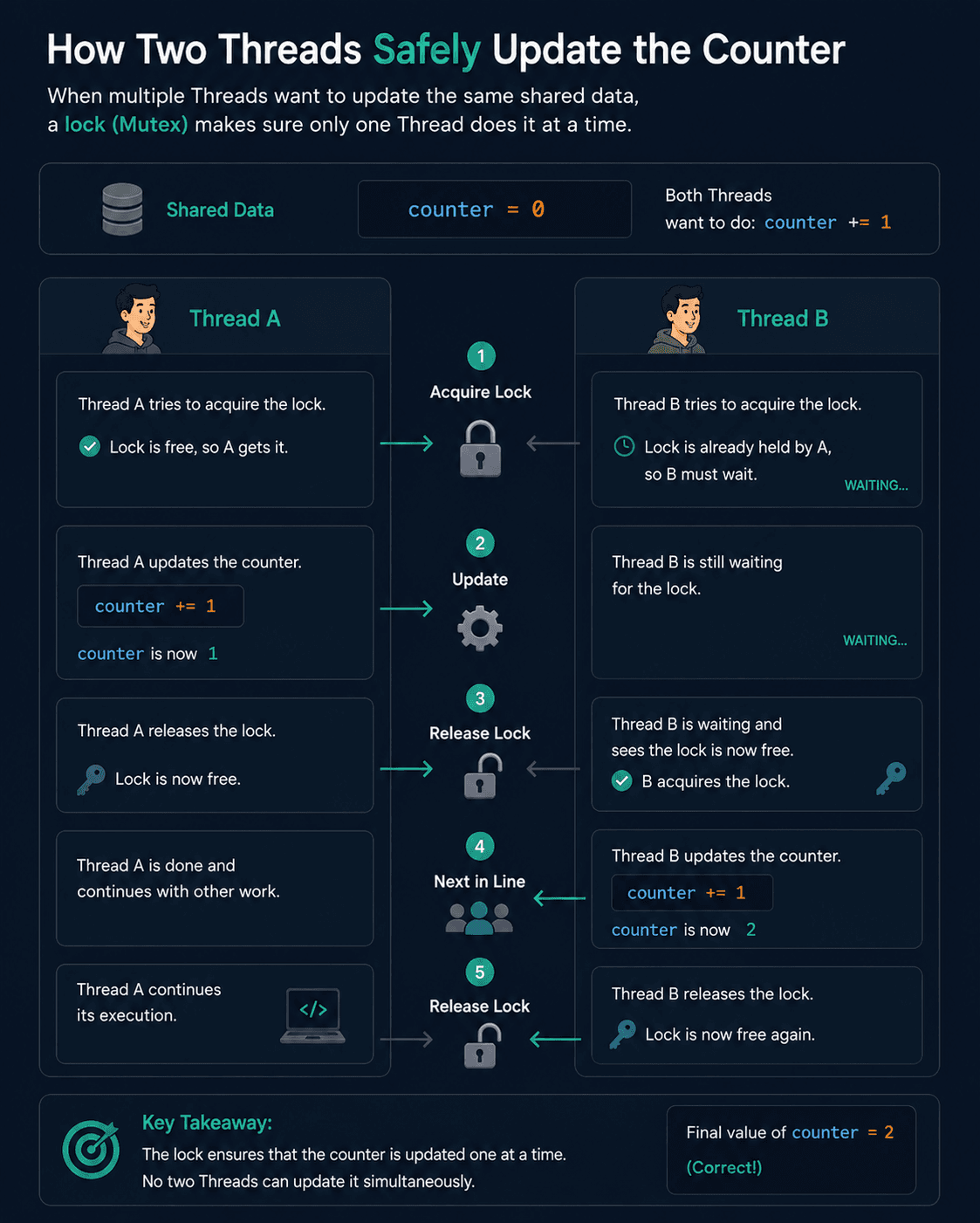
Since only one Thread can execute the critical section at a time, no updates are lost.
What Is a Critical Section?
A critical section is any piece of code that accesses shared mutable data.
In our example, the critical section is simply: counter += 1
Only this line needs protection. Everything outside the synchronize block can continue running concurrently.
As a best practice, always keep the critical section as small as possible. Holding a lock longer than necessary reduces concurrency because other Threads must wait for the lock to be released.
When Should You Use a Mutex?
When Should You Use a Mutex?
Use a Mutex whenever multiple Threads need to modify the same shared resource.
Some common examples include:
- Updating counters
- Modifying shared hashes or arrays
- Writing to a shared file
- Updating in-memory caches
- Managing shared application state
If each Thread works with its own independent data, a Mutex is usually unnecessary.
Now that we've learned how Threads work and how to write thread-safe code, let's see how Rails uses Threads behind the scenes in production applications.
Threads in Rails
You might be thinking:
"This is interesting, but do I actually use Threads in my Rails applications?"
The answer is yes—even if you've never written Thread.new yourself.
Puma
Most Rails applications use Puma as their web server.
Puma maintains a pool of Threads to handle incoming HTTP requests.
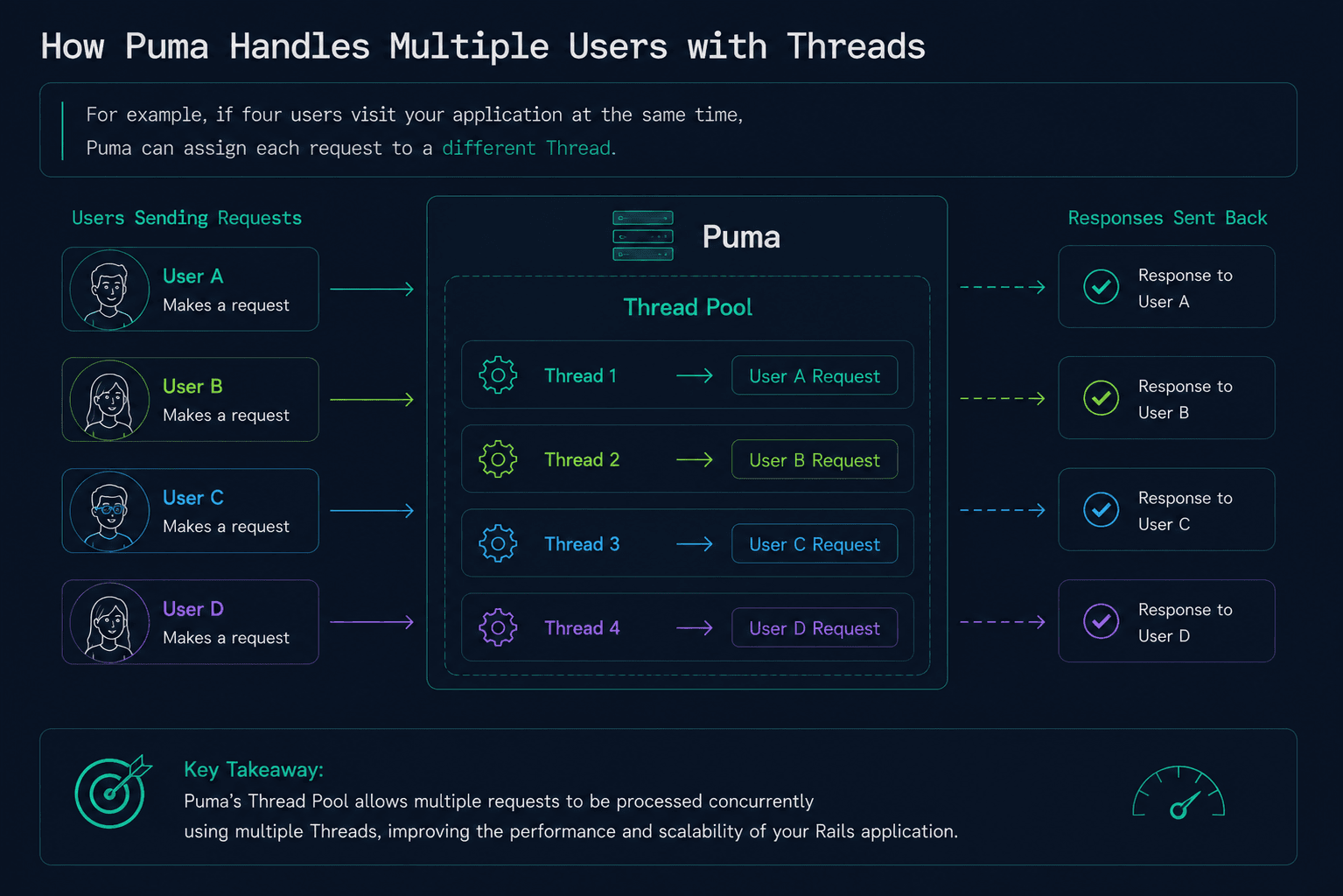
While one request is waiting for a database query or an external API, another Thread can continue processing another user's request.
This allows Rails applications to handle multiple requests efficiently without blocking every user.
Sidekiq
Threads are also heavily used by Sidekiq for background job processing.
Imagine a user places an order.
Instead of making the user wait while the application:
- Sends a confirmation email
- Generates an invoice
- Notifies a third-party service
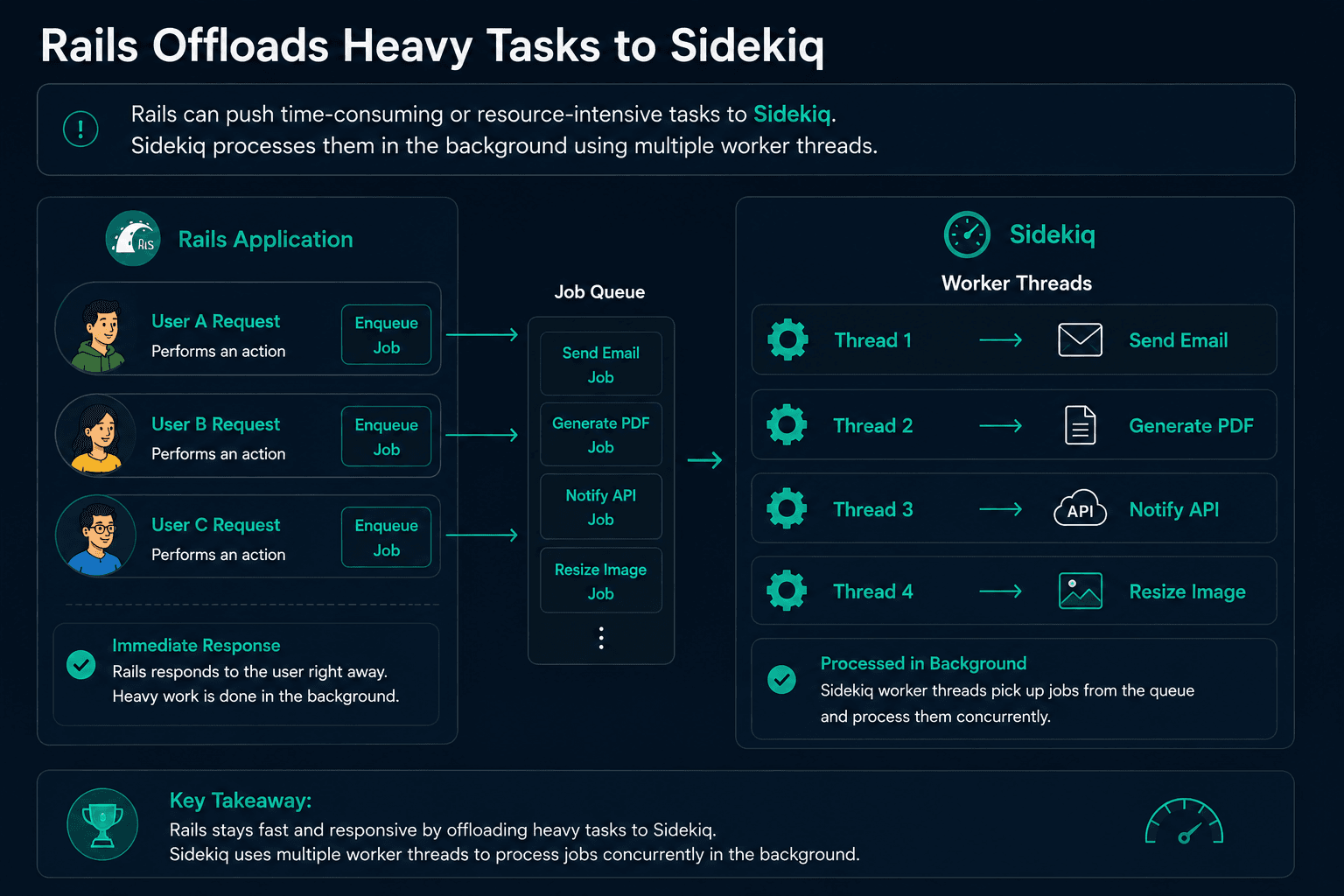
Whether it's handling web requests with Puma or processing background jobs with Sidekiq, Threads form the foundation of concurrency in many Ruby on Rails applications.
Understanding how Threads work helps you write safer, more efficient applications and makes it easier to reason about performance issues in production.
What We've Learned
In this article, we explored the fundamentals of Ruby concurrency and built a strong foundation for understanding how Threads work.
Here's a quick recap:
- Concurrency is about making progress on multiple independent tasks efficiently, while parallelism is about executing multiple tasks at the same time.
- Threads allow independent I/O-bound tasks to run concurrently, reducing the overall execution time.
- The Global VM Lock (GVL) allows only one Thread to execute Ruby code at a time, but it doesn't prevent Threads from improving the performance of I/O-bound operations.
- When multiple Threads modify the same shared data,** race conditions** can occur. -** Mutex** helps prevent race conditions by ensuring only one Thread accesses a critical section of code at a time.
- Rails uses Threads extensively through tools like Puma for handling web requests and Sidekiq for processing background jobs.
At this point, you should have a solid understanding of why Ruby thread is so important and how to use them safely.
However, Threads aren't the only concurrency model Ruby provides.
Consider these questions:
- What if your application needs to manage tens of thousands of WebSocket connections?
- Is creating one Thread for every connection the best approach?
- What if your application spends most of its time performing CPU-intensive calculations, such as image processing or machine learning?
These are different kinds of problems that Threads aren't designed to solve.
In Part 2, we'll answer these questions by exploring Fibers and Ractors. You'll learn how they work, how they differ from Threads, and more importantly, when to choose each one in real-world Ruby and Rails applications.